Troubleshooting VJ-2638/1638X/1938WX/1638WX OPERATION MANUAL
358 7.2 Error messages
• [********] and [*]of the error display indicates the slot number that is subject to warning.
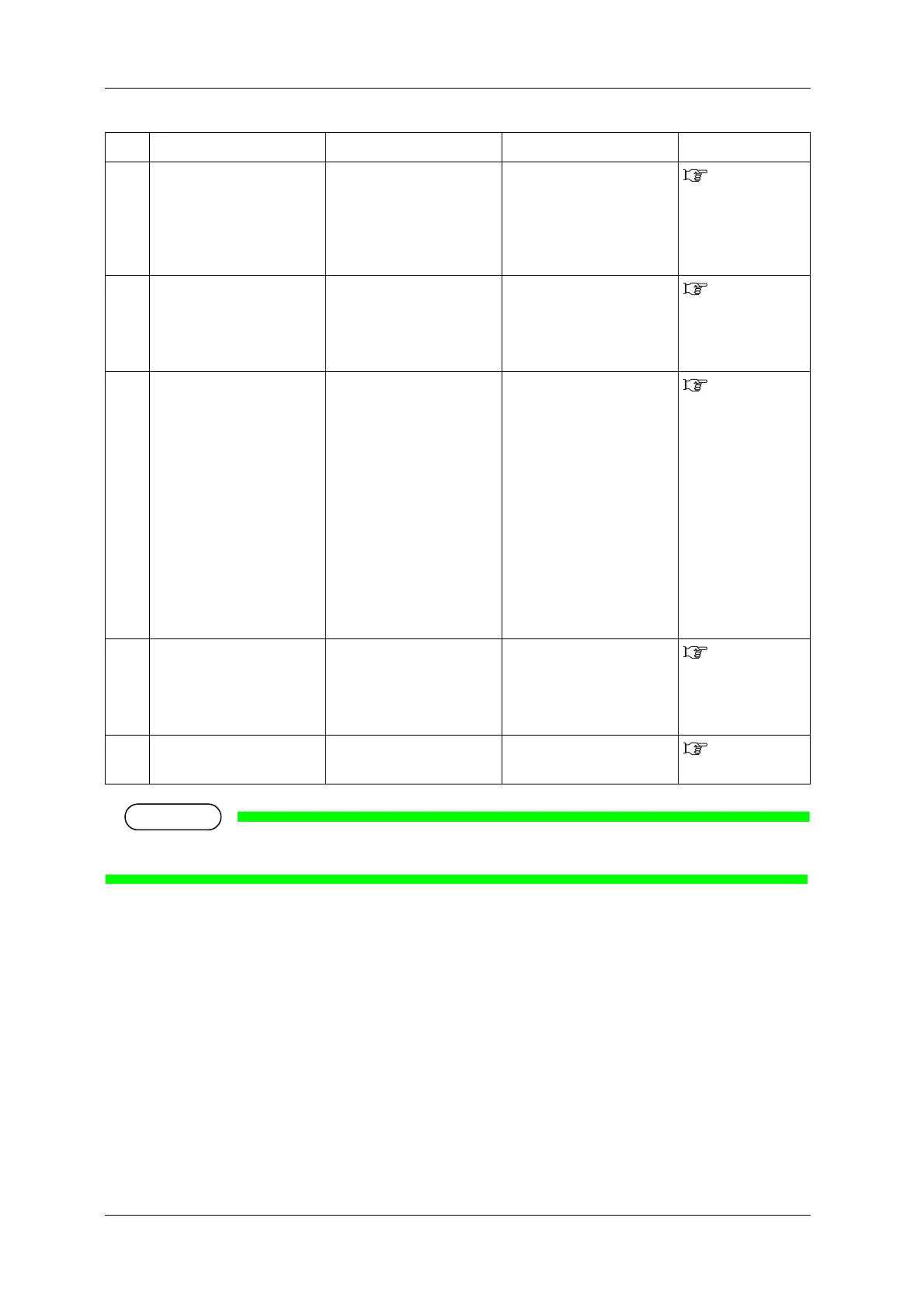
29 Measurement Error
(Instrument)
A communication error with
Spectrophotometer
(SPECTROVUE VM-10)
occurred while measuring the
color target.
(VJ-2638/1638X)
Check the connection
between the printer and
Spectrophotometer
(SPECTROVUE VM-10).
4.5 Using
Spectrophotomet
er (VJ-2638/1638X)
30 Measurement Error
(Cancelled)
Printing or measuring the
color target has been
cancelled from Operation
panel or the RIP software.
(VJ-2638/1638X)
Start printing and measuring
the color target again.
4.5 Using
Spectrophotomet
er (VJ-2638/1638X)
31 Measurement Error
(White Calibration)
White calibration has failed.
(VJ-2638/1638X)
• Open Maintenance cover
on the left side of the
printer and install White
reference plate correctly.
• When White reference
plate is contaminated,
apply a damp and tightly
squeezed soft cloth to clean
it.
• Start printing and
measuring the color target
again.
• If you still have trouble,
contact your local MUTOH
dealer.
4.5 Using
Spectrophotomet
er (VJ-2638/1638X)
32 Measurement Error
(Illegal Operation)
Colorimeter has been
installed forcibly without
following the measurement
procedure.
(VJ-2638/1638X)
Remove Colorimeter.
4.5 Using
Spectrophotomet
er (VJ-2638/1638X)
33 Measurement Error
(Head height)
Head height is set to High
(VJ-2638/1638X).
Set the head height to Low or
Mid.
4.2.5 Head
height adjustment
No. Display Description Remedy Reference









 To Next Page