PRODUCT MANUAL iCOOK - DT.MP.IC.2201.2
7.4. CookingPlanner
CookingPlanner mode allows you to cook several trays of the same food or different foods
or recipes that require different cooking times in different levels.
For simultaneous cooking, only preparations with similar cooking profiles can be selected
from Chef, SmartCooking or Recipes mode, which are the same in terms of temperature
and humidity. Therefore, it will be possible to combine a cooking in this cooking mode when
the parameters are similar and only the cooking time varies. In order to load SmartCooking
cooking procedures in the CookingPlanner mode, it will be necessary to save them in the
recipe book with the desired parameters. A clock icon at the top left will indicate that the
recipe is compatible with CookingPlanner mode. These cooking do not allow cooking
cycles.
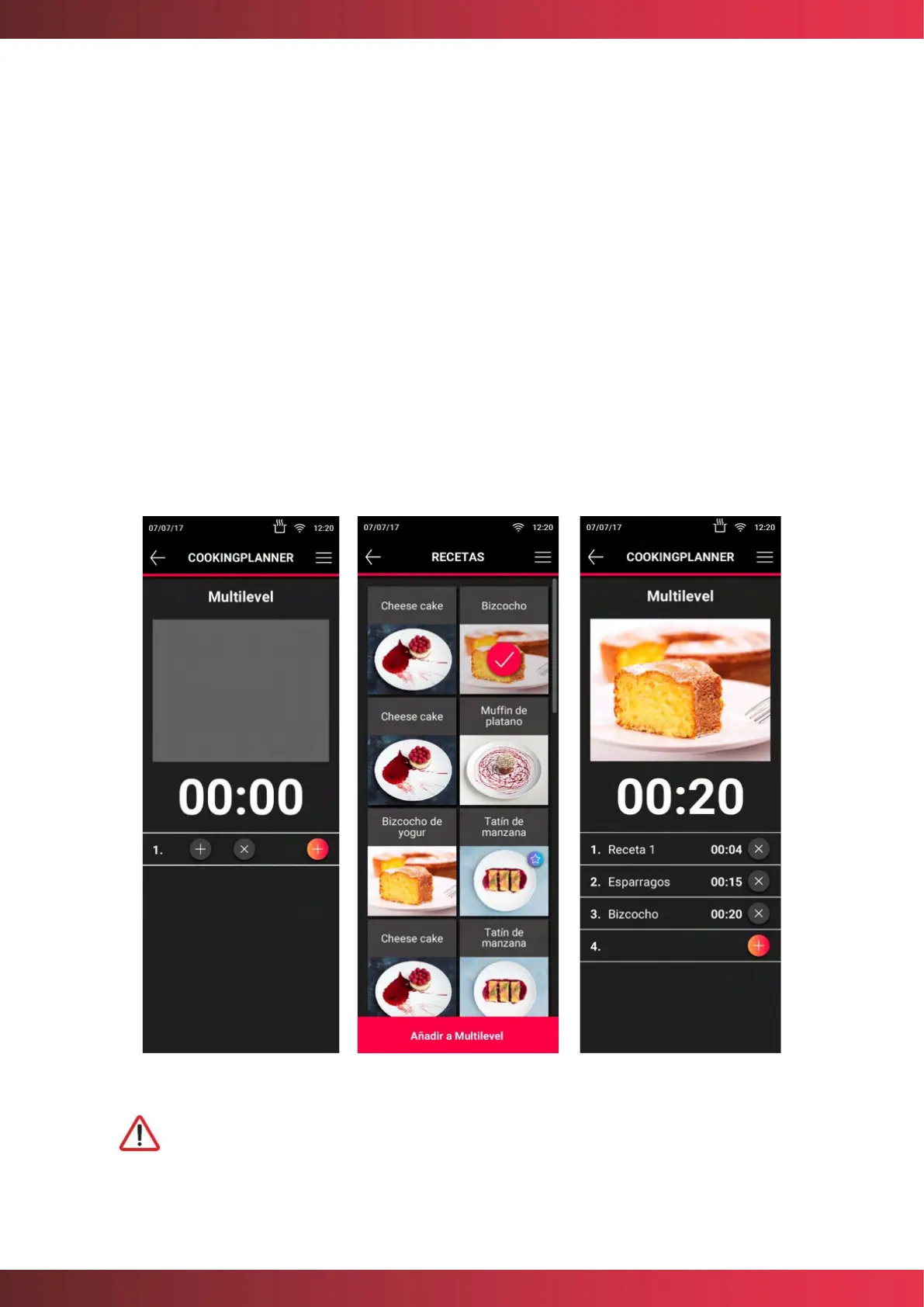
To load a CookingPlanner, select Multilevel or JustInTime and press the (+) button at the
desired level, then access the recipe book where the recipes compatible with this cooking
mode appear. Then select a first recipe and click "Add to Multilevel" or "Add to JustInTime".
Figure 22. CookingPlanner screens
The recipe names are given as an example.



 To Next Page