Importer Plus Technical Instruction Manual Configuring the LAN
Issue 0.02 2010-03-29 Page 7-1
Section 7: Configuring the LAN
Perform the steps in this section to configure the Importer Plus’ IP addresses.
Note: IP address information for the Importer Plus and NE IBOC, Exporter or Exporter Plus, based on LAN
configuration, was determined in “Planning the LAN connection” on page 2-3. The equipment has been factory pre-
configured with a default NE IBOC, Exporter or Exporter Plus IP address of 10.10.10.10. Even if modifications
are not required, you should verify that the IP addresses are correct.
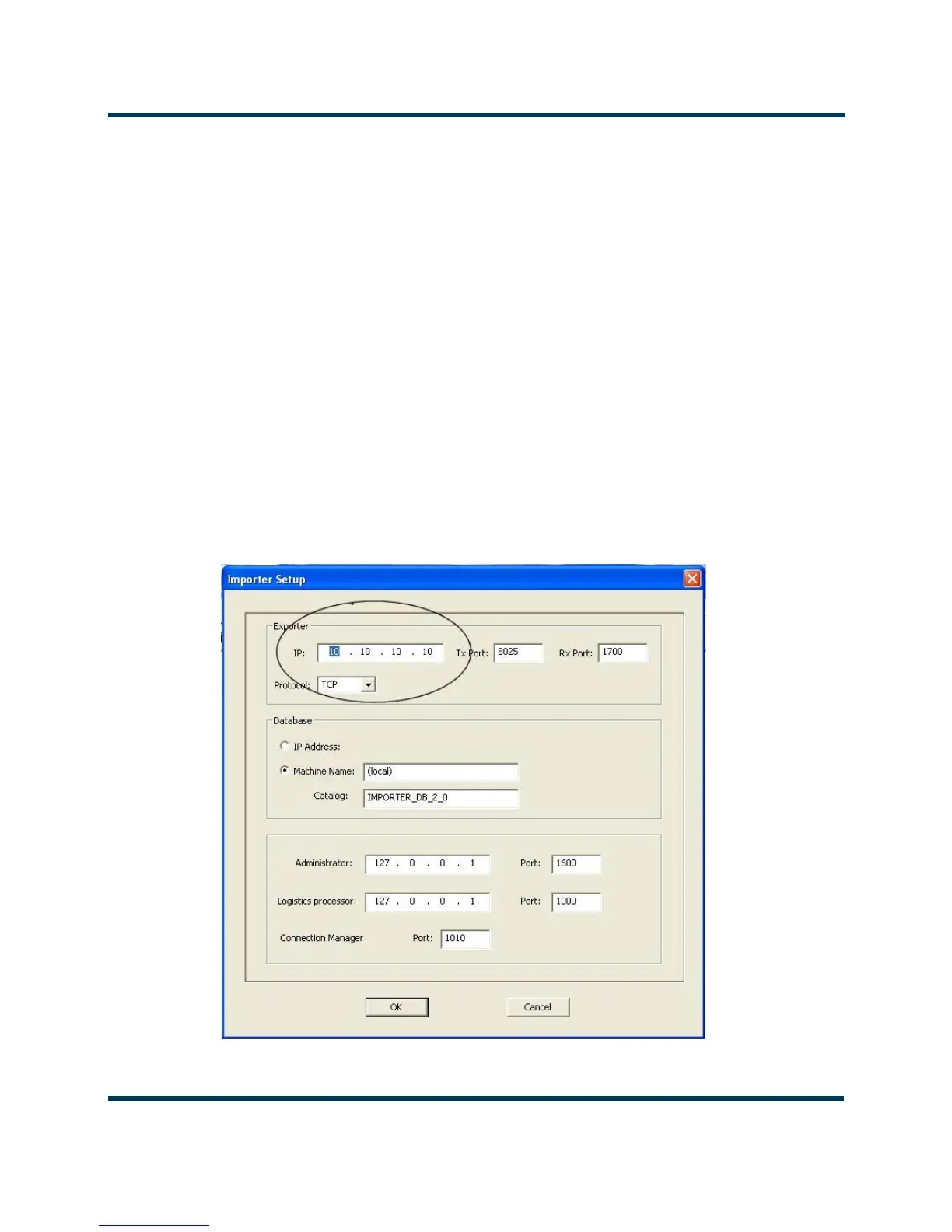
Modify the Importer Plus’ IP address for the NE IBOC, Exporter or Exporter Plus as follows:
1. From the Importer Plus’ control panel:
• Select Setup > Importer
• Enter the Exporter IP address in the Exporter IP field (see Figure 7.1 ).
Figure 7.1: Importer Setup screen



 To Next Page