29
(5) Miscellaneous
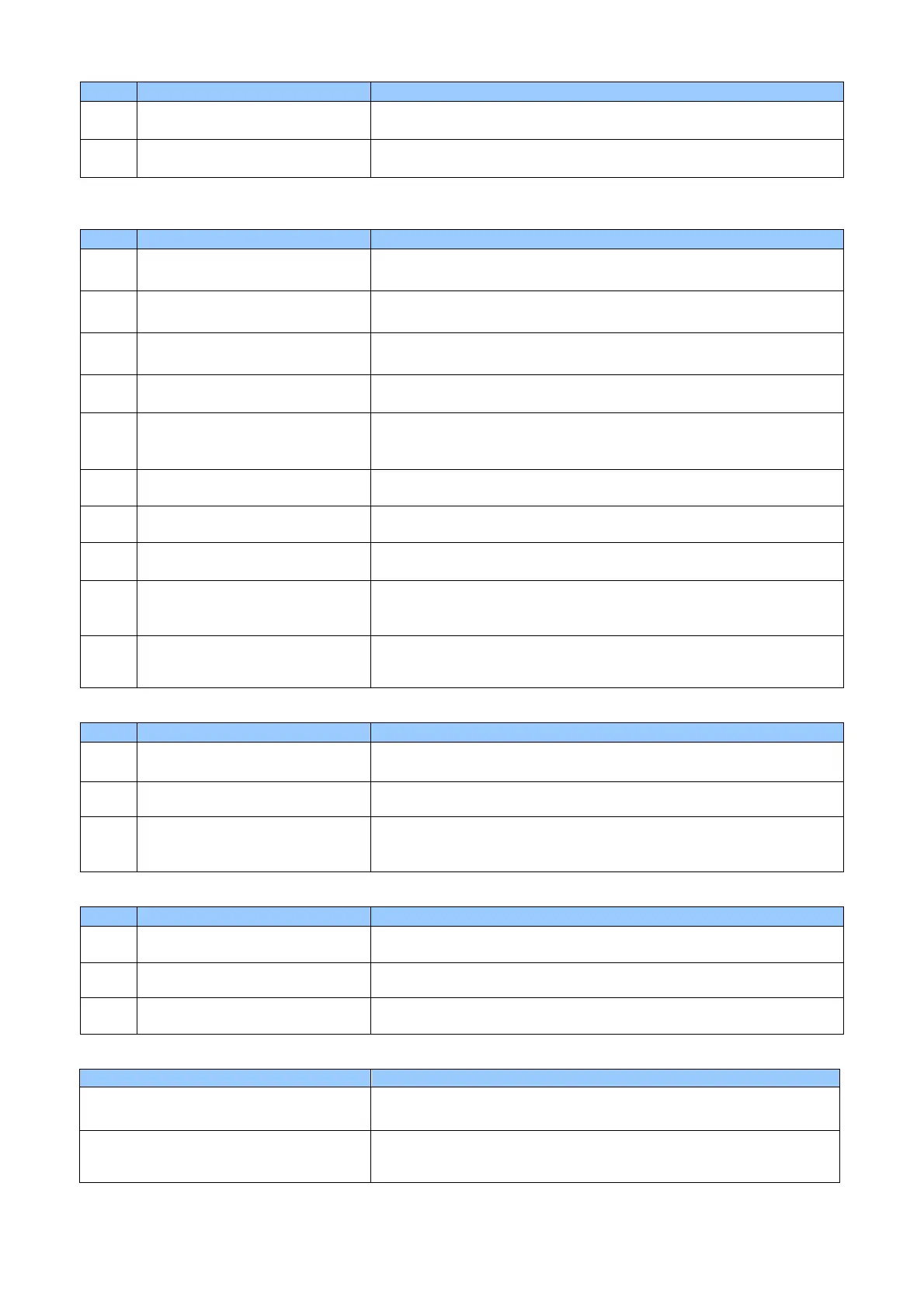
Code Message Details and Countermeasures
15 Media Error The media error occurs.
<Make sure whether the card is not set in the wrong direction>
16 EEPROM Error An EEPROM read/ write error occurs.
<Turn the power OFF and back ON>
B. Warning
(1) Card
Code Message Details and Countermeasures
23 [IC] Contact Error
Print /Encode Unit fails to contact IC chip.
<Make sure whether the card is not set in the wrong direction>
24 [MS] Encoder Error
Print /Encode Unit fails to encode magnetic stripes.
<Make sure whether the card is not set in the wrong direction>
25 [MS] Read Error
Print /Encode Unit fails to read magnetic stripes.
<Make sure whether the card is not set in the wrong direction>
26 [MS] Read STX Error
No STX is found in read data.
<Make sure whether the card is not set in the wrong direction>
27 [MS] Read Parity Error
A parity error occurs when Print /Encode Unit read the data from
magnetic stripes.
<Make sure whether the card is not set in the wrong direction>
28 [MS] Read ETX Error No ETX is found in read data.
<Make sure whether the card is not set in the wrong direction>
29 [MS] Read LRC Error LRC is inconsistent in data that is read from magnetic stripes.
<Make sure whether the card is not set in the wrong direction>
30 IC Module Response Timeout IC module communication failed.
<Make sure whether the card is not set in the wrong direction>
33 Card Eject Error Flipper module communication failed.
<Turn the power OFF, and remove the card from Print /Encode Unit,
turn the power ON>
34 Card Input Timeou
The card input is interrupted.
<Make sure whether any cards are not jammed in the path from the
Input Hopper to Print /Encode Unit>
(2) Ribbon
Code Message Details and Countermeasures
35 Ribbon Life Low Thermal Transfer Ribbon life is reduced to 10% or less.
<Prepare to replace Thermal Transfer Ribbon>
36 No Ribbon Life Thermal Transfer Ribbon is fully consumed.
<Replace the Thermal Transfer Ribbon with a new one>
38 RF Tag Ribbon Error Thermal Transfer Ribbon is not installed properly.
<Make sure whether Thermal Transfer Ribbon is not installed in the
wrong direction>
(3) Miscellaneous
Code Message Details and Countermeasures
20 Command Error Print /Encode Unit receives non-conforming command.
<Contact your distributor>
21 Parameter Error The parameter is not valid.
<Contact your distributor>
22 Main Communication Part
Timeout
The command is not sent on time.
<Contact your distributor>
C. Trouble shooting
Symptom Countermeasures
The ribbon is frequently cut, or some part
of data is not printed.
Check the X-coordinate in the printer driver.
<The recommended starting value for the X- coordinate is 14 ± 2>
The Print /Encode Unit is unable to find
the programs.
Make sure host PC and this product are connected correctly by
LAN or USB.
<Reboot the PC>



 To Next Page