2.54.5
Making and receiving calls
4.6
Making and receiving calls
4.6
Making and receiving calls
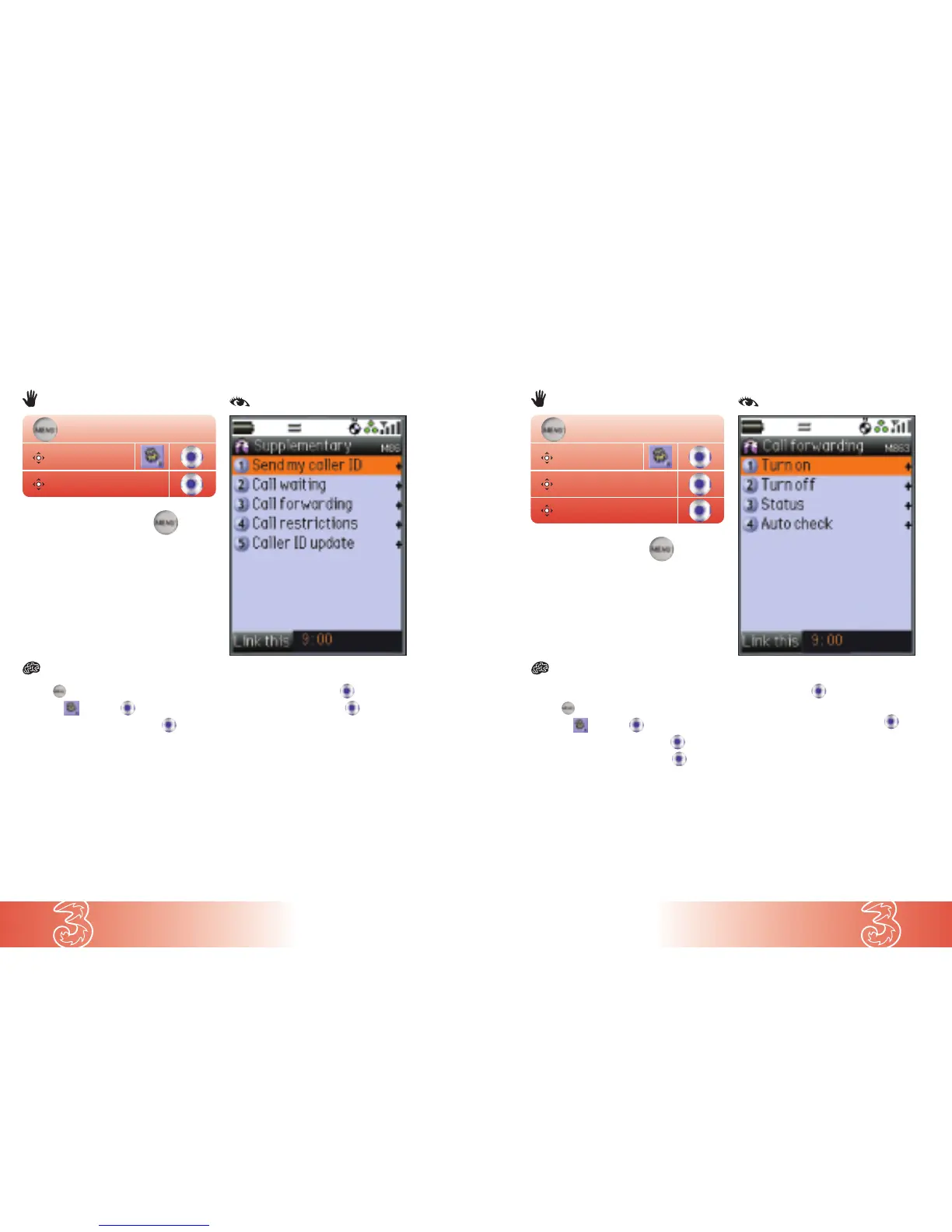
From the start screen
● Press
● Scroll to and press
● Scroll to Supplementary and press
● Scroll to Call forwarding and press
● At Turn on press
● Scroll to the type of call you want to divert:
Voice / Video / Fax / Data and press
● Scroll to your preferred divert option: All calls /
If no answer / If busy / If unreachable
● Enter the alternative number
● Press OK
Note: Video calls can only be diverted to another
3 video mobile number. To check your number,
see page 3.9.
You can divert all your incoming calls to another number (such as your Voicemail)
or divert them only when your handset is busy, out of coverage or unavailable.
● Press
● Scroll to and press
● Scroll to Supplementary and press
● At Send my caller ID press
● Scroll to Withhold and press
The next person you call will not see your
caller ID. For subsequent calls your Caller ID
will be shown.
Caller ID
Handy if you don’t want the person you’re calling to know it’s you.
Diverting incoming voice, video and fax calls to
an alternative number
Supplementary
Settings
Supplementary
Call forwarding
Settings
or
( )
...8...6...
or
( )
...8...6...3...


 To Next Page