6.14
Today on 3
6.13
Today on 3
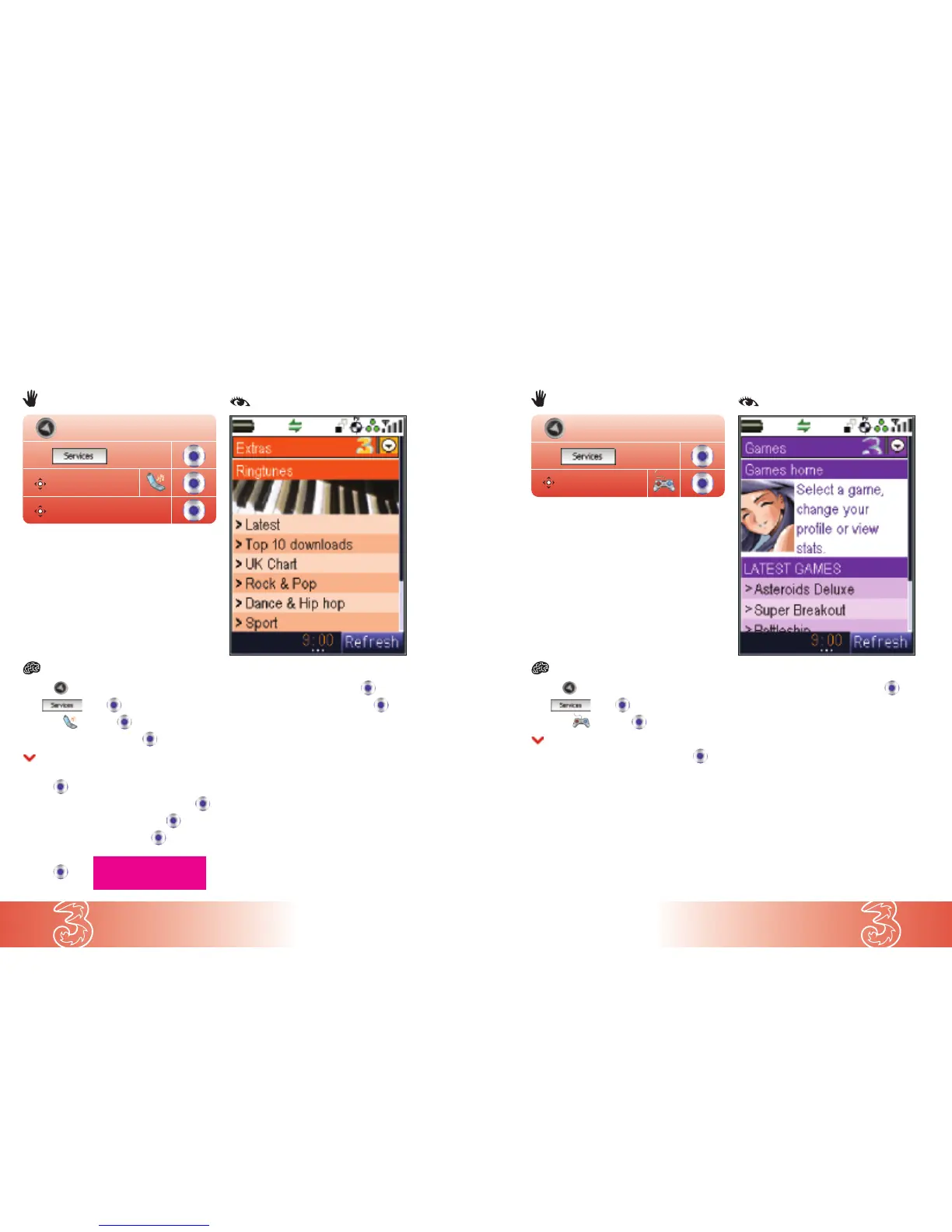
● Press
● At press
● Scroll to and press
● Scroll to Ringtunes and press
● Scroll to your preferred style of ringtune and
press to see the list of available ringtunes
● Scroll to your preferred ringtune and press
● Scroll to Sample ringtune and press
● Scroll to Hear sample and press
● Press Quit
● Press (text)
● Scroll to Buy ringtune and press
● Press Yes / No to play the ringtune
Note: To set the downloaded ringtune,
see page 3.7.
Extras – ringtunes
Personalise your handset from our range of polyphonic ringtunes.
Extras
Ringtunes
● Press
● At press
● Scroll to and press
● Scroll to your preferred game and press
Your handset will display a brief description
of the game.
● Scroll to Select Download and press
To play the game, see page 6.15.
Each game has specific information about what
constitutes a single play of that game. Check the
Game information page for your game.
Note: If you receive an incoming call, message,
or alert during gaming, your game automatically
pauses and can then be continued after your
call / message / alert.
Finding a game
Download a game to your handset, from fast-paced shoot-’em-ups to retro action and
classic brainteasers.
Games
<--- query?


 To Next Page