13.4
Security
e616V
9.3
Security
9.4
Security
e616V
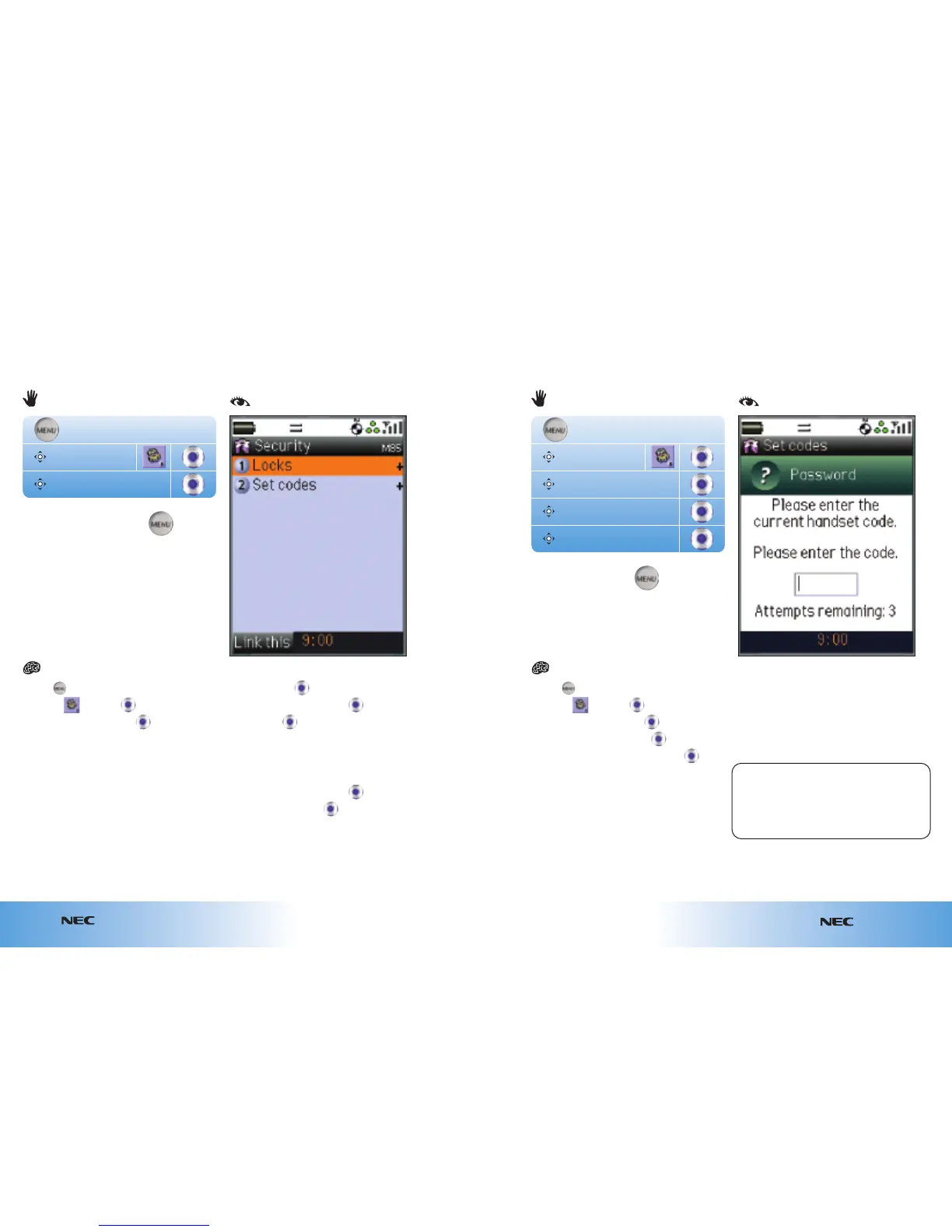
● Press
● Scroll to and press
● Scroll to Security and press
● At Locks press
● Scroll to Auto lock and press
● At On press
● Enter the default code (0000) and press OK
To unlock the auto lock:
● Scroll to Auto lock and press
● Scroll to Off and press
● Enter the code and press OK
Auto-locking your handset
You can set your handset to auto-lock, locking it every time you turn it off. You’ll need
a code to unlock it, so if you lose your handset no one else will be able to use it
without the code.
Security
Settings
● Press
● Scroll to and press
● Scroll to Security and press
● Scroll to Set codes and press
● Scroll to New handset code and press
● Enter the default code (0000) and press OK
● Enter the new code
● Scroll to next text box
● Re-enter the new code and press OK
Note: If you change the code and then do
not remember it, you will need to send your
handset to
3 to unlock it. All stored data on your
handset will be erased. Call
3 Customer Sevices
on
0870 7330 333 for details.
Changing your handset lock security code
Security
Set codes
New handset code
Settings
or
( )
...8...5...
or
( )
...8...5...2...6...


 To Next Page