80
5. Using On-Screen Menu
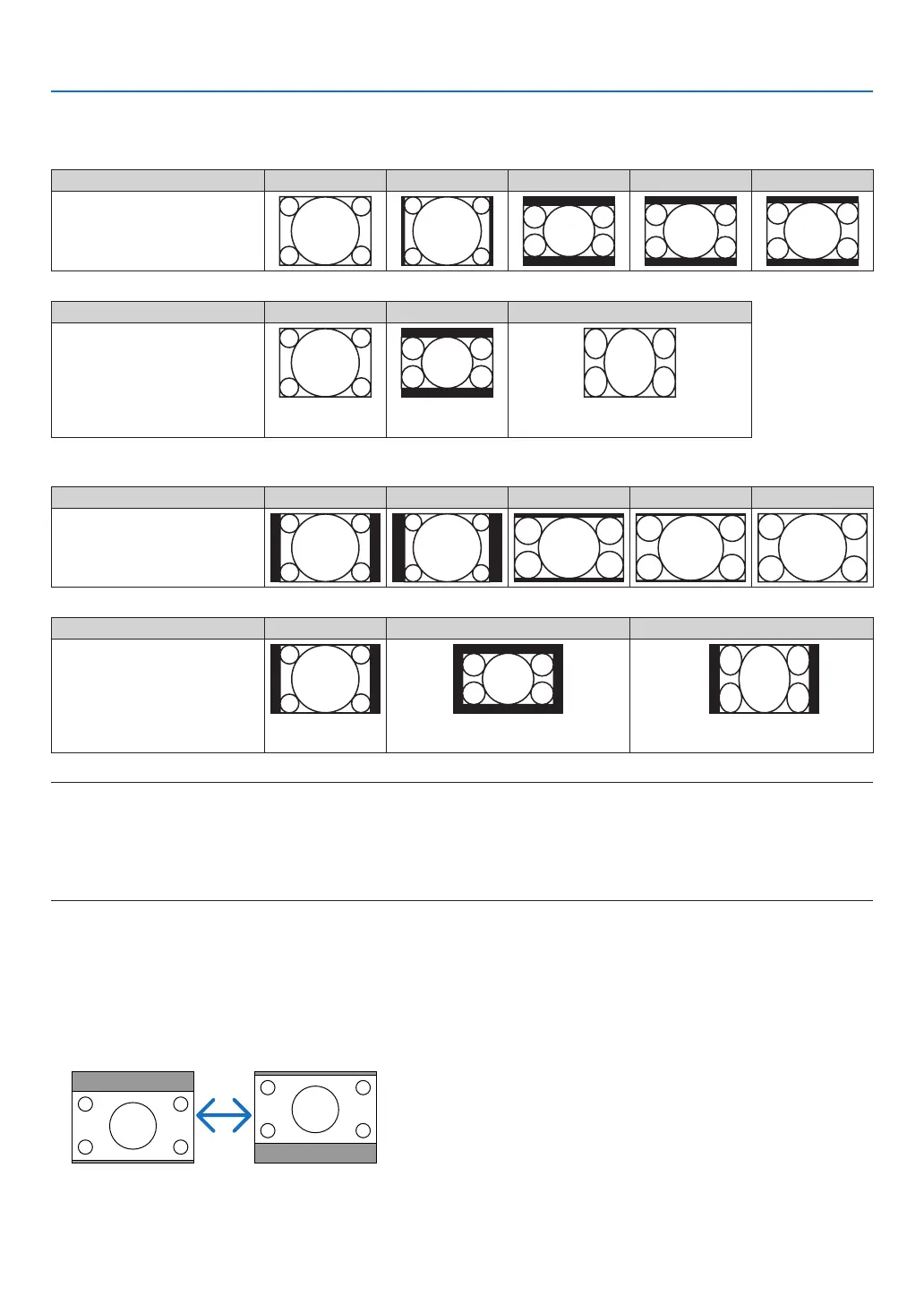
Sampleimagewhentheappropriateaspectratioisautomaticallydetermined
M350X/M300X/M260X/M230X/M420X/M420XV/M350XS/M300XS/M260XS
[Computersignal]
Aspectratioofincomingsignal 4:3 5:4 16:9 15:9 16:10
Sampleimagewhentheappro-
priate aspect ratiois automati-
cally determined
[Videosignal]
Aspectratioofincomingsignal 4:3 Letterbox Squeeze
Sampleimage when the as-
pectratiois automatically de-
termined
NOTE:Todisplayasqueezedsignalprop-
erly,select[16:9]or[WIDEZOOM].
M300W/M260W/M300WS/M260WS
[Computersignal]
Aspectratioofincomingsignal 4:3 5:4 16:9 15:9 16:10
Sampleimagewhentheappro-
priate aspect ratiois automati-
cally determined
[Videosignal]
Aspectratioofincomingsignal 4:3 Letterbox Squeeze
Sampleimage when the as-
pectratiois automatically de-
termined
NOTE:Todisplayaletterboxsignalprop-
erly,select[LETTERBOX].
NOTE:Todisplayasqueezedsignalprop-
erly,select[16:9].
TIP:
• Imagepositioncanbeadjustedverticallyusing[POSITION]whenthe[16:9],[15:9],or[16:10]aspectratiosareselected.
• Theterm“letterbox”referstoamorelandscape-orientedimagewhencomparedtoa4:3image,whichisthestandardaspect
ratioforavidesource.
Theletterboxsignalhasaspectratioswiththevistasize“1.85:1”orcinemascopesize“2.35:1”formovielm.
• Theterm“squeeze”referstothecompressedimageofwhichaspectratioisconvertedfrom16:9to4:3.
AdjustingtheVerticalPositionofImage[POSITION](notavailableonM300W/M260W/M300WS/
M260WS)
(onlywhen[16:9],[15:9],or[16:10]isselectedfor[ASPECTRATIO])
When[16:9],[15:9],or[16:10]isselectedin[ASPECTRATIO],theimageisdisplayedwithblackbordersonthetop
and bottom.
Youcanadjusttheverticalpositionfromthetoptothebottomoftheblackarea.


 To Next Page