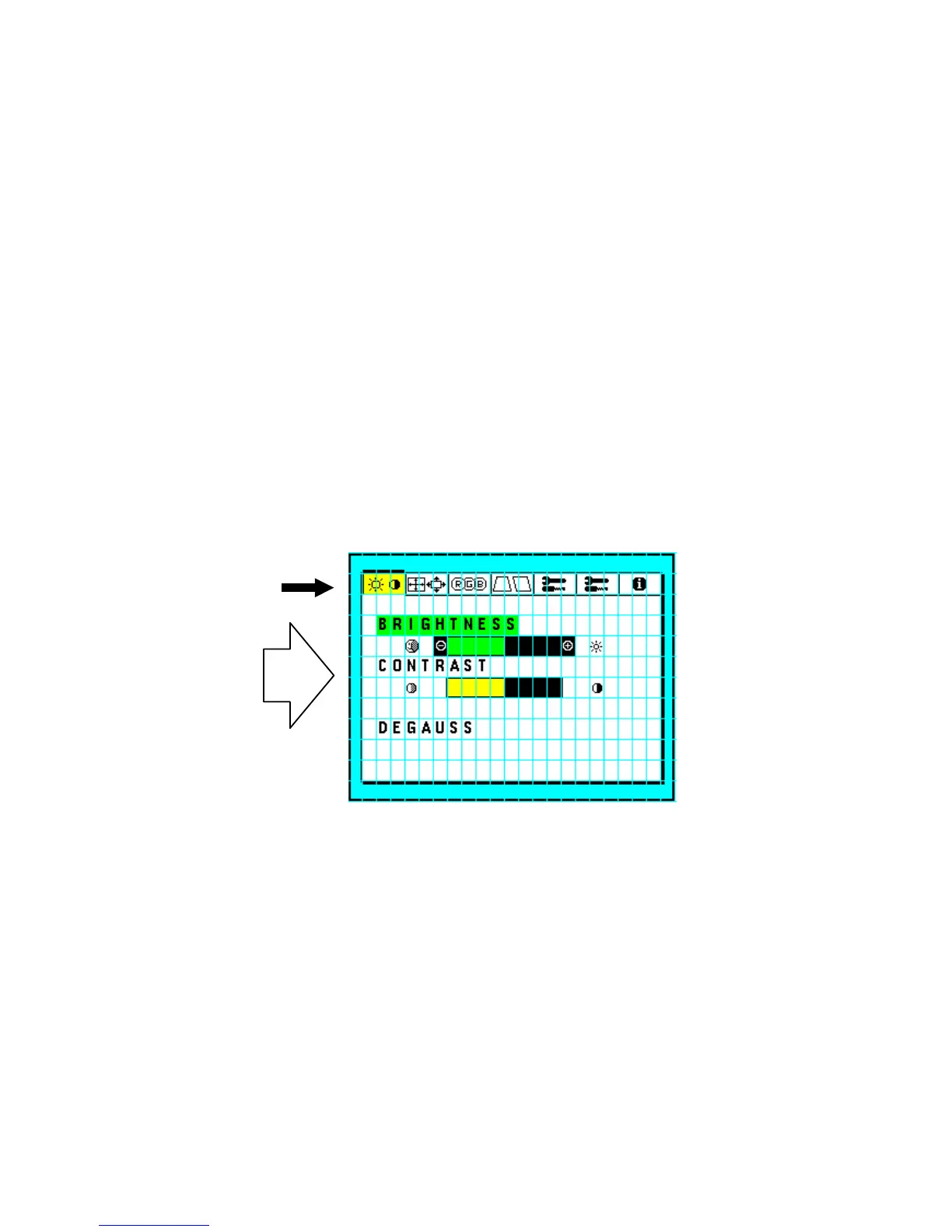
5-5
7-6. How to turn off OSM MENU
* To close the Menu
Press "EXIT" switch while MENU (U) or MENU (S) is displayed
TAG is highlighted: 1 time.
ITEM is highlighted: 2 times.
entering SUB MENU: 3 times
* To close MENU temporarily.
Press "PROCEED" once, while MENU (S) is being displayed.
Press "PROCEED" once more, MENU (S) is displayed again.
7-7. TAG, Item, Sub Menu Change
TAG to TAG : Push "-" SW or "+" SW.
TAG to item : Push "t" SW or "6" SW
Item to sub Menu : Push "PROCEED" SW once.
Item to item : Push "t" SW or "6" SW.
Sub Menu to item : Push "EXIT" SW once.
Item to TAG : When top item is selected, push "t" SW.
When bottom item is selected, push "6" SW.
Push "EXIT" all items.
TAG
ITEM
7-8. To change Data values
Data values are changed by pressing "-" or "+" switch.
7-9. To save Data Value
Data values are saved for EEPROM, while highlighted ITEM is changed.







 To Next Page