5-25
5. Preset Picture Size and Position Adjustment
Signal: No. 3 (VGA480) No.14 (800*600@85Hz)
No. 6 (MAC 640*480) No.17 (1024*768@75Hz)
No.12 (VESA 640*480@85Hz) No.21 (1280*1024@75Hz)
No.13 (MAC 832*624) No.22 (1600*1200@75Hz)
No.23 (1600*1200@85Hz)
Video: All White
1) Receive signal 3.
2) Open Menu (S), TAG2 "H.POSITION", "V.POSITION", "H.SIZE", "V.SIZE".
3) Adjust the picture size and position as listed below by "+", "-" SW.
Picture size
H: 396 ± 1 mm
V: 297 ± 1 mm
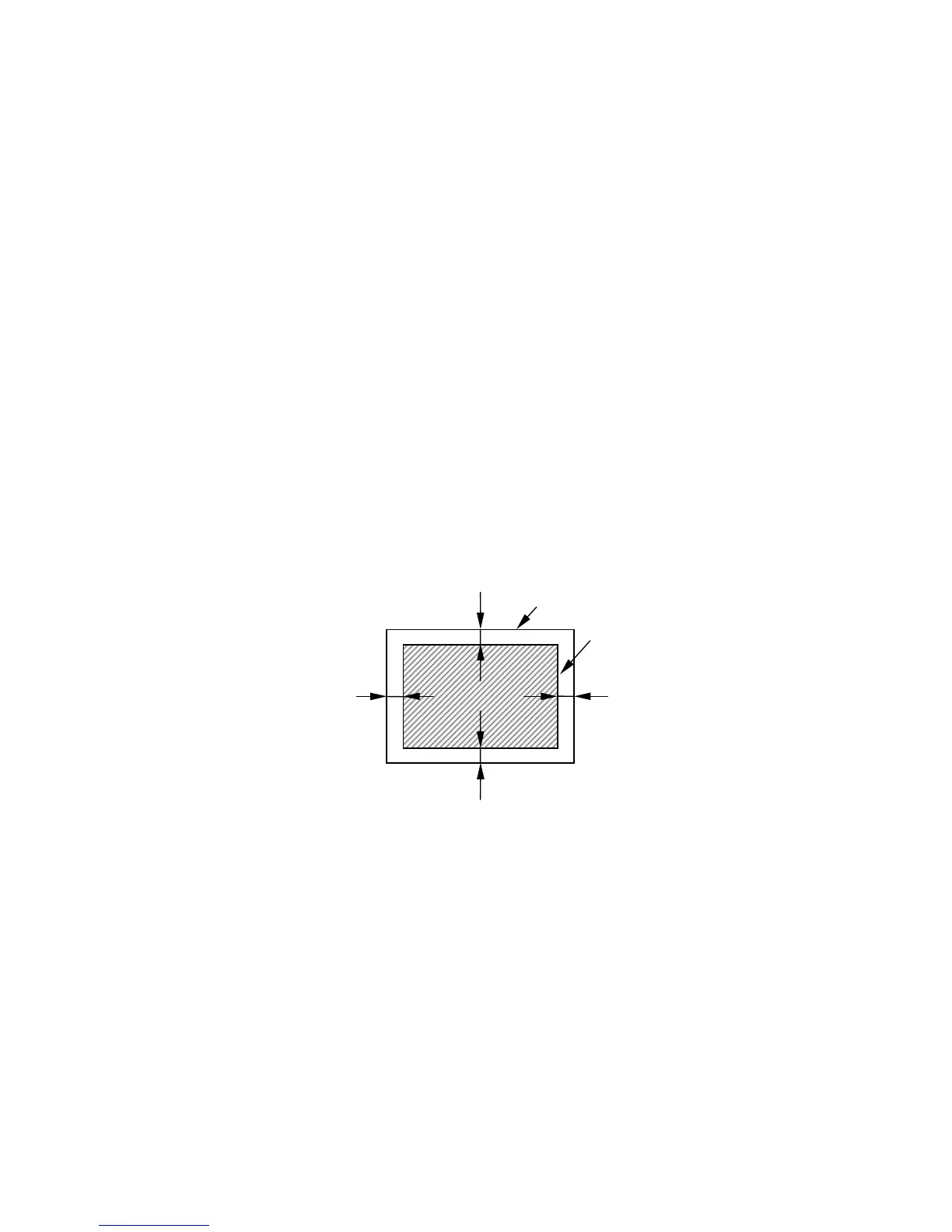
Picture Position
H: | XL
eft
– XR
ight
| ≤ 1.0 mm
V: | XT
op
– XB
ottom
| ≤ 1.0 mm
4) Push "EXIT" SW.
5) Receive the next signal and repeat steps 2) - 4).
Note: Before receiving the next signal, always push "EXIT" SW to store adjustments.
Fig 5-1 Picture Position
Bezel
X
Left
X
Right
X
Top
X
Bottom
Video







 To Next Page