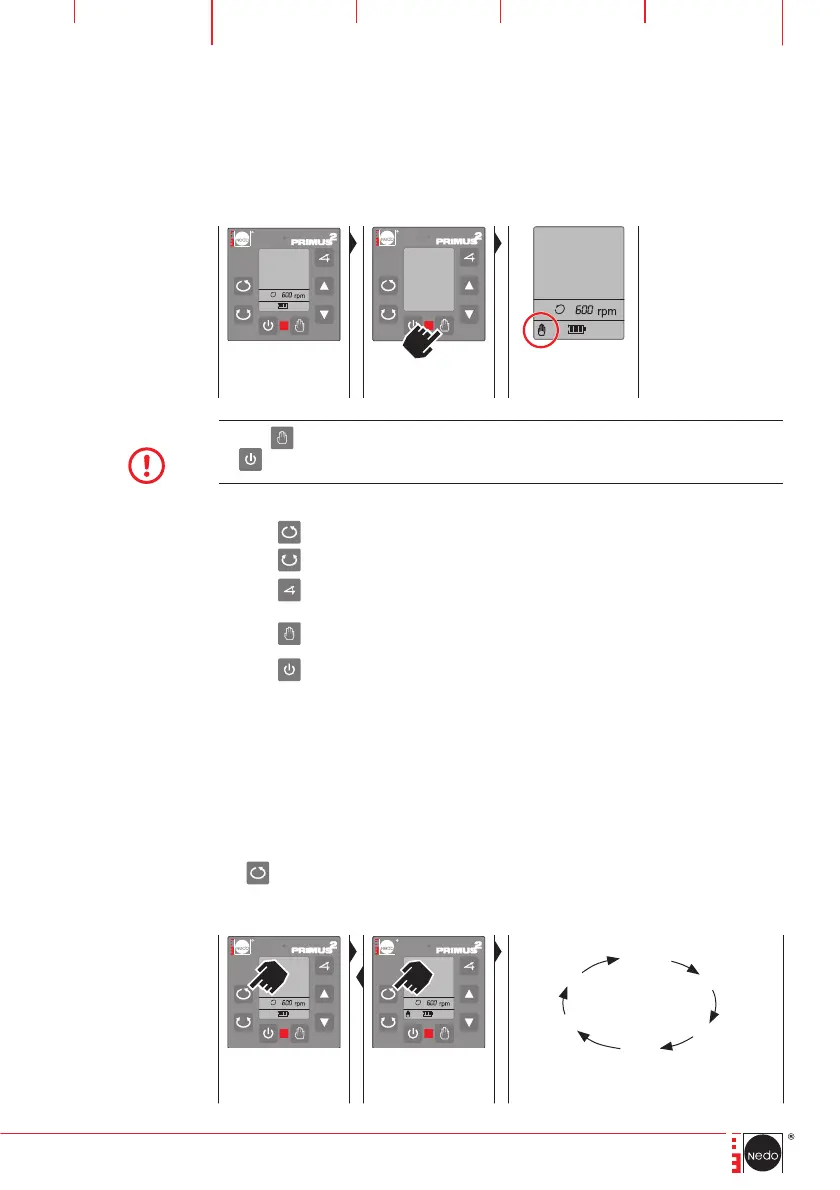
7.2 MANUAL operating mode
In MANUAL operating mode the laser does not detect any vibrations and
does not level itself horizontally.
HVA2N
AUTOMATIC opera-
ting mode is active
Set MANUAL opera-
ting mode
The hand symbol is
displayed
NOTE
Use the button to switch to MANUAL operating mode immediately after switching
on
.
MANUAL operating mode is active. The following functions can be invoked:
Use the
button to invoke the VARIABLE SPEED function (Chapter 8.1).
Use the
button to invoke the SCANNING function (Chapter 8.2).
Use the
button to invoke the TILT/TURN X and Y axes function
(Chapter 8.3).
Use the
button to switch to AUTOMATIC operating mode (Chapter 7.1).
Use the
button to exit the operating mode, switch off the laser.
8 Function PRIMUS 2 HVA2N
8.1 Set VARIABLE SPEED
The default speed is 600 rpm and is designed for use of the laser receiver of
COMMANDER 2 HVA2N. The speed can be gradually changed by pressing
the
button several times to make the laser beam more perceptible to the
human eye.


 To Next Page