44 EN Operating Instructions
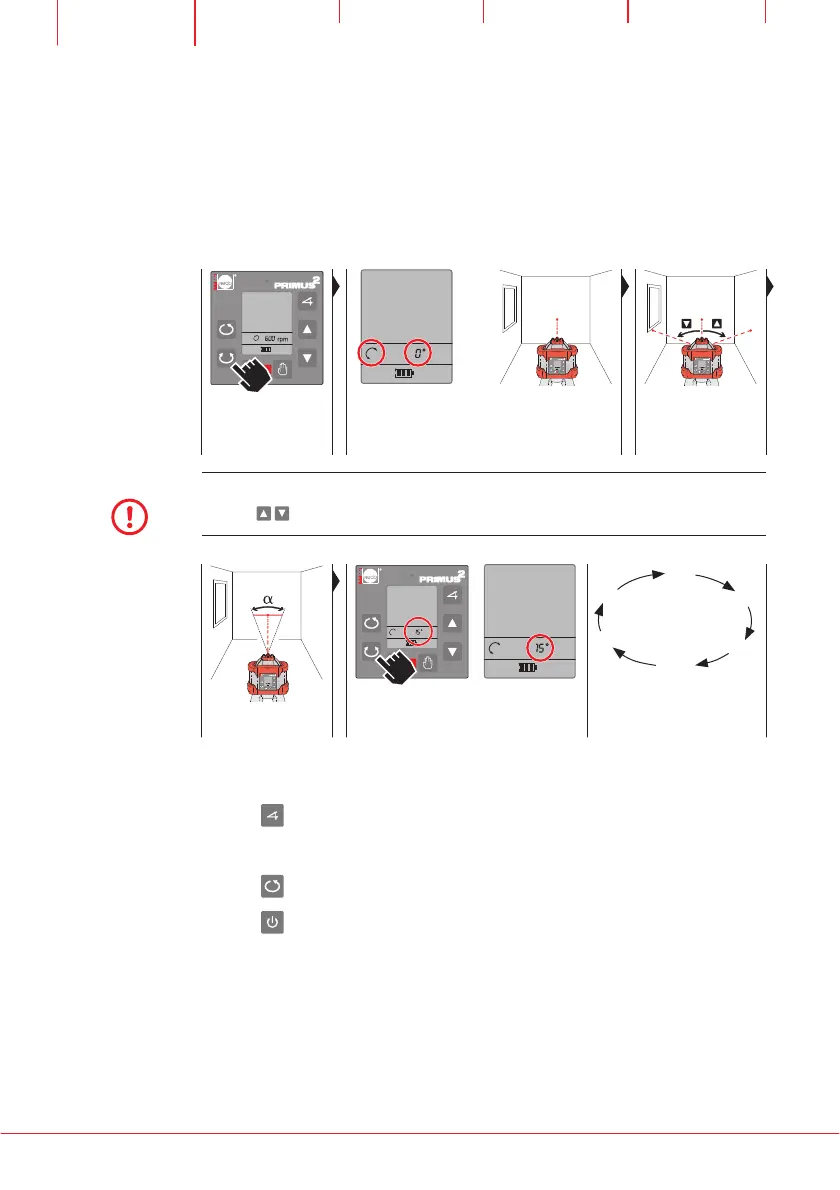
8.2 Set SCANNING
Best laser line visibility is achieved when the laser beam moves between two
points. The length of the laser line can be adjusted by changing the angle bet-
ween the two points. Adjustable angle: 0°, 5°, 10°, 15°.
Switch on SCANNING
mode
Display: SCANNING
and scanned angle
Rotating beam
becomes point beam
(dot)
Align point beam
NOTE
The point beam can be moved in the displayed direction of rotation, gradually be pres-
sing the
buttons several times or continuously by keeping them pressed.
HVA2N
10°
10°
15°
5°
0°
5°
Set scanned angle Press SCANNING button several times Sequence of the adjustable
angle
The new SCANNING angle is active with the last button pressed. The fol-
lowing functions can be invoked:
Use the
button to invoke the TILT/TURN axes function (Chapter 8.3).
–In MANUAL operating mode the X and Y axis can be invoked.
–In AUTOMATIC VERTICAL operating mode, only the X axis can be invoked.
Use the
button to switch to ROTATION operating mode.
Use the button to exit the operating mode, switch off the laser.


 To Next Page