35
Chapter 6 . Camera and photos
Camera and Photos
Use multiple features of your camera to capture your precious moments.
• Camera at a glance
• Take a photo
• Record a video
• Shooting modes
• Camera and video settings
• Photos
6. 1 Camera at a glance
Launch your camera
• On the Home screen: Tap Camera.
• On the Lock screen: Just swipe up.
• On the off screen: Press the Volume-down button twice to snapshot.
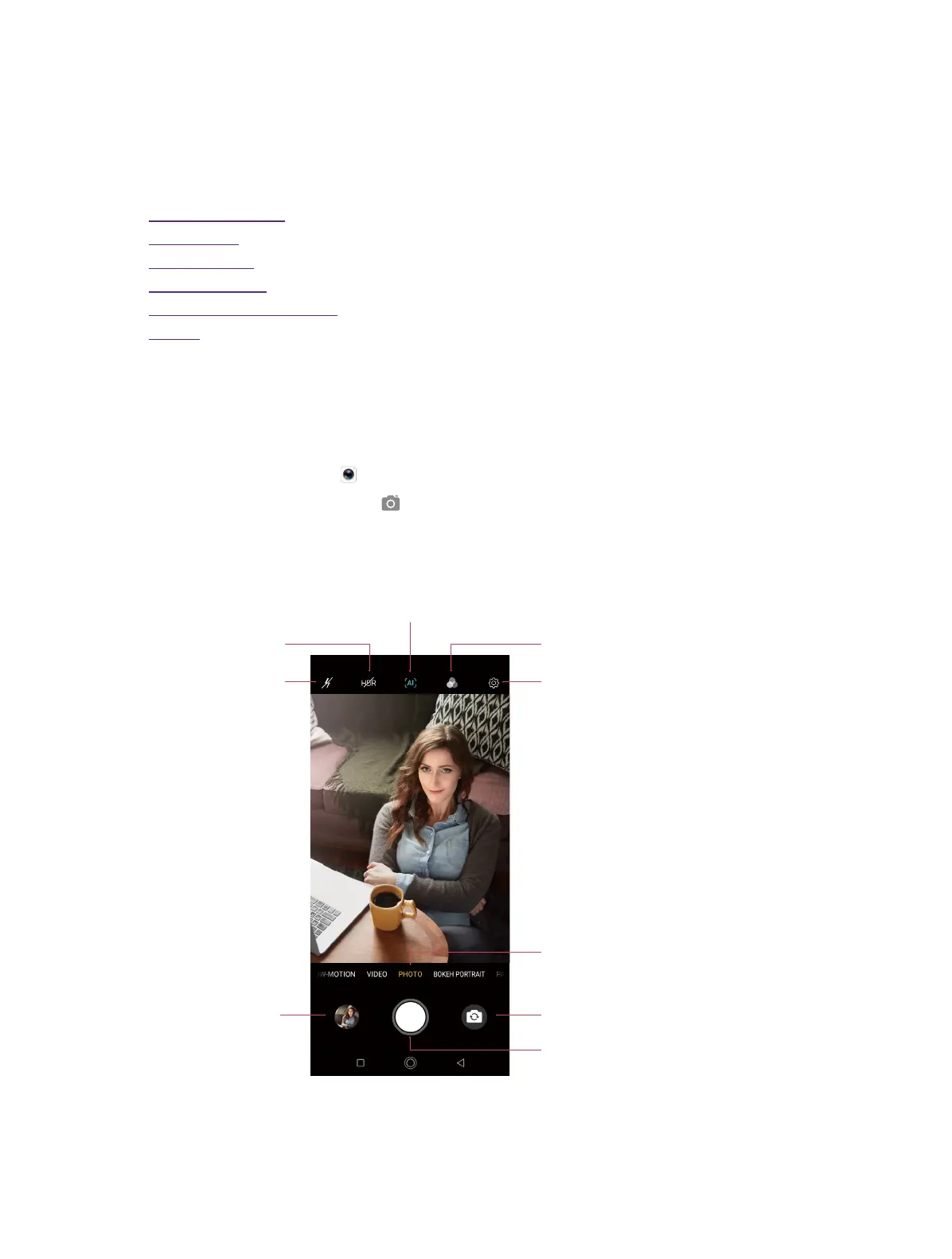
Camera screen
Switch ash modes
Switch HDR modes
AI scene recognition: When enabled, the AI camera will
automatically recognize and optimize the picture scene
in real time to help you easily shoot stunning photos.
Camera settings
Switch shooting mode
Switch filters
Switch between the front camera and rear camer
Ta ke a photo
View the photos and
videos you’ve taken
1. Tap the viewfinder to manually focus. Touch and hold an area of the viewfinder to lock the focus
when AE/AF Lock appears.
2. Swipe up or down the viewfinder to switch the rear and front camera.
6



 To Next Page