EasyManua.ls Logo

Nellcor N-20 - Loaner Policy (U.S.A. only); Shipping Procedures; Exclusions

Nellcor N-20
219 pages
Print Icon
To Next Page IconTo Next Page
To Previous Page IconTo Previous Page
Loading...
Troubleshooting
30
c.
If
the
N-20P
is
off,
turn
it
on
(press
the
"Measure"
button
on
the
front
of
the
N-20P)
and
repeat
step
a.
d.
If
the
previous
attempts
fail to
clear
the
jam,
then
first
remove
the
paper
exit
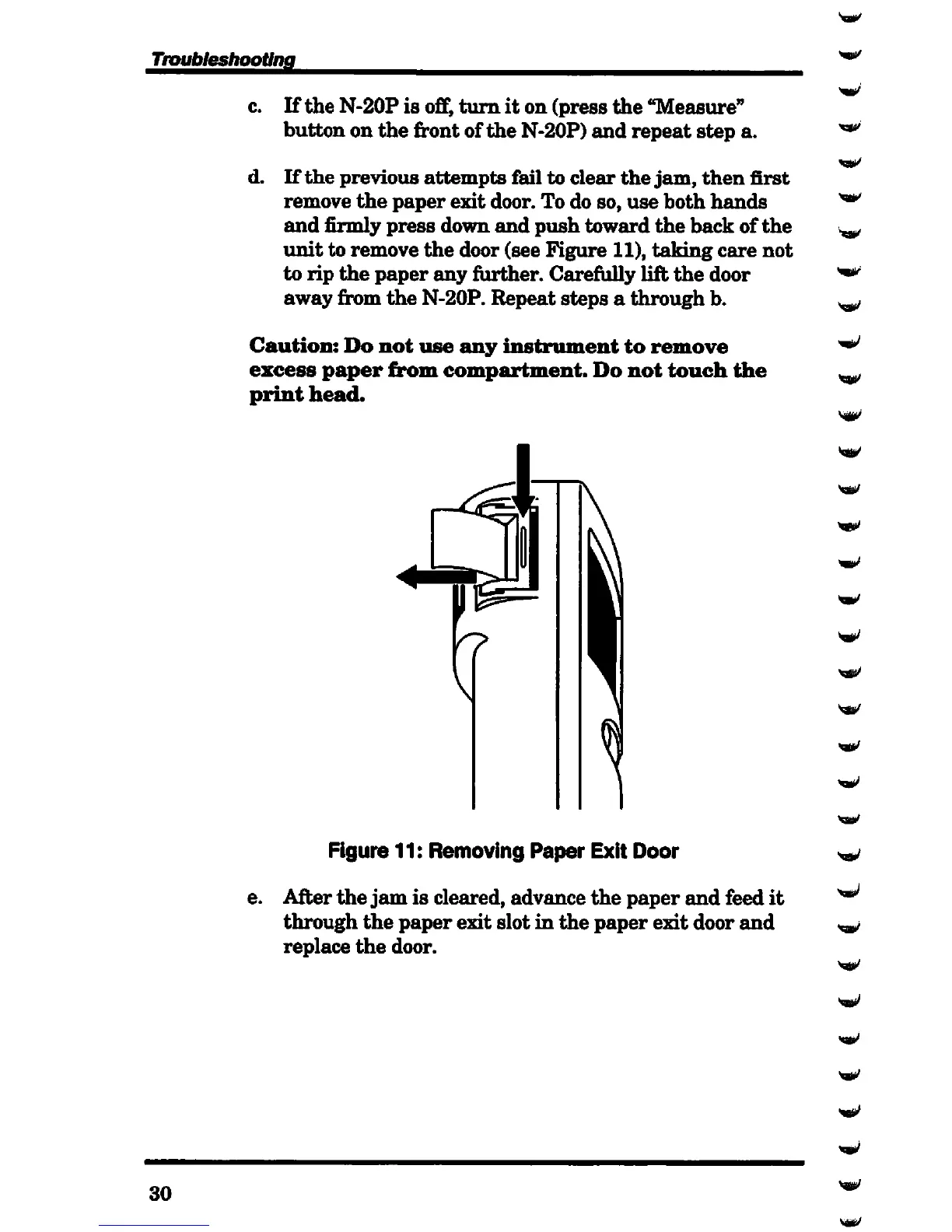
door. To do so,
use
both
hands
and
firmly
press
down
and
push
toward
the
back
of
the
unit
to
remove
the
door (see
Figure
11),
taking
care
not
to
rip
the
paper
any
further.
Carefully
lift
the
door
away
from
the
N-20P.
Repeat
steps
a
through
b.
Caution:
Do
not
use
any
instrument
to
remove
excess
paper
from
compartment.
Do
not
touch
the
print
head.
Figure 11:
Removing
Paper Exit Door
e.
After
the
jam
is cleared,
advance
the
paper
and
feed
it
through
the
paper
exit
slot
in
the
paper
exit
door
and
replace
the
door.
yaffil/
Vffi&V

Table of Contents

Related product manuals