INTELLIGENT REACTIVE POWER MANAGEMENT
RM-12P
9
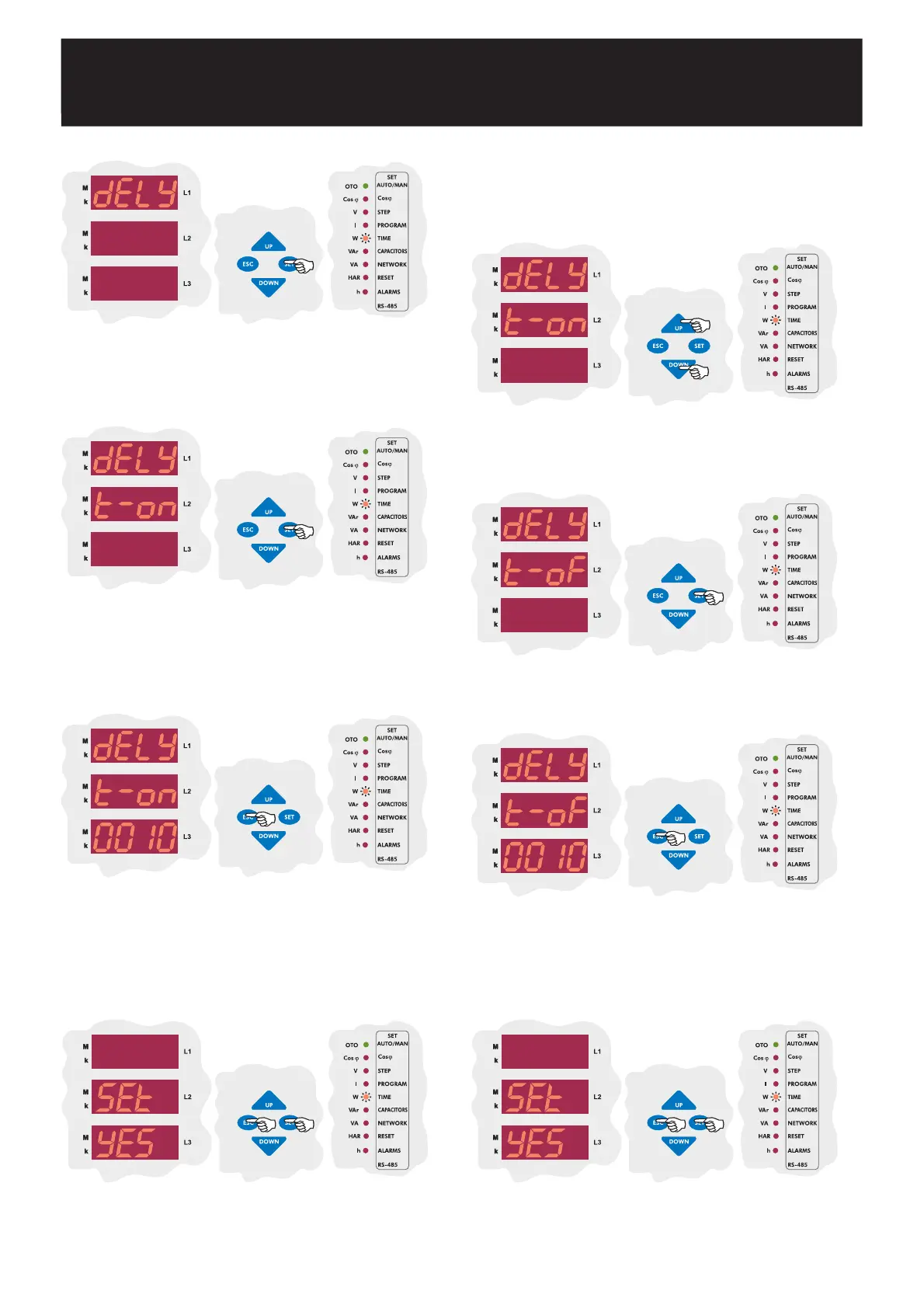
3.5.b Switch-Off Delay Time Setting
Press SET button to select Delay menu.
Press SET button to set switch on delay time (dELy t-on).
Enter a value between 1-1800 seconds and then press SET
button. If you do not want to set another parameter, press ESC
button.
SAUE
If you do not want to set another parameter, in order to quit from the
menu, press ESC button one by one until SAVE SEt yES is displayed.
Press SET button to save your changes or press ESC button to quit
without saving.
Switch-off delay time must be set according to system requirement in
order to achieve compensation targets and also to provide long life time
for contactors and capacitors.
By UP/DOWN buttons, select switch-off delay time
(dELy t-of) menu.
Press SET button to set switch-off delay time.
SAUE
If you do not want to set another parameter, in order to quit from the
menu, press ESC button one by one until SAVE SEt yES is displayed.
Press SET button to save your changes or press ESC button to quit
without saving.
Enter a value between 1-1800 seconds and then press SET
button. If you do not want to set another parameter, press ESC
button.


 To Next Page