INTELLIGENT REACTIVE POWER MANAGEMENT
RM-12P
14
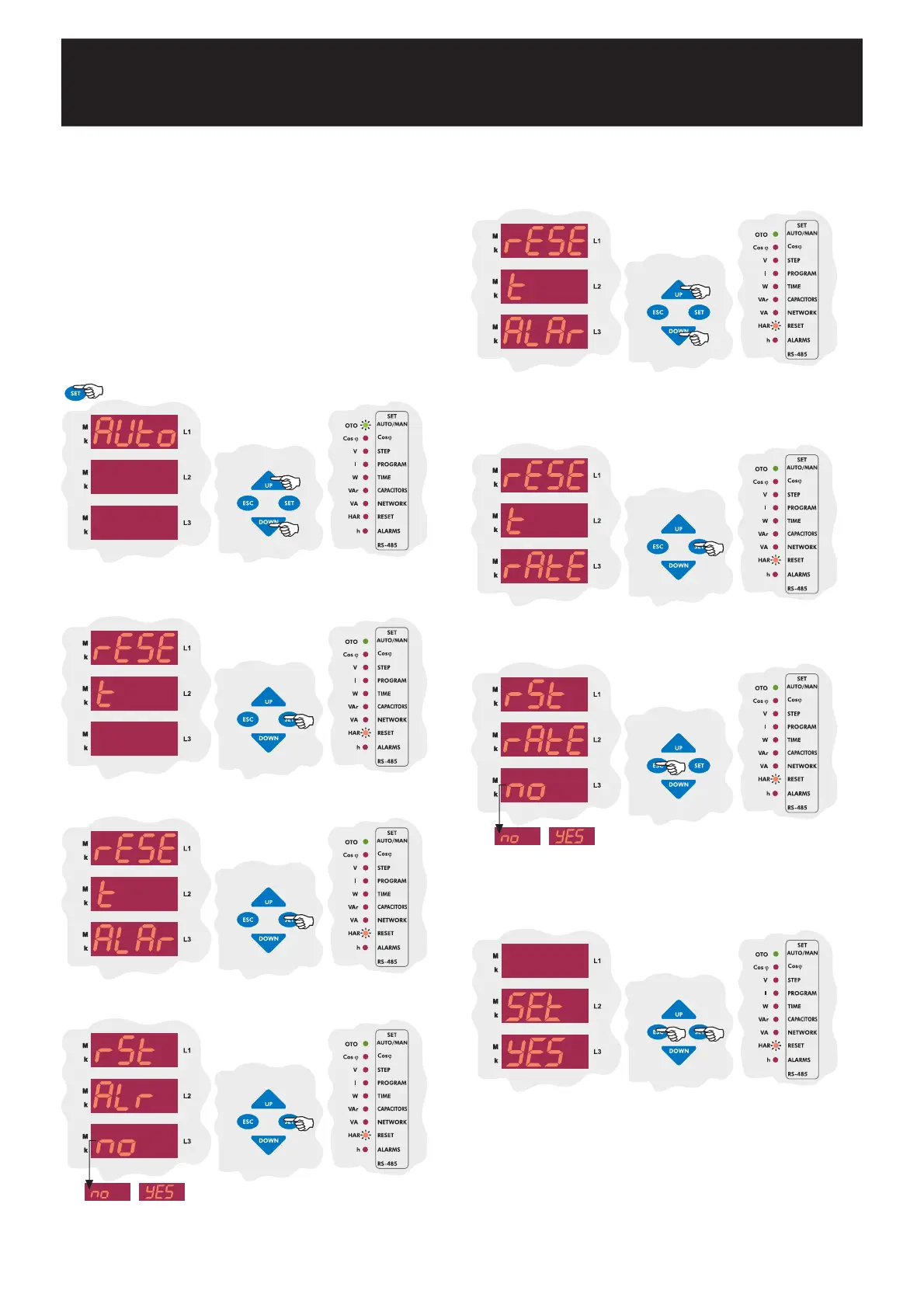
In this menu, alarms, ratios (reactive/active ratios) and energymeters are
reset.
While device operates, existing alarms are reset in this menu by selecting
yES option.
Note : When an alarm exists, alarm relay switches on. Also related led
lights and alarm code is displayed. Even if alarm conditions do not
exist, alarm relay still switches on. In reset menu, alarms are reset and
so alarm relay is switched off. If alarm conditions still exist, even if
alarms are reset in the reset menu, alarm relay switches on again.
If alarm conditions does not exist, alarm relay continues,to its normal
operation.
3.8.a Alarm Reset Setting
3.8 Reset Settings
By UP/DOWN buttons, find reset menu. When reset menu is selected,
reset led lights.
Press SET button for reset settings.
Press SET button for alarm settings.
By UP/DOWN buttons, select yES to delete alarm values or no to
cancel the delete process and then press SET button.
3.8.b Reactive/Active Ratio Reset Setting
In this menu, reactive/active ratio, which is calculated by device, is reset.
SAUE
If you do not want to set another parameter, in order to quit from the
menu, press ESC button one by one until SAVE SEt yES is displayed.
Press SET button to save your changes or press ESC button to quit
without saving.
By UP/DOWN buttons, find reactive/active ratio reset (rAtE) menu.
Press SET button for reactive/active ratio reset settings.
By UP/DOWN buttons, select, yES to delete reactive/active ratio or
no to cancel the delete process and then press SET button.
Press SET button for 3 sec. in order to enter to the menu.
3 sec.


 To Next Page