INTELLIGENT REACTIVE POWER MANAGEMENT
RM-12P
24
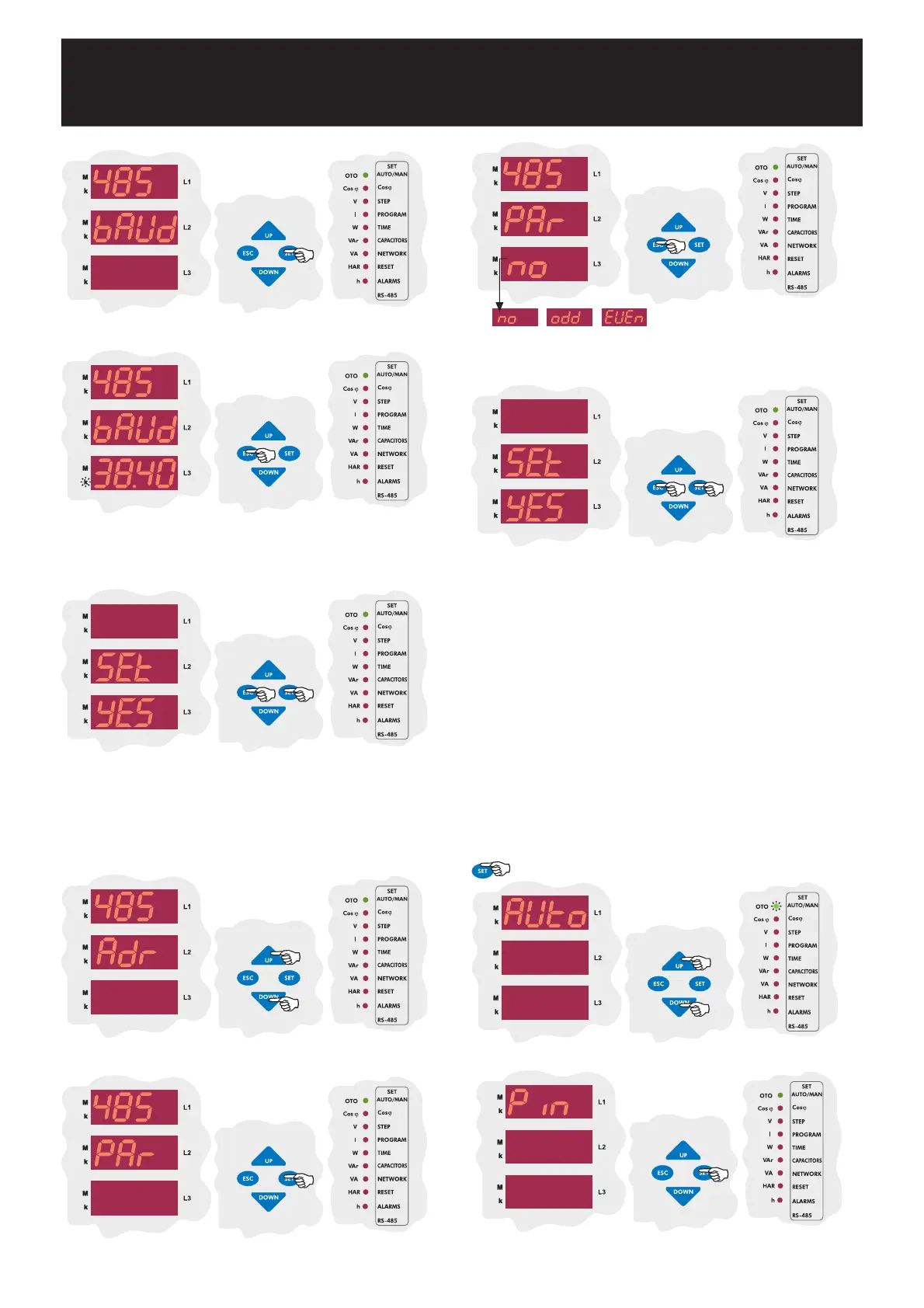
By UP/DOWN buttons, enter baud rate value (1.200 - 2.400 - 4.800
- 9.600 - 19.20 - 38.40) and press SET button. If you do not want to
set another parameter, press ESC button.
In this menu, Parity value can be set as no, odd or EVEn.
3.11.c Parity Setting
Press SET button to set baud rate value.
SAUE
If you do not want to set another parameter, in order to quit from the
menu, press ESC button one by one until SAVE SEt yES is displayed.
Press SET button to save your changes or press ESC button to quit
without saving.
By UP/DOWN buttons, find baud rate(baud) menu.
Press SET button to set parity value.
In this menu, user password is activated. When the password is activated,
a pin code is always required before entering to the menu.
User password can be changed and activated in this menu. When the
password is activated, a pin code is always required before entering to
the menu.
Thus, user password prevents to change the settings of the device by
unauthorized people. For this reason, a pin code with 4 digits must be set
and then it must be activated.
Note : Factory set value for pin code is 1234 and also it is not
activated.
3.12 Password Activation and Change Settings
3.12.a Pin Activation
By UP/DOWN buttons, find Pin menu.
Press SET button to set password.
By UP/DOWN buttons, select a parity option and press SET button.
If you do not want to set another parameter, press ESC button.
SAUE
If you do not want to set another parameter, in order to quit from the
menu, press ESC button one by one until SAVE SEt yES is displayed.
Press SET button to save your changes or press ESC button to quit
without saving.
Press SET button for 3 sec. in order to enter to the menu.
3 sec.


 To Next Page