INTELLIGENT REACTIVE POWER MANAGEMENT
RM-12P
3.1.b Automatic Mode Setting
When device starts to operate, it checks connections and if
there is a connection error, corrects it automatically. For this
function, 3-phase voltage and current connections must
completely be done.
Warning: If fast load variations exist together with
compensation capacitors, device can not detect correct
connection at first time but after several attempts. If device
can not finish this detection, C/k calculation can not be
accomplished.
After correcting connection errors, if Auto:On option is selected
device starts to measure capacitor steps automatically according
to program selection. When PS-10 program is selected, all
capacitor steps are measured. In other programs, only first
capacitor step power is measured and other capacitor steps
are calculated and recorded according to the selected program.
Note: After this process, calculated power values of all
capacitor steps always must be controlled. In order to have
correct power values for capacitor steps, current and voltage
transformer ratios must be entered correctly. If current and
voltage transformer ratios are not entered, these ratios are
supposed to be 1 and capacitor powers are calculated
according to these values.
(Refer to VT and CT ratio settings)
Note: If automatic setup is selected as on, automatic mode
starts immediately without waiting to escape from the menu.
6
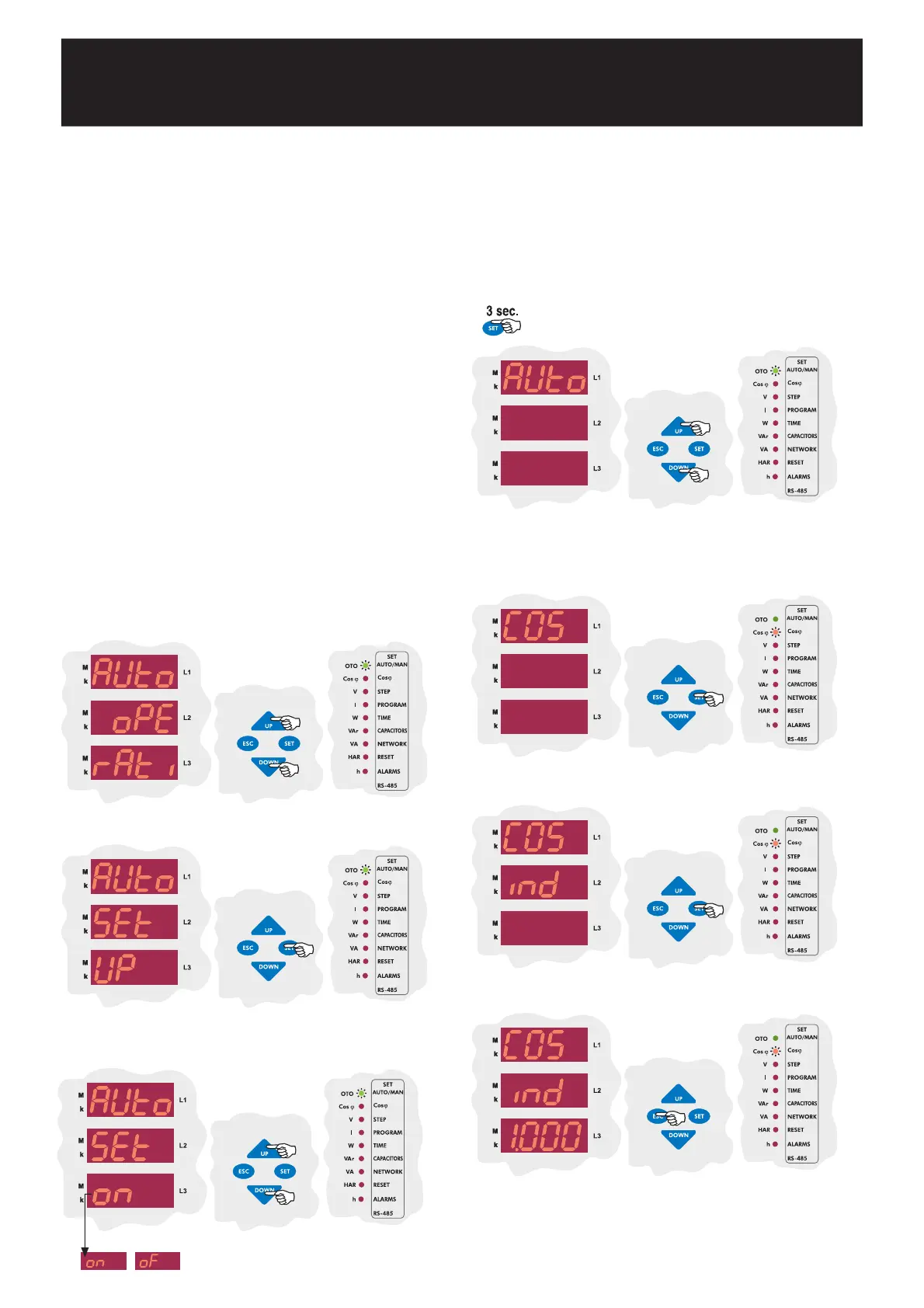
In Auto operatý menu, press DOWN button to enter the
Auto Setup menu.
Press SET button to change Auto Setup mode.
Press UP or DOWN button to enable (on) or disable (of) the Automatic
Setup mode.
In this menu, required COSj value in the inductive area is set.
3.2.a Inductive Cosj Setting
3.2 Target Cosj Setting
Target Cosj value can be set between Ind. 0,800-Cap.0,800.
RM-12P tries to reach systems Cosj value to the set value. Cosj set
value must be in the range of the smallest capacitor step power (Q
C
k
).
Switching on and off demand occur outside of this range.
Press SET button for 3 sec. in order to enter to the menu.
Find Target Cosj menu by using UP/DOWN buttons.
When Target Cosj menu is displayed, Cosj led lights on the display.
Press SET button for inductive Cosj value setting in Target Cosj
menu.
Press SET button for inductive Cosj value setting.
By UP/DOWN buttons, select inductive Cosj value between 0,800 -
1,000 and then press SET button. To quit, press ESC button.


 To Next Page