RM-12P has MODBUS-RTU protocol on RS-485 communication port in
order to communicate with the computer. All measured parameters can be
saved into computers memory via appropriate software.
All necessary configurations also can be set via software.
Note : Computer communication feature is only available for
RM-12P model.
Computer communication can be achieved up to 247 devices via device
adress setting.
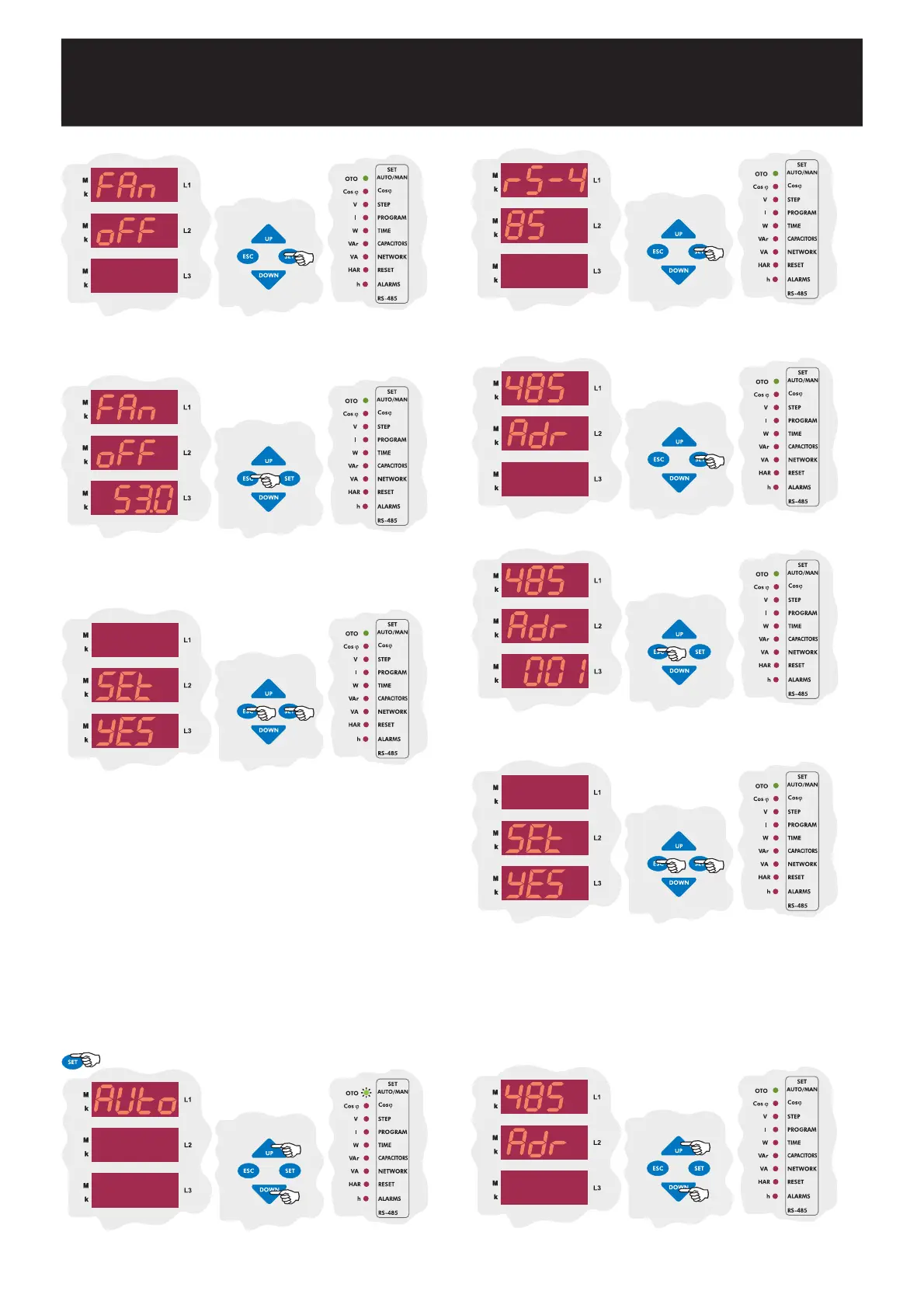
3.11.a Device Address Setting
3.11 Computer Communication Settings (RS-485)
By UP/DOWN buttons, find computer communication (RS-485) menu.
Press SET button for address setting.
Press SET button to set address value.
Enter the communication address between 1-247 and press SET button.
If you do not set another parameter, press ESC button.
Baud rate value can be set as 1.200 Kbps, 2.400 Kbps, 4.800 Kbps,
9.600 Kbps, 19.20 Kbps, 38.40 Kbps in this menu.
3.11.b Baud Rate Setting
SAUE
If you do not want to set another parameter, in order to quit from the
menu, press ESC button one by one until SAVE SEt yES is displayed.
Press SET button to save your changes or press ESC button to quit
without saving.
By UP/DOWN buttons, find baud rate (bAUd) menu.
Press SET button for 3 sec. in order to enter to the menu.
3 sec.
INTELLIGENT REACTIVE POWER MANAGEMENT
RM-12P
23
Press SET button for disabling the temperature protection.
Press SET button to enter the temperature alarm between
00.0-99.8 °C.
(Higher value than FAn on value can not be programmed)
SAUE
If you do not want to set another parameter, in order to quit from the
menu, press ESC button one by one until SAVE SEt yES is displayed.
Press SET button to save your changes or press ESC button to quit
without saving.


 To Next Page