INTELLIGENT REACTIVE POWER MANAGEMENT
RM-12P
7
In this menu, last capacitor step number is set between 1-12 for
RM-12P. For example, if this value is 8, it means that first eight capacitor
step (1......8) is selected. After this setting, device must be powered-up
again.
Note : When program 10 (PS-10) is selected, device detects steps
without capacitors automatically. These steps are always switched off
by device. In this case, only capacitor connected steps are functional.
3.3 Last Capacitor Step Number Setting
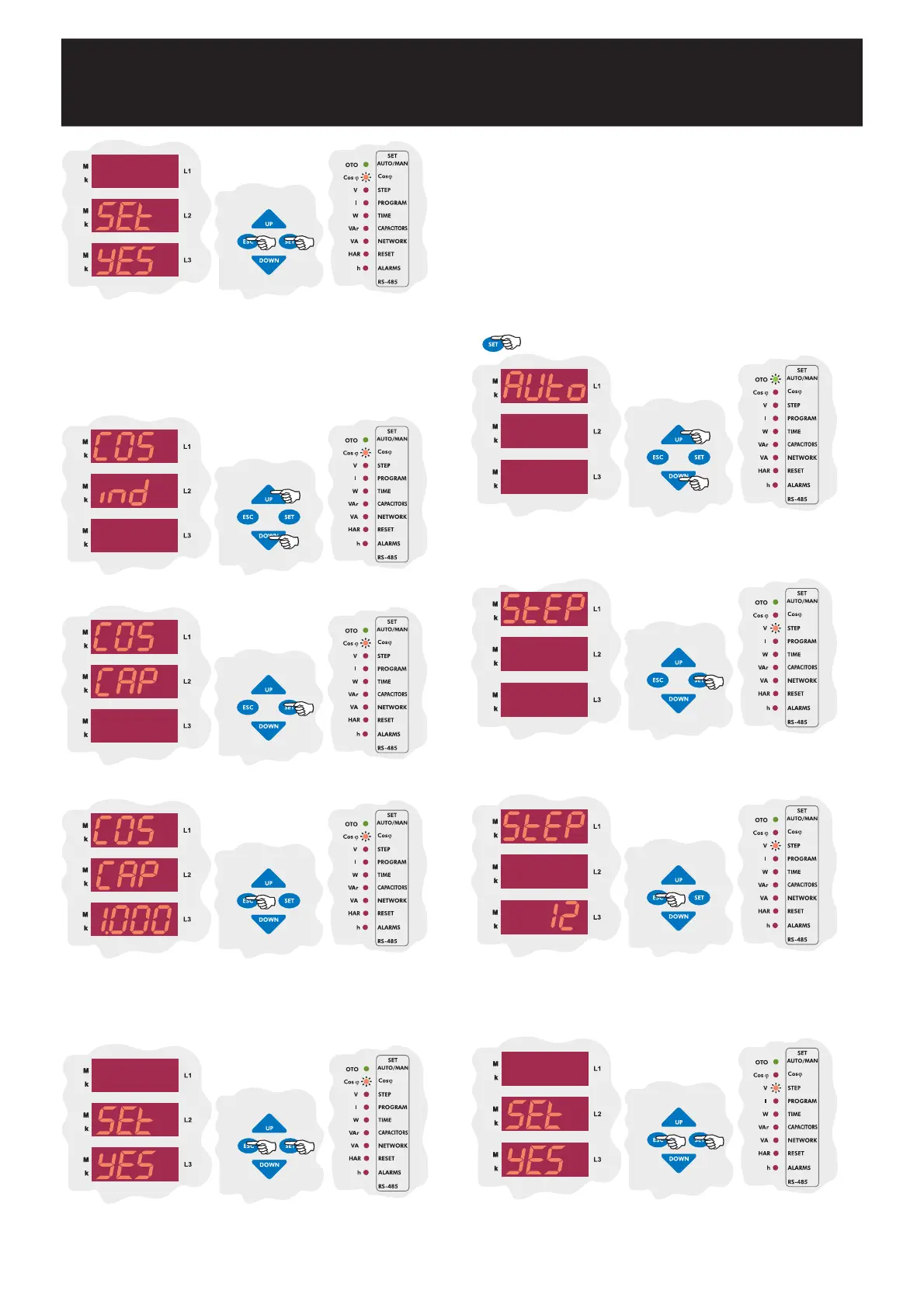
Press UP/DOWN buttons to find capacitor step number (StEP)
menu. When step number menu is displayed, step led lights.
SAUE
If you do not want to set another parameter, in order to quit from the
menu, press ESC button one by one until SAVE SEt yES is displayed.
Press SET button to save your changes or press ESC button to quit
without saving.
Press SET button to enter step number.
Press UP/DOWN buttons to enter step number between 1-12
and then press SET button. If you do not want to set another
parameter, press ESC button.
SAUE
If you do not want to set another parameter, in order to quit from the
menu, press ESC button one by one until SAVE SEt yES is displayed.
Press SET button to save your changes or press ESC button to quit
without saving.
3.2.b Capacitive Cosj Setting
SAUE
If you do not want to set another parameter, in order to quit from the
menu, press ESC button one by one until SAVE SEt yES is displayed.
Press SET button to save your changes or press ESC button to quit
without saving.
In this menu, required COSj value in capacitive area is set.
Press UP/DOWN buttons to set
COSj
parameter.
Press SET button for Cosj value settings in capacitive area.
Press UP/DOWN buttons to set capacitive Cosj value between
0,800-1,000 and then press SET button. If you do not want to
set another parameter, press ESC button.
Press SET button for 3 sec. in order to enter to the menu.
3 sec.


 To Next Page