INTELLIGENT REACTIVE POWER MANAGEMENT
RM-12P
15
In this menu, alarm values for over voltage, reactive/active ratio,
*temperature and THD can be set saparately.
Device has 2 relay outputs (except capacitor step relays).wihc are alarm
relay and *fan relay.
If any mentioned alarm condition (except temperature) exists, alarm relay
switches on and also related error led and alarm led (
) light.
(Refer to errors section for details)
Also related error code is displayed. (Refer to page 30 for alarm codes)
* Optional
In this menu, over voltage alarm values are Preset. Entered also value
consists of 3-phase. If any phase value exceeds the set value and also
alarm condition still exists even if entered delay time is over, alarm relay
switches on and also over voltage led (V>) lights.
3.9.a Over Voltage Alarm Setting
3.9 Alarm Settings
In this menu, over voltage value is set between 0-300 V (for Vtr=1).
If this value is set as 0, this function is disabled.
3.9.a.a Over Voltage Setting
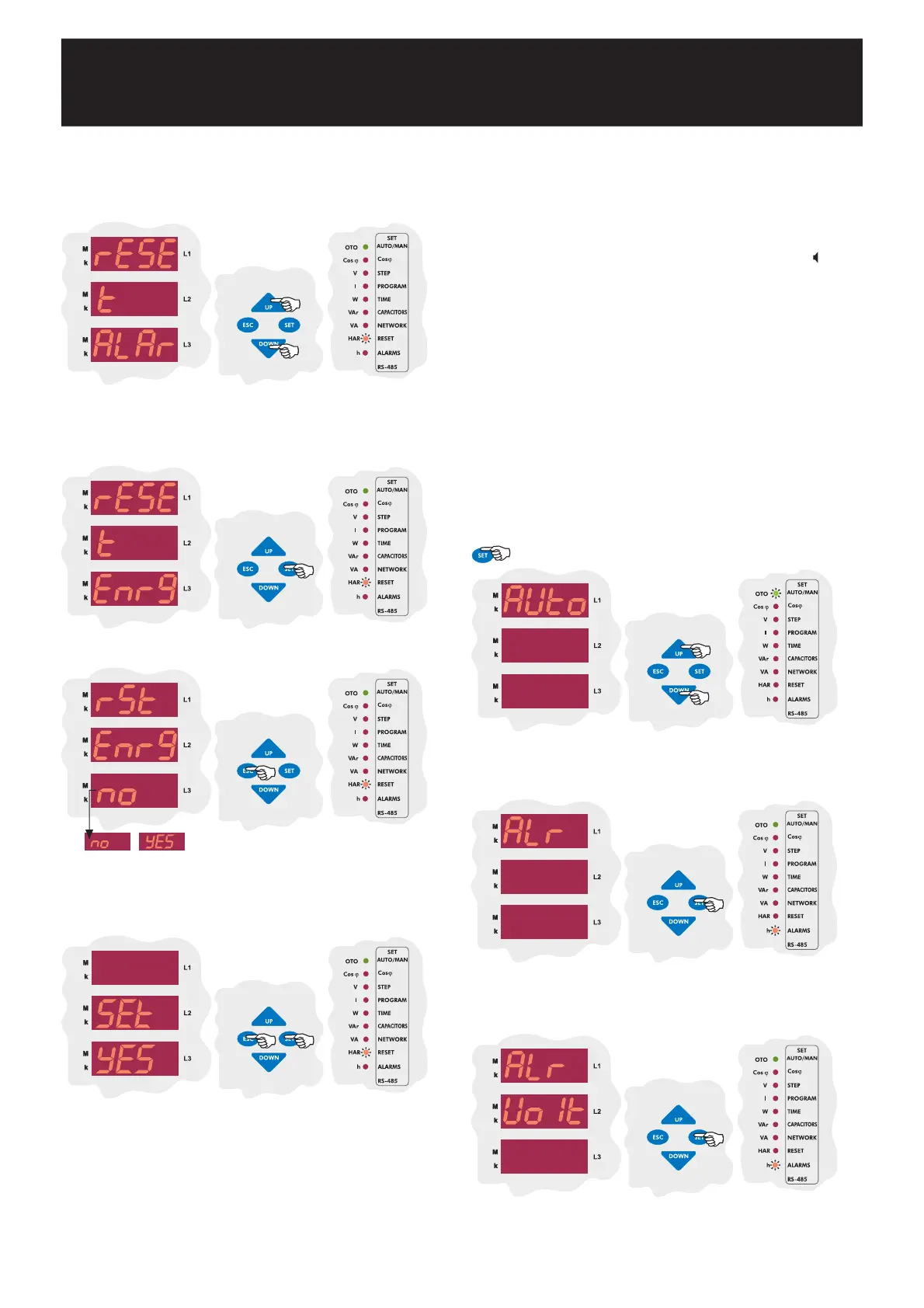
By UP/DOWN buttons, find Alarm (ALr) menu. When Alarm menu is
selected, alarm led lights.
Press SET button for voltage settings.
Over voltage value (SP-H), delay time (dELy) and over voltage step (StEP)
parameters can be set in this menu. In order to set these parameters,
press SET button.
In this menu, energy counters are reset.
3.8.c Energy Counter Reset Setting
By UP/DOWN buttons, find energy counter reset menu.
Press SET button for energy counter settings.
By UP/DOWN buttons, select yES to delete reactive/active ratio or
no to cancel the delete process and then press SET button.
SAUE
If you do not want to set another parameter, in order to quit from the
menu, press ESC button one by one until SAVE SEt yES is displayed.
Press SET button to save your changes or press ESC button to quit
without saving.
Press SET button for 3 sec. in order to enter to the menu.
3 sec.


 To Next Page