INTELLIGENT REACTIVE POWER MANAGEMENT
RM-12P
11
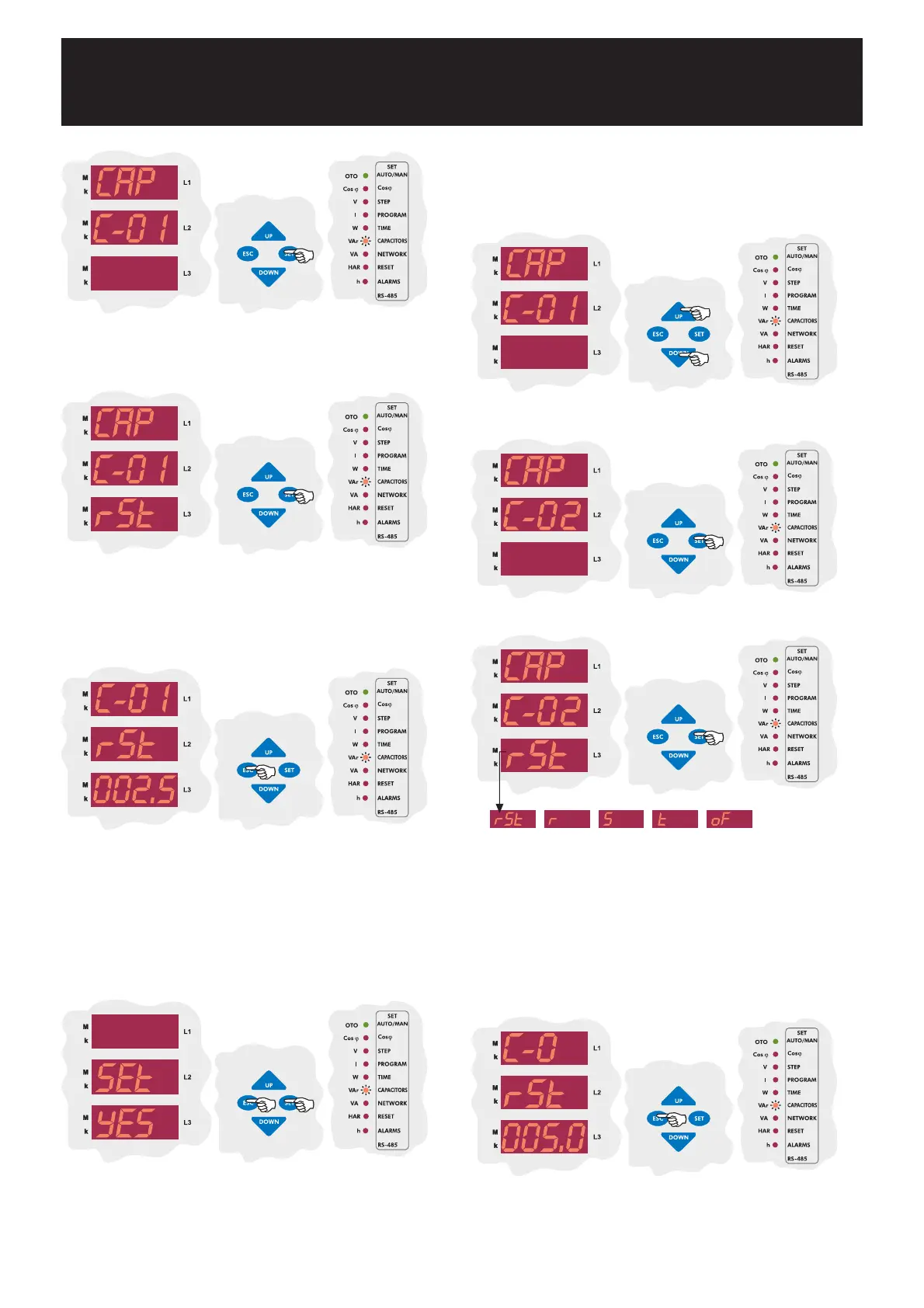
Press SET button for capacitor settings.
First capacitor step is used to find connection For this reason,
3-phase capacitor connection to first step is a must and also there is not
any connection setting for first step. Connection type is selected as RST
and it can not be changed. Press SET button to set power value of the
first capacitor step.
Enter power value of the first capacitor step and then press SET button.
If you do not want to set any parameter, press ESC button.
Note : If PS-10 program is selected, capacitor powers can be set
separately for each capacitor step. However, if any program
(except PS-10) is selected, only first capacitor steps power value
(C-01) can be set manually. Capacitor powers of other steps are
calculated according to the selected program.
SAUE
If you do not want to set another parameter, in order to quit from the
menu, press ESC button one by one until SAVE SEt yES is displayed.
Press SET button to save your changes or press ESC button to quit
without saving.
When PS-10 (Program 10) is selected, connection type and capacitor power
value settings of all capacitor steps can be selected. When a program
(expect PS-10) is selected, only first capacitor steps setting can be done
and other steps can not be set but calculated automatically by the device.
By UP/DOWN buttons, second capacitor steps connection type can be
set as r, S, t or rSt. If this parameter is selected as oF, capacitors
which are connected to the second step are disabled.
Note : After automatic calculation of the capacitors, if oF is displayed
in any step, it means that related capacitor could not be calculated,
defected or there is no connected capacitors in the related step.
3.6.b Second Capacitor Step Setting
By UP/DOWN buttons, find C-02 menu.
Press SET button to select connection type.
2
Enter power value of the second capacitor step and then press SET
button. If you do not want to set another parameter, press ESC button.
Press SET button to set second capacitor step value.


 To Next Page