NESS D8 V4.7 CONTROL PANEL - USER MANUAL
18
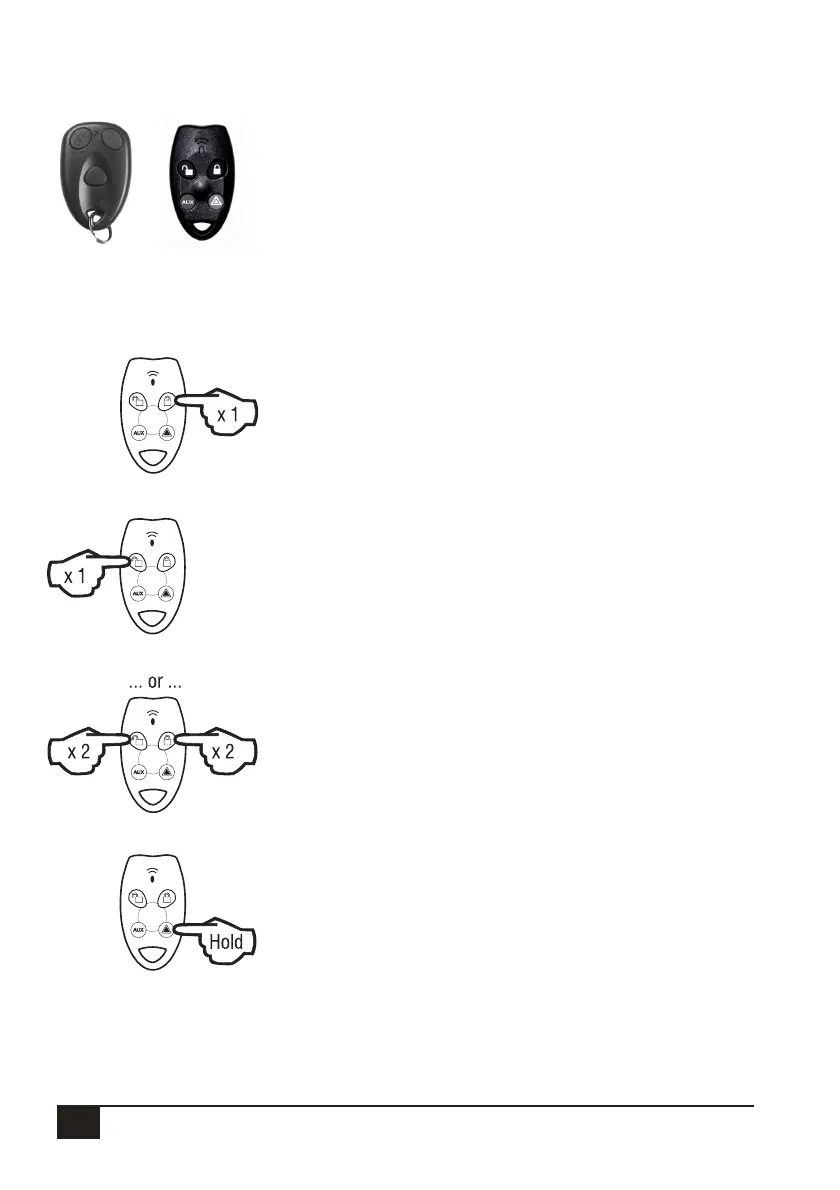
RADIO KEY OPERATION
NESS RADIO KEYS
The optional Ness Radio Keys allows you to Arm, Disarm and activate
PANIC. Radio Keys can also Arm Monitor Mode*. The RK4 Radio
Key can also be programmed to activate an auxiliary output on the
control panel.*
* If these extra options have been enabled by your installer)
ARMING
Press the ON button.
• The keypad will give 3 beeps.
• The outside siren will give 1 ‘chirp’. (If enabled by your installer).
• The strobe light will fl ash briefl y. (If Monitor Arming by Radio Key is enabled,
the chirp and fl ash will be delayed for 5 seconds).
DISARMING
Press the OFF button.
• The keypad will give 3 beeps.
• The outside siren will give 3 ‘chirps’. (If enabled by your installer).
• The strobe light will fl ash briefl y.
ARMING MONITOR MODE (If enabled by your installer).
Press the OFF button twice within 4 seconds
...or... press the ON button twice within 5 seconds.
• The keypad will give 9 beeps.
• The outside siren will NOT ‘chirp’.
• The strobe light will fl ash briefl y.
PANIC
Press and hold the PANIC button for at least 4 seconds.
• The siren and strobe will activate, (If enabled by your installer).
• The dialler will report a Panic alarm, (If enabled by your installer and if your
system is monitored by a central station).
Press the OFF button to reset a Panic alarm.
Note: Ness Radio Keys are optional and are not supplied with any Ness control panel as standard.
Ness radio products require a Ness Radio Interface (100-200) to be fi tted to the control panel.
100–664
Ness RK3
Radio Key
100–067
Ness RK4
Radio Key



 To Next Page