Security Gateway Manual Netgate-4200
Locate the Console Port Device
The appropriate console port device that the workstation assigned as the serial port must be located before attempting
to connect to the console.
Note: Even if the serial port was assigned in the BIOS, the workstation OS may remap it to a different COM Port.
Windows
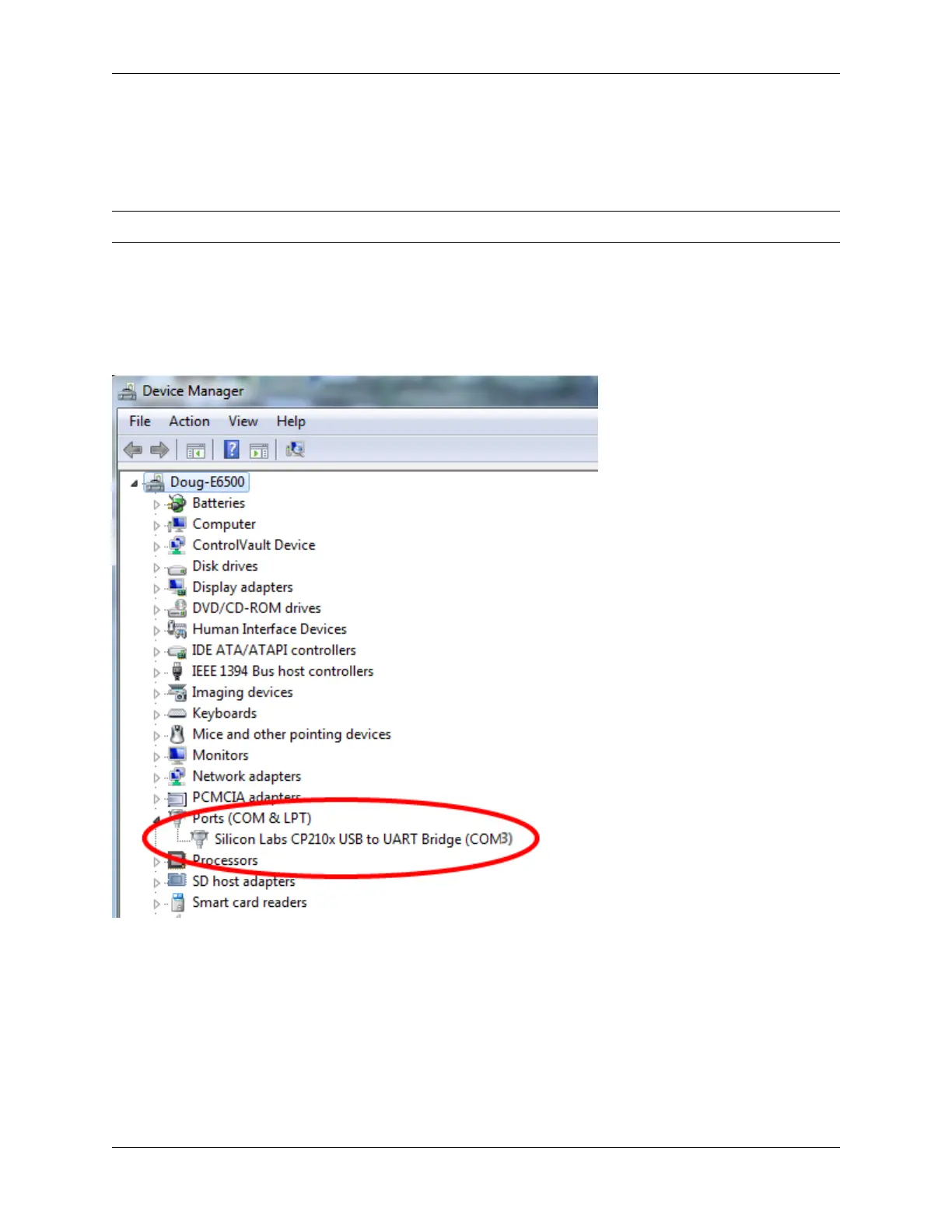
To locate the device name on Windows, open Device Manager and expand the section for Ports (COM & LPT).
Look for an entry with a title such as Silicon Labs CP210x USB to UART Bridge. If there is a label in the name that
contains “COMX” where X is a decimal digit (e.g. COM3), that value is what would be used as the port in the terminal
program.
macOS
The device associated with the system console is likely to show up as, or start with, /dev/cu.usbserial-<id>.
Run ls -l /dev/cu.* from a Terminal prompt to see a list of available USB serial devices and locate the appropriate
one for the hardware. If there are multiple devices, the correct device is likely the one with the most recent timestamp
or highest ID.
Linux
The device associated with the system console is likely to show up as /dev/ttyUSB0. Look for messages about the
device attaching in the system log files or by running dmesg.
© Copyright 2024 Rubicon Communications LLC 31



 To Next Page