Security Gateway Manual Netgate-4200
DNS Servers
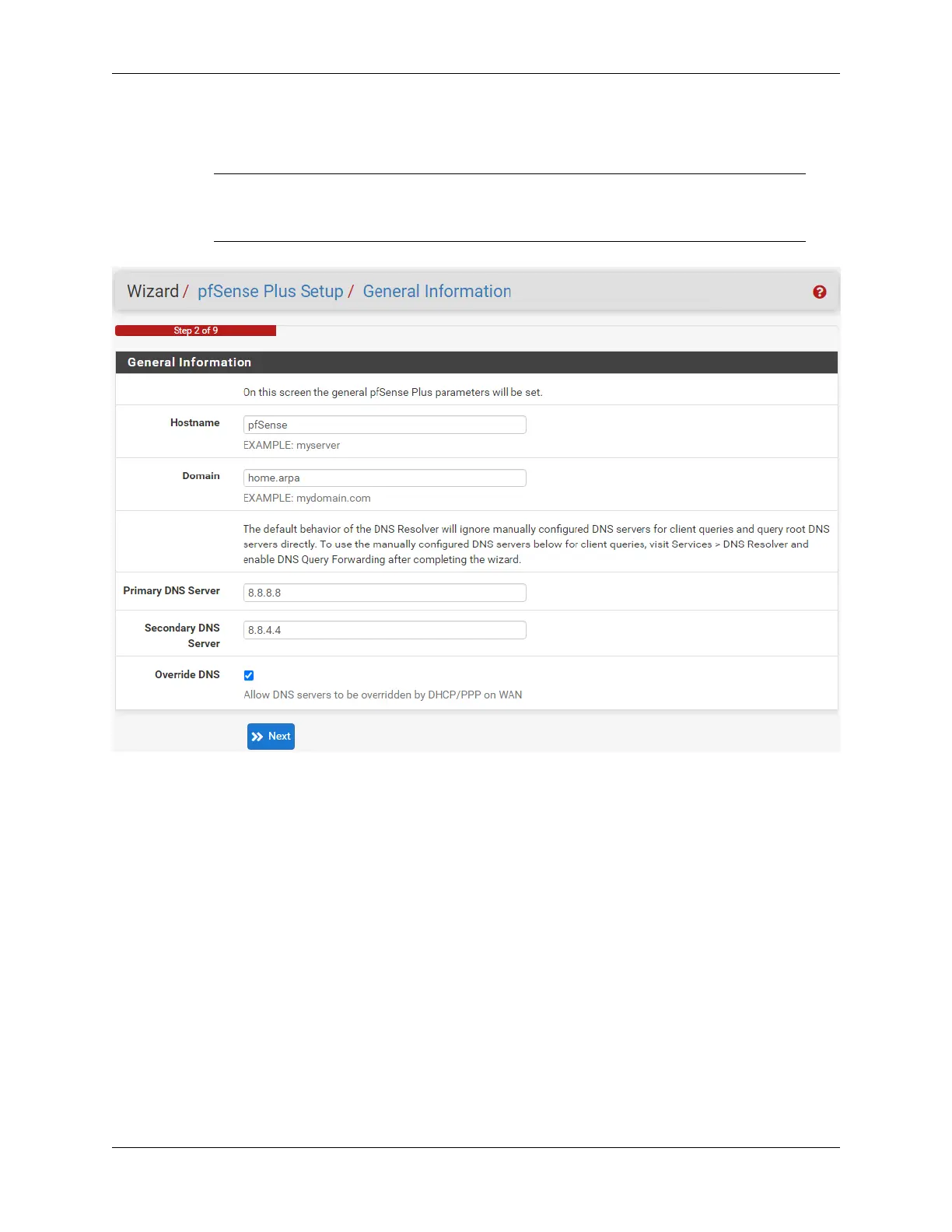
For purposes of this setup guide, use the Google public DNS servers (8.8.8.8 and 8.8.4.4).
Note: The firewall defaults to acting as a resolver and clients will not utilize these forwarding
DNS servers. However, these servers give the firewall itself a way to ensure it has working DNS
if resolving the default way does not work properly.
Fig. 4: General Information page in the Setup Wizard
Type in the DNS Server information and Click Next.
4. Use the following information for the Time Server Information page:
Time Server Hostname
Use the default time server address. The default hostname is suitable for both IPv4 and IPv6 NTP
clients.
Timezone
Select a geographically named time zone for the location of the firewall.
For this guide, the Timezone will be set to America/Chicago for US Central time.
Change the Timezone and click Next.
5. Use the following information for the Configure WAN Interface page:
The WAN interface is the external (public) IP address the firewall will use to communicate with the Internet.
DHCP is the default and is the most common type of WAN interface for home fiber and cable modems.
© Copyright 2024 Rubicon Communications LLC 6



 To Next Page