Security Gateway Manual XG-7100
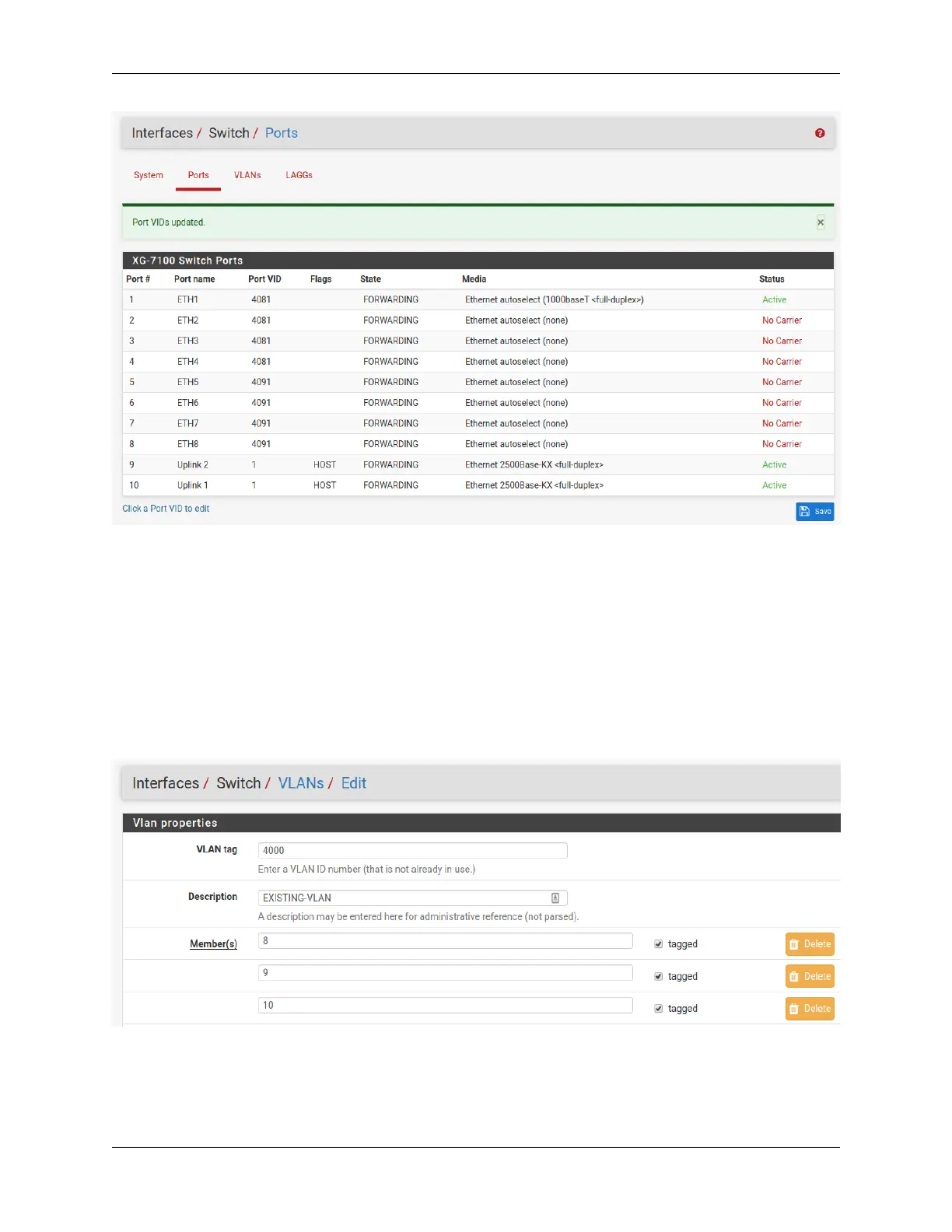
Now ETH1-4 act as a switch for the VLAN 4081 LAN and ETH5-8 act as a switch for the VLAN 4091 LAN.
2.4.3 Trunking VLAN tagged traffic
Expanding on the previous example, assume there is a management VLAN of 4000 where devices are already tagged
on this VLAN prior to reaching the device. Hosts on this VLAN may come through on ETH8 but there may also be
untagged client traffic.
First, create the management VLAN of 4000 in pfSense
®
Plus software using the same steps in the previous example
(up to the switch configuration part). Next, add the VLAN to the switch under Interfaces > Switches, VLANs tab.
ETH8 and PORT9-10 should be added as members and all three will be marked as tagged:
Once it’s added, the final result should look like this:
© Copyright 2024 Rubicon Communications LLC 38



 To Next Page