Security Gateway Manual XG-7100
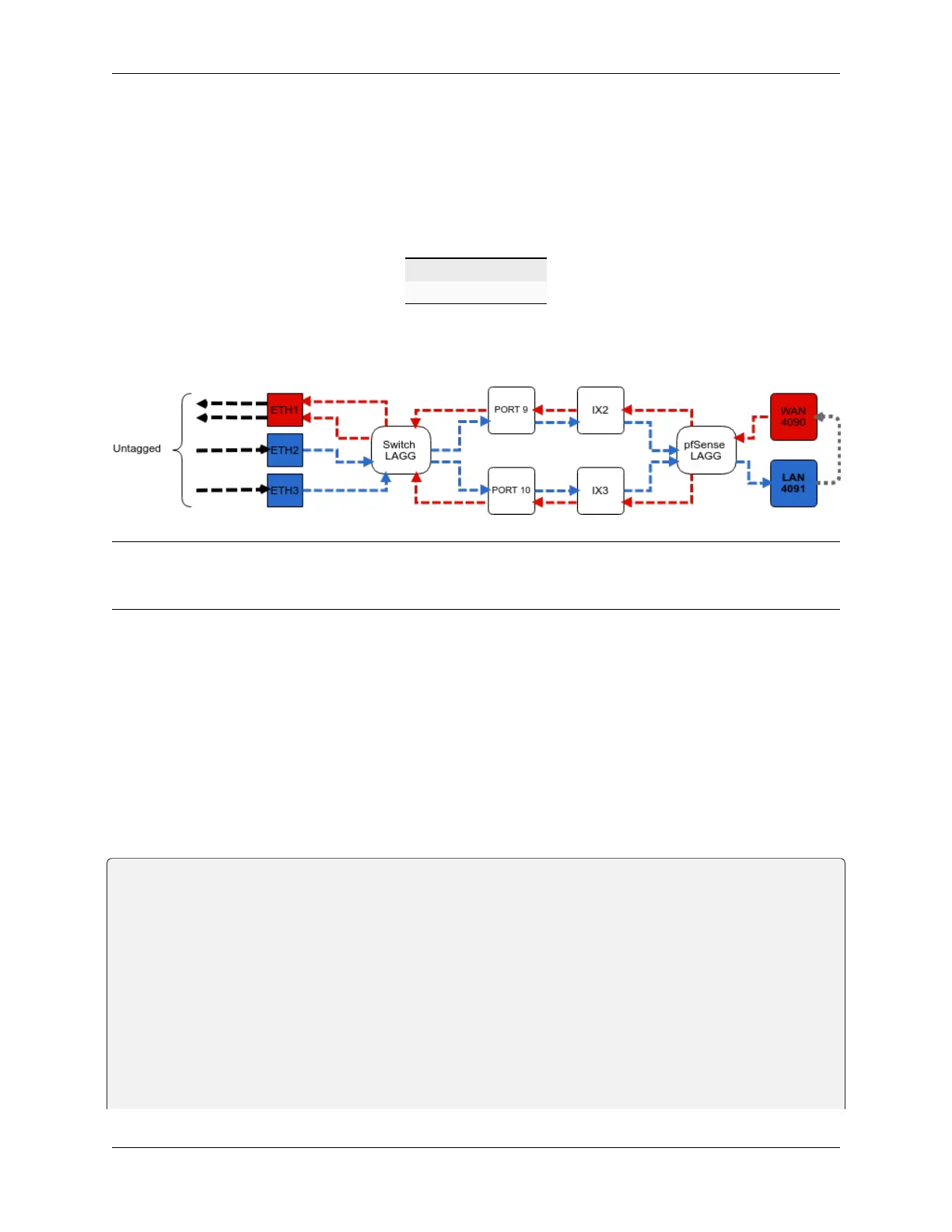
• When data comes into interfaces ETH2-8, a VLAN tag of 4091 is added to the Ethernet frame.
PORT9-10 are configured to act as Trunk ports.
• By default, only Ethernet frames containing a VLAN tag of 4090 or 4091 are allowed over the trunk.
Each VLAN configured on the switch uses the LAGG interface as its parent interface. For example, the default interface
assignment for WAN and LAN:
WAN lagg0.4090
LAN lagg0.4091
This means lagg0.4090 and lagg0.4091, as well as any other VLANs created for the switch, all share the same 5
Gbps LAGG uplink across two 2.5 Gbps links. The visual below demonstrates how the VLAN tagging works along
with the traffic flow:
Note: Traffic leaving and entering the ETH1-3 interfaces in the visual above are untagged. Devices sending/receiving
traffic over these ports do not need to be VLAN aware. The VLAN tagging that occurs within the switch is completely
transparent to clients. It’s used solely for segmenting switch traffic internally.
3.1.4 Port Mode
Aside from being able to specify whether a switch port should act as an access or trunk port, it’s also possible to disable
802.1q VLAN mode. When this is done, a third mode called Port VLAN Mode is enabled. In this mode, any and all
VLAN tags are allowed on all ports. No VLAN tags are added or removed. Think of it as a dummy switch that retains
VLAN tags on frames, if present. This mode is useful when there are numerous VLANs on a network and the goal is
to physically segment the switch, while allowing the same VLANs on all segments of the switch.
In Port VLAN Mode, rather than specifying which interfaces are associated to a VLAN, the configuration can specify
which physical ports form a switch. For example, to create two physical switches that act as individual dummy switches
- - allowing tagged or untagged traffic, configure Port VLAN Mode like so:
// UPLINKS
VLAN group 9, Port 9, Members 1,2,3,4,10
VLAN group 10, Port 10, Members 1,2,3,4,9
// SWITCH-A
VLAN group 1, Port 1, Members 2,3,4,9,10
VLAN group 2, Port 2, Members 1,3,4,9,10
VLAN group 3, Port 3, Members 1,2,4,9,10
VLAN group 4, Port 4, Members 1,2,3,9,10
// SWITCH-B
VLAN group 5, Port 5, Members 6,7,8
VLAN group 6, Port 6, Members 5,7,8
(continues on next page)
© Copyright 2024 Rubicon Communications LLC 78



 To Next Page