Security Gateway Manual XG-7100
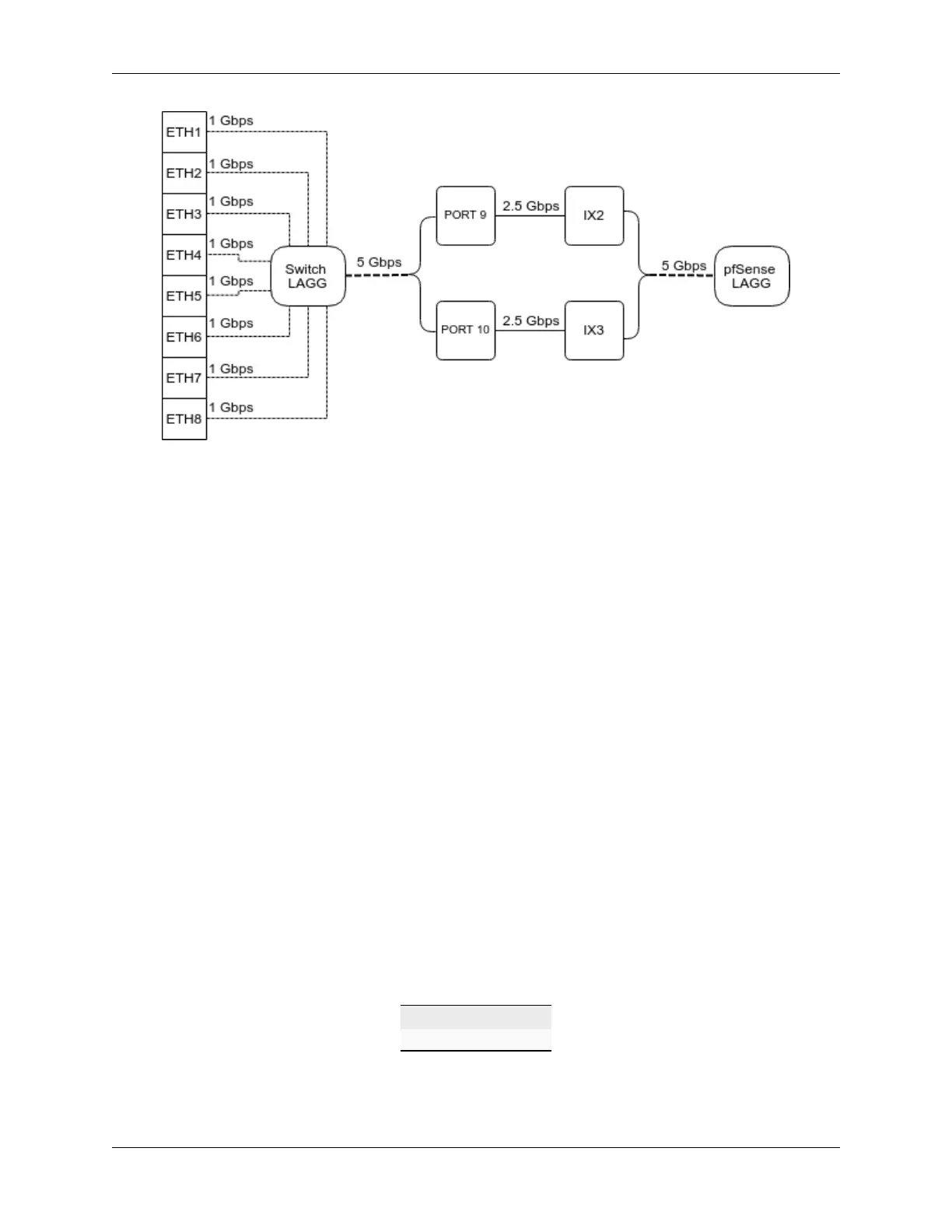
When data is received on ETH1-8, the switch is capable of utilizing LAGG to determine whether that data should be
sent out of PORT 9 or PORT 10. That data then passes over one of two 2.5 Gbps switch links (PORT 9/10) to the SoC.
Data coming from PORT 9 has a direct line to ix2 and data from PORT 10 has a direct line to ix3.
pfSense
®
Plus LAGG will then take in traffic from both ix2 and ix3 as though it came in on a single interface, lagg0.
The same concept applies to traffic sourcing from the pfSense
®
Plus LAGG to the switch LAGG.
3.1.3 802.1q VLAN Mode
By default, ETH1 on the switch is configured as a WAN interface and ETH2-8 are configured as the LAN interface.
These eight switch ports are customizable and each can be configured to act as an independent interface. For example,
all of these configurations are possible:
• ETH1-8 dedicated as a LAN switch
• ETH1-4 configured as a switch for LAN network A and ETH5-8 configured as a switch for LAN network B
• ETH1-8 configured as individual network interfaces
• ETH1 configured for WAN A, ETH2 configured for WAN B, ETH3 configured for LAN network A, ETH4-6
configured as a switch for LAN network B, and ETH8 configured as a H/A sync port.
These scenarios are possible by utilizing VLANs. Each of the switch ports (ETH1-8 and PORT9-10) are VLAN aware
interfaces. They are capable of functioning like a standard access or trunk port:
Access Port:
Adds a VLAN tag to inbound untagged traffic
Trunk Port:
Allows tagged traffic containing specified VLAN IDs
In the default configuration, two VLANs are used to create the ETH1 WAN interface and ETH2-8 LAN interface:
WAN VLAN 4090
LAN VLAN 4091
ETH1-8 are configured to act as Access ports.
• When data comes into the ETH1 interface, a VLAN tag of 4090 is added to the Ethernet frame.
© Copyright 2024 Rubicon Communications LLC 77



 To Next Page