12 • Getting Started NEW FOCUS, Inc.
2. Set the operating mode:
An LED on the front panel will indicate
the system’s operating mode: constant-current or constant-power.
To change modes, press the
Mode
button.
You will need to use an external photodetector to operate the
Vortex in constant-power mode. See “Selecting an Operating
Mode” on page 17 for details on the different modes, or the
“Constant-Power Mode” chapter beginning on page 25 for details
on setting up and using the laser in constant-power mode.
3. Set the operating current or power:
Press the
Display
button
until the current, “0.0 mA” (for constant-current mode), or the
power, “0.0%” (for constant-power mode), is displayed. If the
Set
button is not already lit, press it to enable the adjustment knob.
Turn the knob to set the current or power.
To prevent damage to the laser diode, the factory has limited the maximum
current to the operating current listed on the Acceptance Test Data Sheet.
4. Activate the laser:
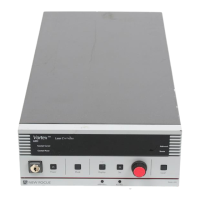
Push the
Power
button to activate the laser
power. The button will flash for 5 seconds before current flows
through the diode.
Laser light should now be emitting from the aperture.
Laser radiation emitted from this unit may be harmful. Avoid direct exposure
to the beam.
5. Turn the laser off:
To minimize the risk of power surges
damaging the laser diode, push the
Power
button to turn off the
laser when it is not in use (the LED on the button will turn off) and
before shutting down the system. Turn the keyswitch off (position
“
0
”) to shut down the entire system.
Vortex6000.book Page 12 Tuesday, February 19, 2002 3:25 PM
Artisan Technology Group - Quality Instrumentation ... Guaranteed | (888) 88-SOURCE | www.artisantg.com


 To Next Page