6000 Vortex Series General Operation • 15
Using the Front-Panel Controls
The Vortex has two control options, local and remote. In local mode,
the front panel provides control of the laser system. In remote mode,
you control the laser over the computer interface (IEEE-488 or RS-232).
Whenever the Vortex receives a command over the computer interface,
it automatically deactivates most of the front-panel controls (the
Local
button, which restores local control, and the
Power
button and power
keyswitch all remain active). For information on using computer
control, see page 29.
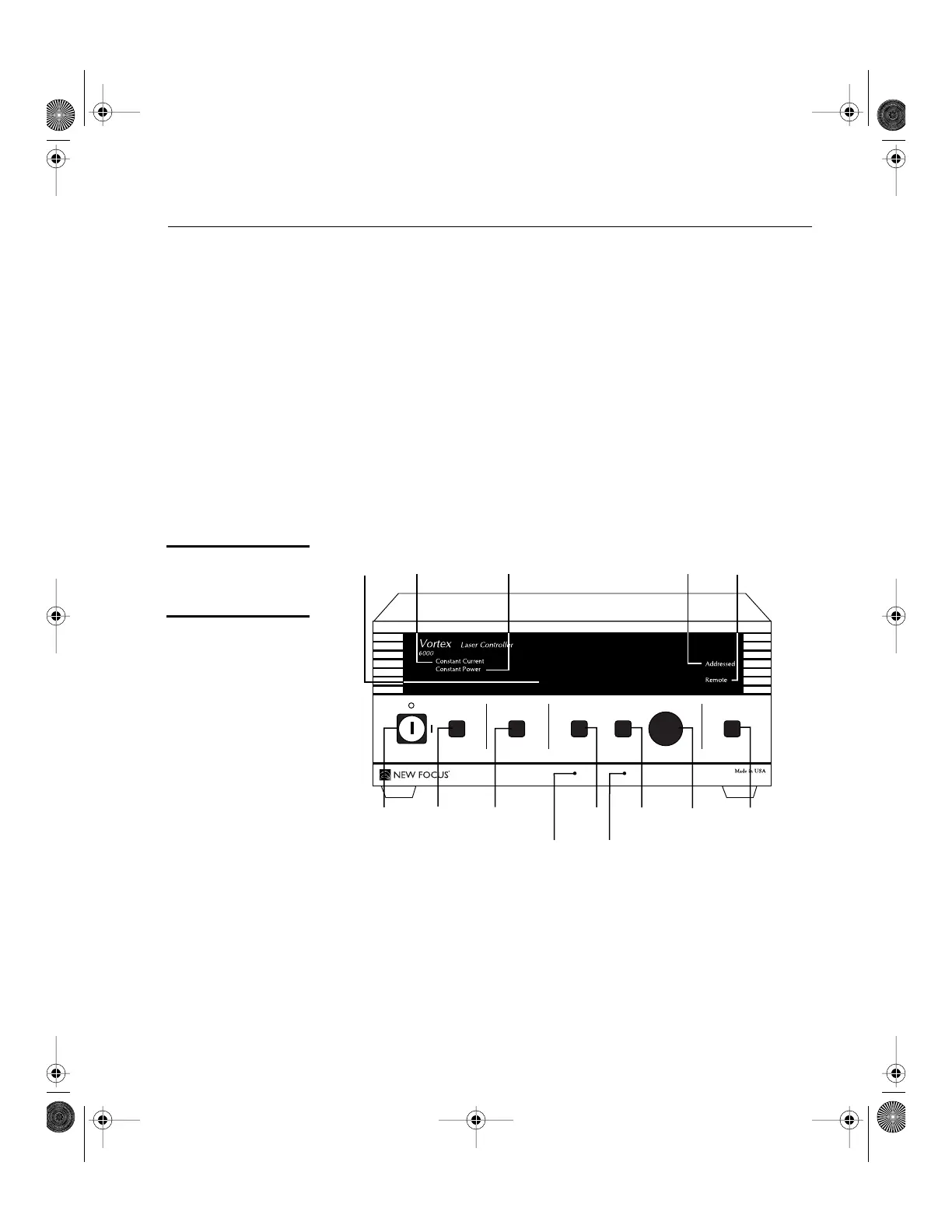
The controls on the front panel (Figure 5) allow you to switch system
operating modes and to read and set the laser current, laser power,
piezo voltage (which controls the laser wavelength), and computer-
interface parameters.
Figure 5:
Controller front
panel
1. Display:
The display shows the various laser parameters, as well as
errors and system-identification information.
2.
Constant Current
Indicator:
This indicator is lit when the laser is
set for constant-current mode.
3.
Constant Power
Indicator:
This indicator is lit when the laser is set
for constant-power mode.
45.0 mA
1 2435
12
1110
1413
98876
GPIB Address
Baud Rate
Display SetPower
Mode
Local
TM
Vortex6000.book Page 15 Tuesday, February 19, 2002 3:25 PM
Artisan Technology Group - Quality Instrumentation ... Guaranteed | (888) 88-SOURCE | www.artisantg.com


 To Next Page