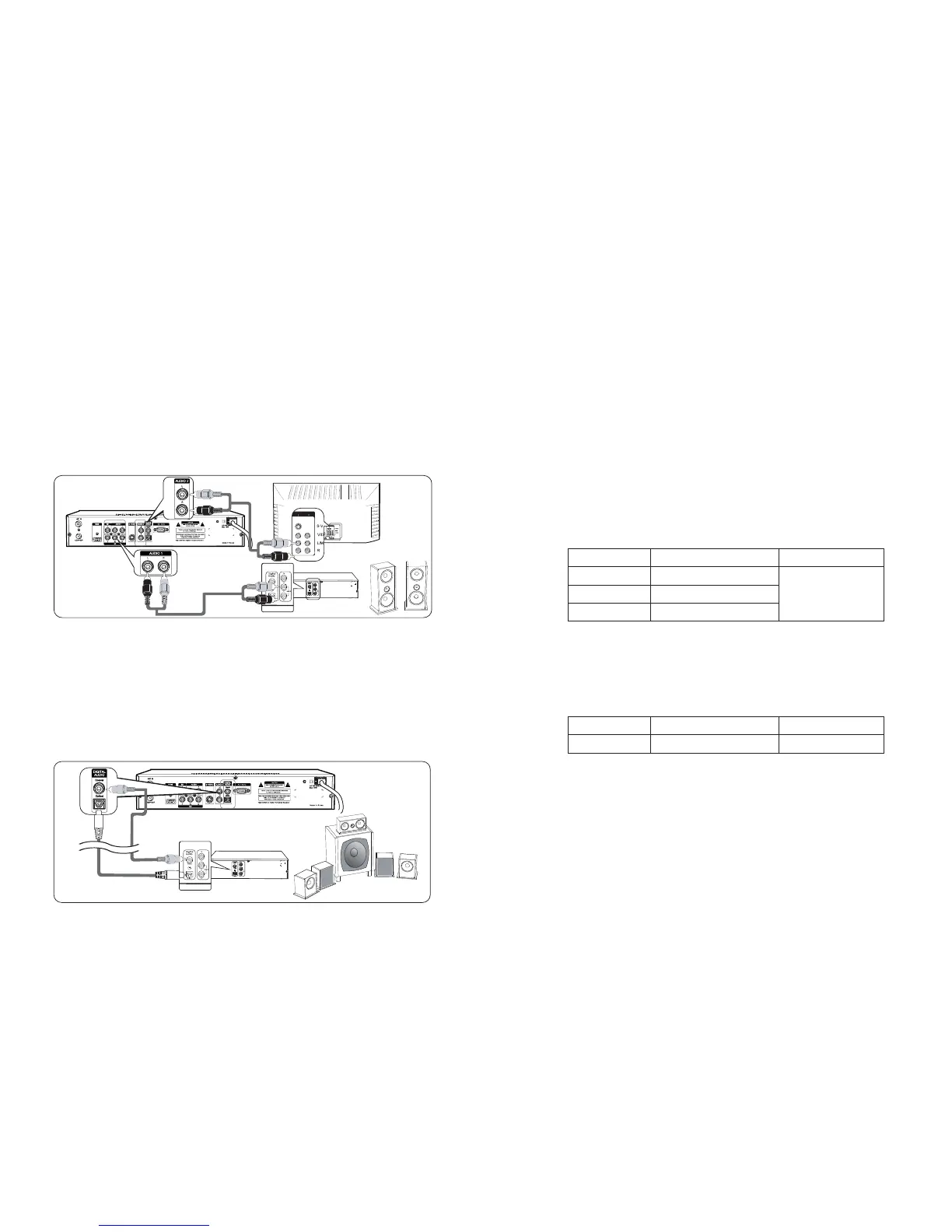
3. Audio Connection
This HD-STB can support four different options for connecting audio signals. Each of
the audio connections delivers the same audio sound. You can select desired audio
connection by following the Audio connection Diagrams below.
Pleasemakesure,if youareusingHDMIconnection,youdonotneedthisAudio
Connection. The HDMI connection is already included Digital Audio internally.
Audio L/R deliver analog stereo sound or Dolby Digital 2-channel downmix
analog stereo sounds. Connect Audio Cable to Audio L/R terminal on the rear of the
HD-STB.
Connect the other end of the Audio Cable to the conventional TV Audio Input or
Stereo Amplifier Audio Input. (Refer to Fig. 8)
Optical Digital Audio and Coaxial Digital Audio deliver Dolby Digital 5.1-channel
digital sound or PCM digital sound.
If youhaveaHomeTheatersystemanditcanreceiveDigitalAudio,thenyoucan
connect Digital Audio.
For the Optical Digital Audio connection, connect the Optical Digital Audio Cable
(Available in Local Store) to the Optical Audio terminal on the rear of the HD-STB.
Connect the other end of the Optical Digital Audio Cable to the Optical Audio Input
terminal on the Home Theater System.
Stereo Audio Connection
Digital Audio Connection
For the Coaxial Digital Audio connection, connect the RCA Cable to the Coaxial
Audio terminal on the rear of the HD-STB. Connect the other end of the RCA Cable
to the Coaxial Audio Input terminal on the Home Theater System. (Refer to Fig. 9)
5
Connecting your HD-STB
INPUT
AMP
INPUT
AMP
Fig.8 Stereo Audio Connection
INPUT
INPUT
Fig. 9 Digital Audio Connection
Home
Theater
System
4. Display Mode Change
This HD-STB supports simultaneous video output of HD and SD.
For HD output, it required display mode setting.
This HD-STB supports Native 1080i/50Hz, Native 720p/50Hz and Native 576p/50Hz.
The factory default is Native 1080i/50Hz.
For change the output display mode, please check up your TV support display mode. To
determine which resolution your HD input television supports, please consult the
Television s user manual.
Forchangedisplaymode,pleasefollowbelowprocedure.
.
Most Plasma and LCD display and some CRT televison with HD input(s) fall into this
category. To determine which resolution(s) your display support, consult the user
manual for your display device.
Most existing 4:3 televisions fall into this Category.
For optimum SD picture quality, we recommend S-Video connection. If your TV sets
dose not supports S-Video then you should use the composite (CVBS) Video input.
(Yellow cinch socket)
STB
STB
1) Press front panel "DISPLAY MODE" button.
2) Press front panel "Up" or "DOWN" button for desired display mode.
3) Press front panel "OK" button to change selected display mode.
Connection to 576p/720p/1080i High Definition Display
Connection to Standard Definition Display
STB Video Output
576i
Video Output Scan Frequency
15.625 KHz
STB Video Connection
S-Video and CVBS


 To Next Page