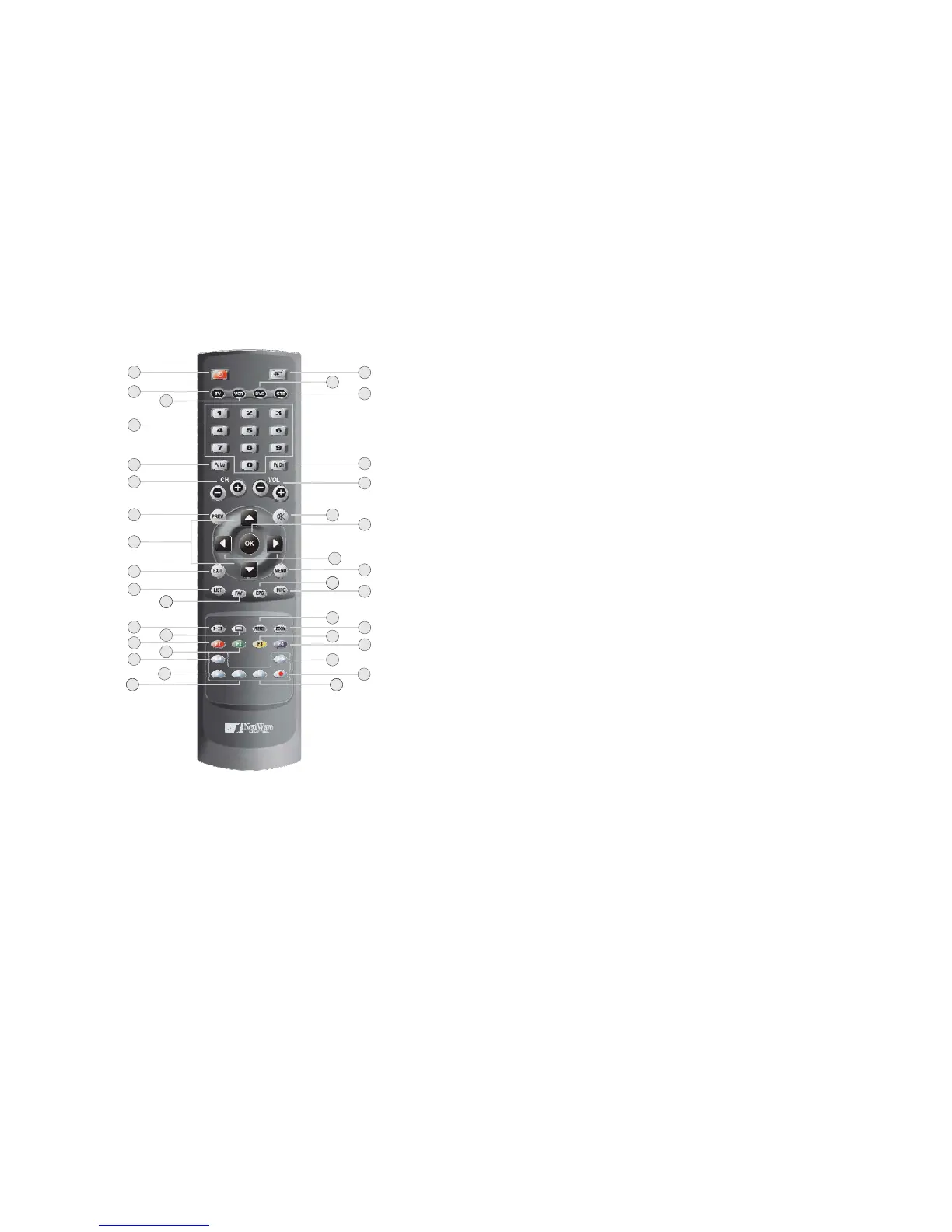
Remote Control
1. POWER
Tur n y o u r HD-STB on or off.
2. TV
3. VCR
4. 0~9 (Number Button)
Change your Remote Controller to VC R mode.
Direct change the desired channel.
To change the channel, simply press desired channel number.
The button operation should be less than 2 seconds between button pressing.
Change your Remote ControllertoTV mode.
Overview of the equipment
11
18
13
15
20
28
30
32
3
36
26
2
10
17
12
14
21
29
35
31
33
34
24
16
4
5
6
7
9
23
27
22
25
8
1
19
5. PgUp(STB Mode)
7. PREV (Previous Channel - STB mode)
8. Up/Down
9. Exit
10. LIST (STB Mode)
11. FAV(STB Mode)
12. I-II (STB mode)
13. Subtitle (STB Mode)
14. RED (F1)
15. GREEN (F2)
16. REWIND
18. STOP
20. DVD
21. STB
22. PgDn (STB Mode)
In the menu system, move up item list by page.
Go to the previous watched channel.
In the menu system, move up or down the cursor.
In the menu system, exit menu from any menu level.
Set & display ALL DTV channel list as the default channel list.
Set & Display FAV D TV channel list as the default favourite channel list.
Switch between MPEG and Dolby Digital audio.
Enable/disable program subtitles.
RED button. Also worked with function 1 button.
GREEN button. Also worked with function 2 button.
In the VCR or DV D mode,itworkedwithREWIND button.
In the VCR or DV D mode,itworkedwithSTOP button.
Change your Remote Controller to DVD mode.
Change your Remote Controller to STB mode.
In the menu system, move down item list by page.
6. CH+/CH-
17. PLAY
19. AV(TV's External Video Input Selection)
23. VOL+/VOL-
Change the TV/HDTV's analog channel / Change the STB's digital channel.
In the VCR or DV D mode,itworkedwithPLAY button.
Select the TVExternal Video Input.
Change the TV/HDTV'svolumelevelupordown.


 To Next Page