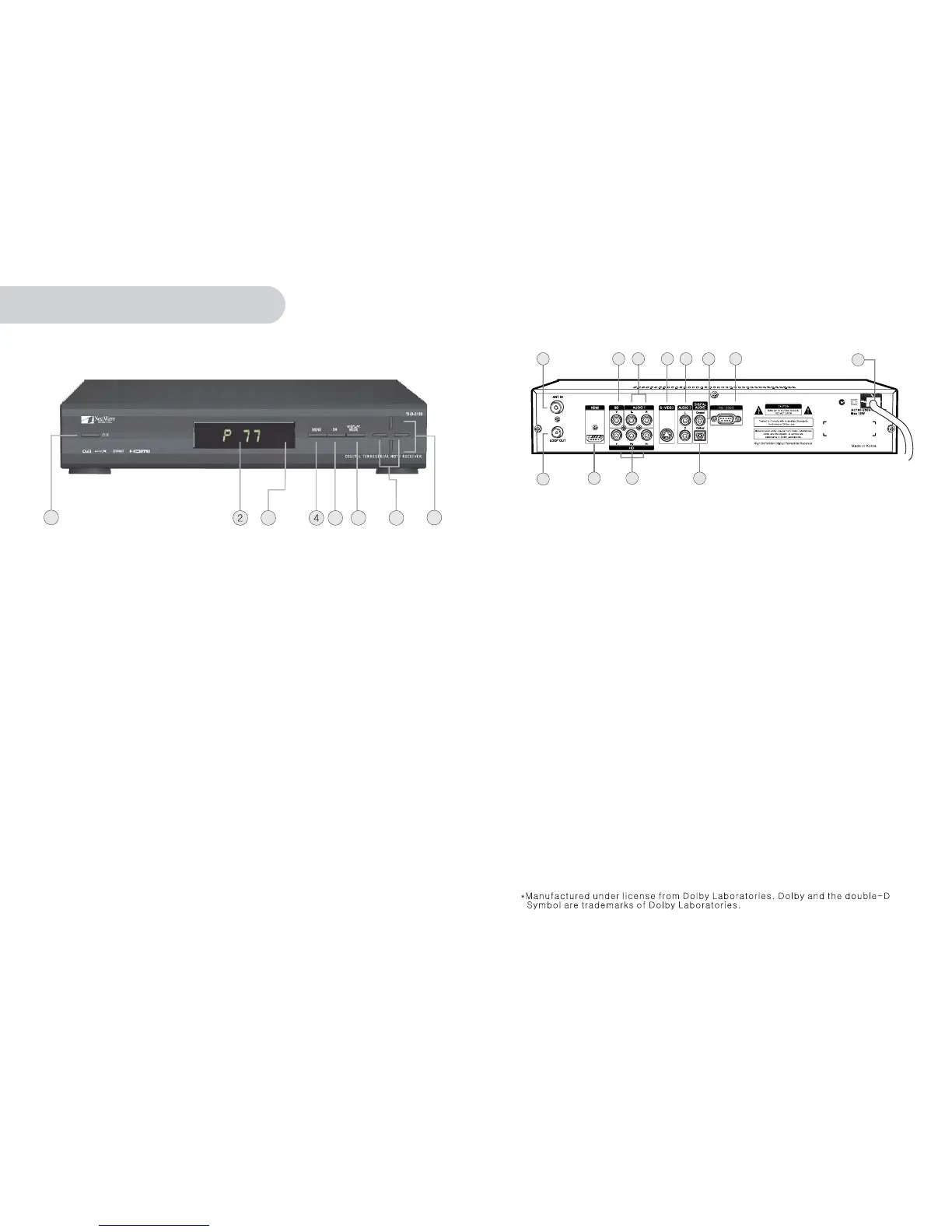
This section summarizes HD-STB buttons, controls, and terminals.
6HOHFWWKH LWHP V LQWKH P HQX V\ VWHP
3UHVV WRFKDQJHWKH RXWSXWYLGHR GLVSOD\ P RGH
/HIWRU5 LJKWPRYHPHQWLQWKH P HQX V\ VWHP
8SRU' RZQPRYHPHQWLQWKH P HQX V\ VWHP
Front Panel
1. POWER
2. Display Panel
3. Remote Sensor
4. MENU
5. OK
6. DISPLAYMODE
7. LEFT /RIGHT
8. UP/ DOWN
Press to turn the HD-STB on or off.
Display information to assist you in operating the HD-STB successfully.
This HD-STB receives infrared remote signal from your remote control.
Do not block it.
Activate the menu system.
-
-Display Channel List
Overview of the equipment
8
3
5
6
7
1
Rear Panel
9. ANT IN terminal
10. TV Composite Video Output terminal (CVBS)
11. AU DIO 1L/R(Analog Stereo Audio) Output terminal
12. S-Video Output terminal
13. AU DIO 2L/R(Analog Stereo Audio) Output terminal
14. Coaxial Digital Audio (S/P DIF) Output terminal
15. RS-232C
16. Power Cord
17. LOOP OUT terminal
18. HDMIOutput terminal
19. HD YPbPr (HD Component Video) Output terminal.
20. Optical Digital Audio (S/P DIF) Output terminal
Attach an external Antenna to this terminal.
Use this terminal with your TVVideo input.
ThisterminalcanbeusedwithyourTV analog audio input. Refer to Audio Connection
Pages.
Use this terminal with your TVS-Video input.
ThisterminalcanbeusedwithyourTV analog audio input. Refer to Audio Connection
Pages.
Use this terminal with A/V device equipped with Coaxial Digital input for Dolby*
Digital 5.1-channel sound.
Use this terminal for software upgrade purpose only.
Plug this Cord to the specified AC Power socket.
Use this terminal to feed RF signal to your TV or VCR for analog reception.
Use this terminal with your TVHDMI Video input.
Use this terminal with your TVHDComponent Video input. (HDTV only)
Use this terminal with A/V device equipped with Optical Digital input for Dolby Digital
5.1-channel sound.


 To Next Page