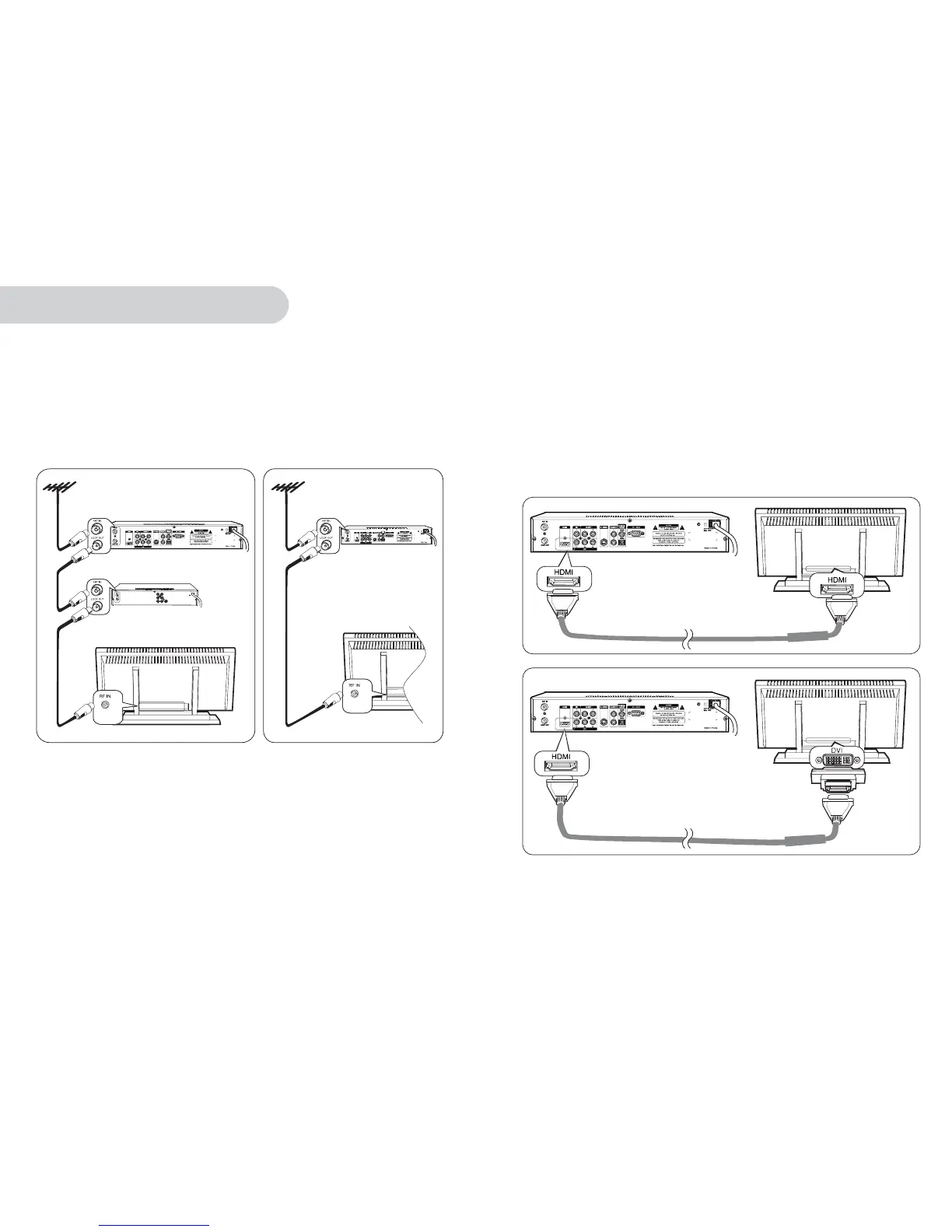
1. Antenna Connection
HD-STB, TVandVCR antenna connection
HD-STBandTV antenna connection
Connect IEC-Male antenna cable into HD-STB 'ANTIN' terminal.
Connect VCR 'ANTIN' cable into HD-STB 'LOOP OUT' terminal.
Connect VCR 'LOOP OUT' cable into TVRFIN terminal. (Refer to Fig. 1)
Connect IEC-Male antenna cable into HD-STB 'ANTIN' terminal.
Connect HD-STB 'LOOP OUT' cable into TVRFIN terminal. (Refer to Fig. 2)
To ensure optimum DTV reception, the HD-STB must be the first device connected to the antenna
system when daisy-chaining RF input/ output products such as VCRs, DVD Recorders and analog
televisions as illustrated in Fig.1 and 2.
Connecting your HD-STB
Fig.1 HD-STB Antenna Connection
with TV and VCR
Fig.2 HD-STB Antenna Connection
with TV only
HD - STB
VCR
TV
HD - STB
TV
2. Video Connection
HDMI(High Definition Multimedia Interface) connection
HDMIisthenewdigitalinter-connection standard that carries digital video & audio
signals via a single cable.
HD-STBHDMI output supports the following 50Hz HD video modes: 1080i, 720p
and 576p. SD via HDMI is not supported.
Connect HDMI cable between HD-STB and TVHDMI terminals as shown.
(Refer to Fig. 3)
The HD-STBHDMI connection is also DVI compatible when using a HDMItoDVI
cable (not supplied) or HDMItoDVIgenderchanger.(notsupplied)(Refer to Fig.4)
When using a HDMItoDV I connection, a separate audio connection is also required
between the HD-STB and display device.
2
Connecting your HD-STB
Fig.3 HDMI to HDMI Input TV
Fig.4 to nput TVHDMI DVI I
Gender changer
HDMI CABLE
HDMI CABLE


 To Next Page