44
OpenSPR 1-Channel Operation Manual V4.1.01
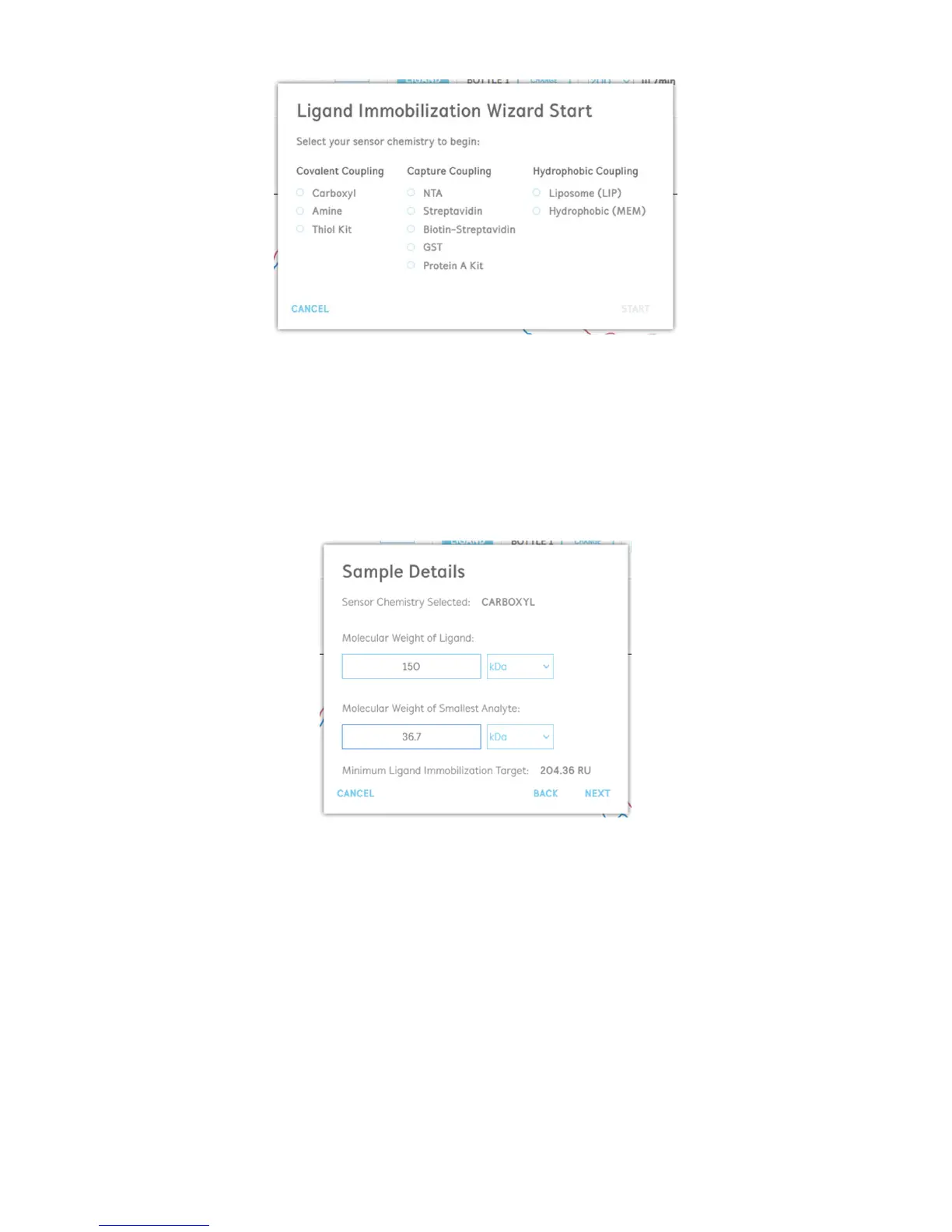
Figure 2.55 Ligand wizard starting step: select a sensor chemistry to begin.
After selecting your desired sensor chemistry, the user will be asked to enter in the molecular
weights of their samples to be used for kinetic analysis [Figure 2.56]. The ligand is the biomolecule
being immobilized onto the sensor surface, while the analyte is the second binding partner which
will be free-flowing in solution. Based on the relative molecular weights, the software will
calculate the theoretical minimum ligand immobilization target to obtain sufficient analyte signal
for analysis.
Figure 2.56 Enter in the molecular weights of your biomolecules into the ligand wizard.
After this step, the specific protocols for each sensor chemistry will begin. Each step will indicate
the recommended solution to be loaded into the instrument, and the injections will be
performed right from the dialogue box [Figure 2.57]. It is recommended to keep the dialogue
boxes open throughout the injection processes otherwise the position in the wizard will be lost.
Once an injection is complete, the user can click “Next” to move onto the following step. Prior to
performing the subsequent injection, it is recommended that the user waits until the baseline
stabilizes from the previous injection.



 To Next Page