190
w
m Recent Settings/OMy Menu
The camera offers a choice of two custom menus: a recent settings menu consisting of
the twenty most recently used settings, added to the top of the menu in the order
they are used, and My Menu, a customized list of options from the playback, shooting,
Custom Settings, setup, and retouch menus.
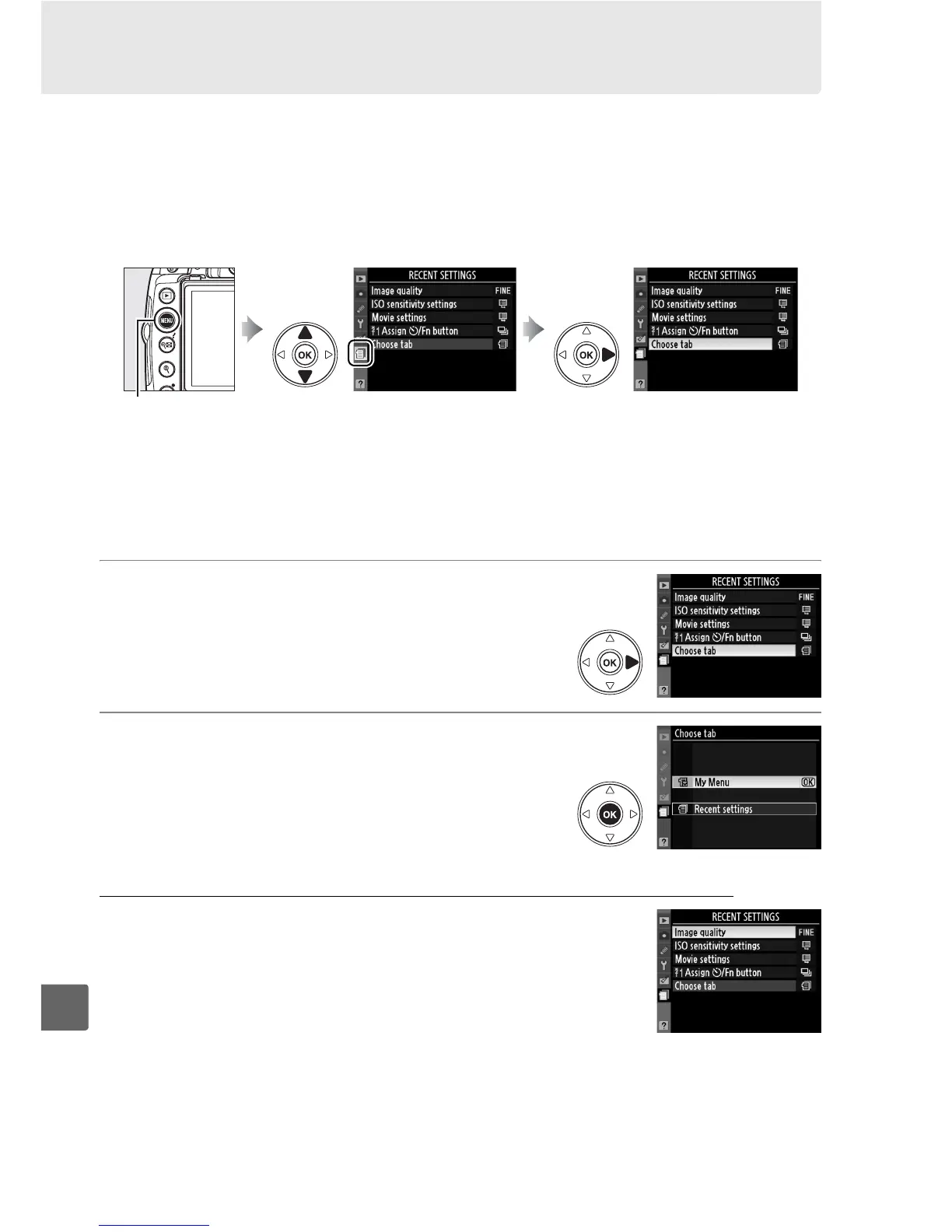
To display the custom menu, press G
and select the custom menu tab (m or O, depending on whether Recent settings or
My Menu is currently selected for Choose tab).
❚❚ Choose Tab: Choosing a Custom Menu
Both the recent settings menu and My Menu contain a Choose tab option for
choosing the menu displayed.
To switch back and forth between the recent settings
menu and My Menu, follow the steps below.
1 Select Choose tab.
In the m RECENT SETTINGS menu or O MY
MENU, highlight Choose tab and press 2.
2 Select the desired menu.
Highlight Recent settings or My Menu and
press J.
The selected menu will be displayed.
m Recent Settings: Viewing Recent Settings
The recent settings menu lists the twenty most
recently used settings.
Press 1 or 3 to highlight an
option and press 2 to select.
G button



 To Next Page