65
z
Release Mode
Release mode determines how the camera takes photographs: one at a time, in a
continuous sequence, with a timed shutter-release delay or remote control, or with
reduced camera noise.
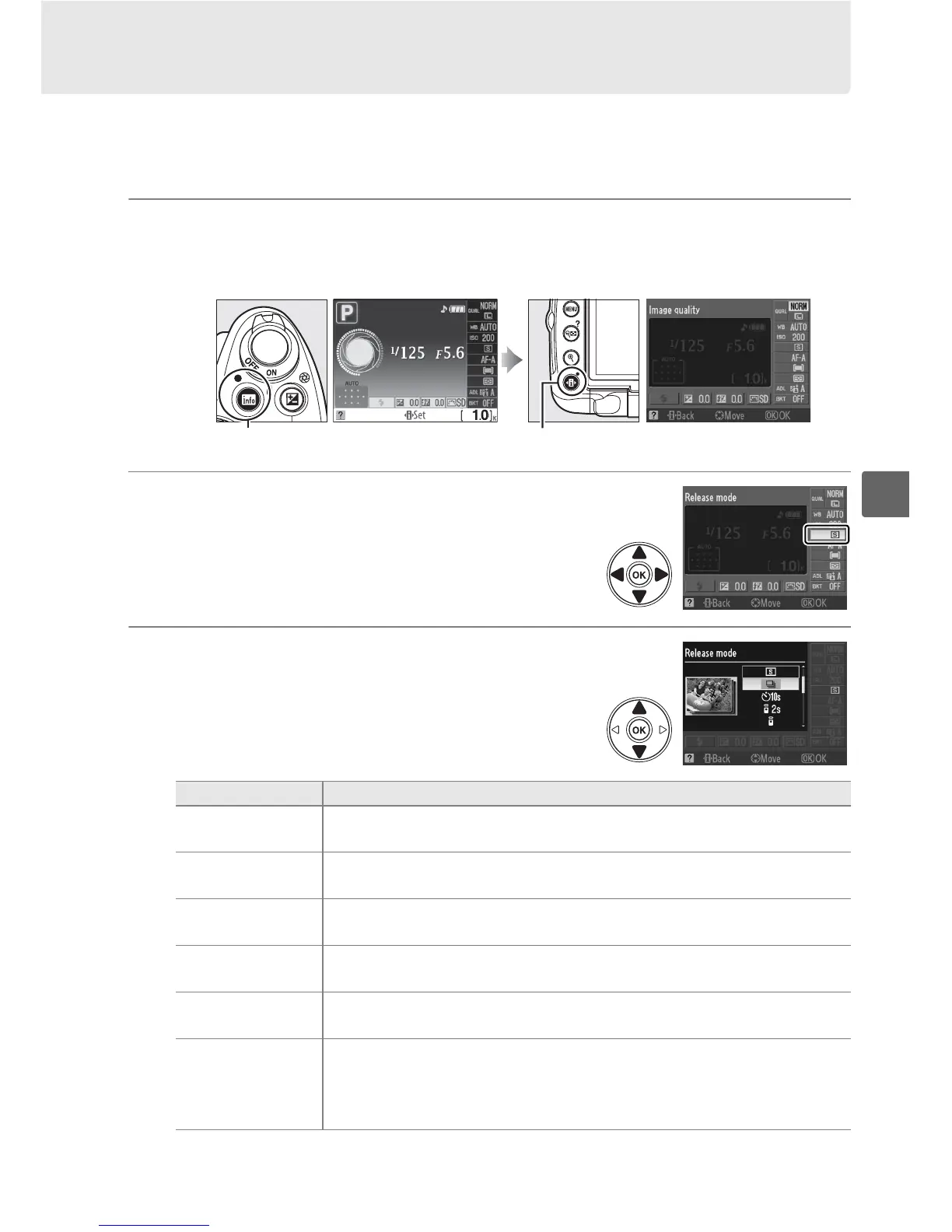
1 Place the cursor in the information display.
If shooting information is not displayed in the monitor, press the R button.
Press the P button to place the cursor in the information display.
2 Display release mode options.
Highlight the current release mode in the
information display and press J.
3 Choose a release mode.
Highlight one of the following options and press
J.
R button Information display P button
Mode Description
8 Single frame
Camera takes one photograph each time shutter-release button is
pressed.
I Continuous
Camera records about 4 frames per second while shutter-release
button is held down.
E Self-timer
Use for self-portraits or to reduce blurring caused by camera shake
(0 67).
" Delayed remote
Optional ML-L3 wireless remote control required.
Shutter is
released after two-second delay (0 67).
#
Quick-response
remote
Optional ML-L3 wireless remote control required.
Shutter is
released immediately (0 67).
v
Quiet shutter-
release
As for 8 (single frame) except that camera makes no sound until
finger is removed from shutter-release button after shooting and
beep does not sound when camera focuses, keeping noise to a
minimum in quiet surroundings.



 To Next Page