207
n
❚❚ “Clean at Startup/Shutdown”
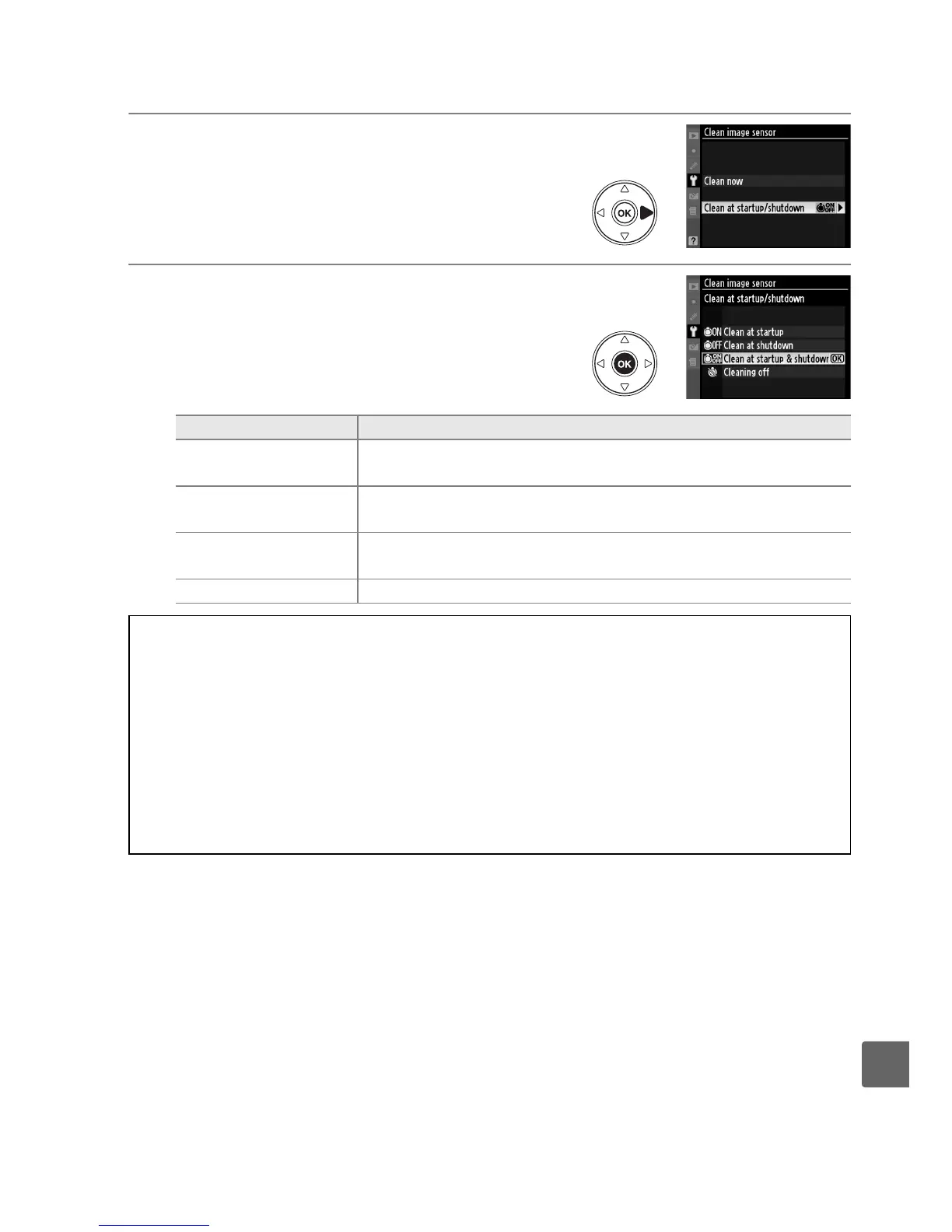
1 Select Clean at startup/shutdown.
Display the Clean image sensor menu as
described in Step 2 on the previous page.
Highlight Clean at startup/shutdown and
press 2.
2 Select an option.
Highlight one of the following options and
press J.
Option Description
5 Clean at startup
The image sensor is automatically cleaned each time the
camera is turned on.
6
Clean at
shutdown
The image sensor is automatically cleaned during shutdown
each time the camera is turned off.
7
Clean at startup
& shutdown
The image sensor is cleaned automatically at startup and at
shutdown.
8 Cleaning off Automatic image sensor cleaning off.
D Image Sensor Cleaning
Using camera controls interrupts image sensor cleaning.
Image sensor cleaning may not be
performed at startup if the flash is on.
Cleaning is performed by vibrating the image sensor.
If dust can not be fully removed using
the options in the Clean image sensor menu, clean the image sensor manually (0 208) or
consult a Nikon-authorized service representative.
If image sensor cleaning is performed several times in succession, image sensor cleaning
may be temporarily disabled to protect the camera’s internal circuitry.
Cleaning can be
performed again after a short wait.



 To Next Page