II
~
Selective
Color
1
Select live
view.
Rotate the
live view switch
to
raise the mirror and
display
the
view through the
lens
in
the
monitor.
2 Display
options.
Press@)
to
display selective color
options.
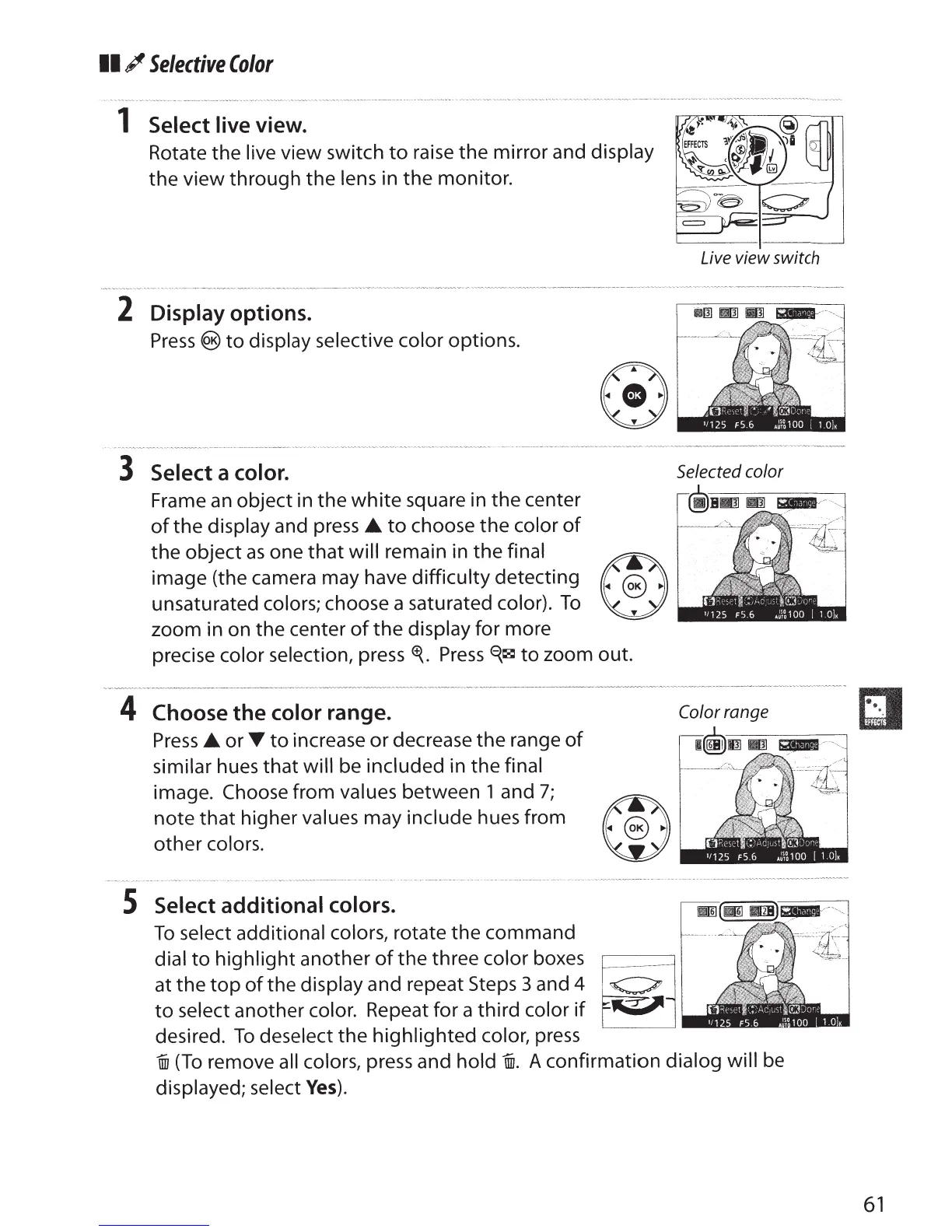
Live view switch
3
Select
a
color.
Selected color
Frame
an
object in the
white
square in the center
of
the
display
and press
A.
to
choose
the
color
of
the
object
as
one
that
will remain in the
final
®
image (the camera may have
difficulty
detecting
~
unsaturated
colors; choose a saturated
color).
To
~
zoom in on the center
of
the
display
for more
precise color selection, press
~-
Press
'i~
to
zoom out.
4
Choose the color
range.
Press
A.
or
T
to
increase
or
decrease the range
of
similar hues
that
will be
included
in the
final
image.
Choose from
values between
1
and
7;
note
that
higher
values
may
include hues from
other
colors.
S
Select additional colors.
To
select additional colors,
rotate the command
dial
to
highlight
another
of
the
three
color
boxes
~~j
at
the
top
of
the display and repeat Steps
3 and
4
~
to
select
another
color.
Repeat for a third
color
if
desired.
To
deselect
the
highlighted
color,
press
Color
range
i
(To
remove all colors,
press and
hold
i.
A confirmation dialog will
be
displayed; select
Yes).
61



 To Next Page