Using
Camera
Menus
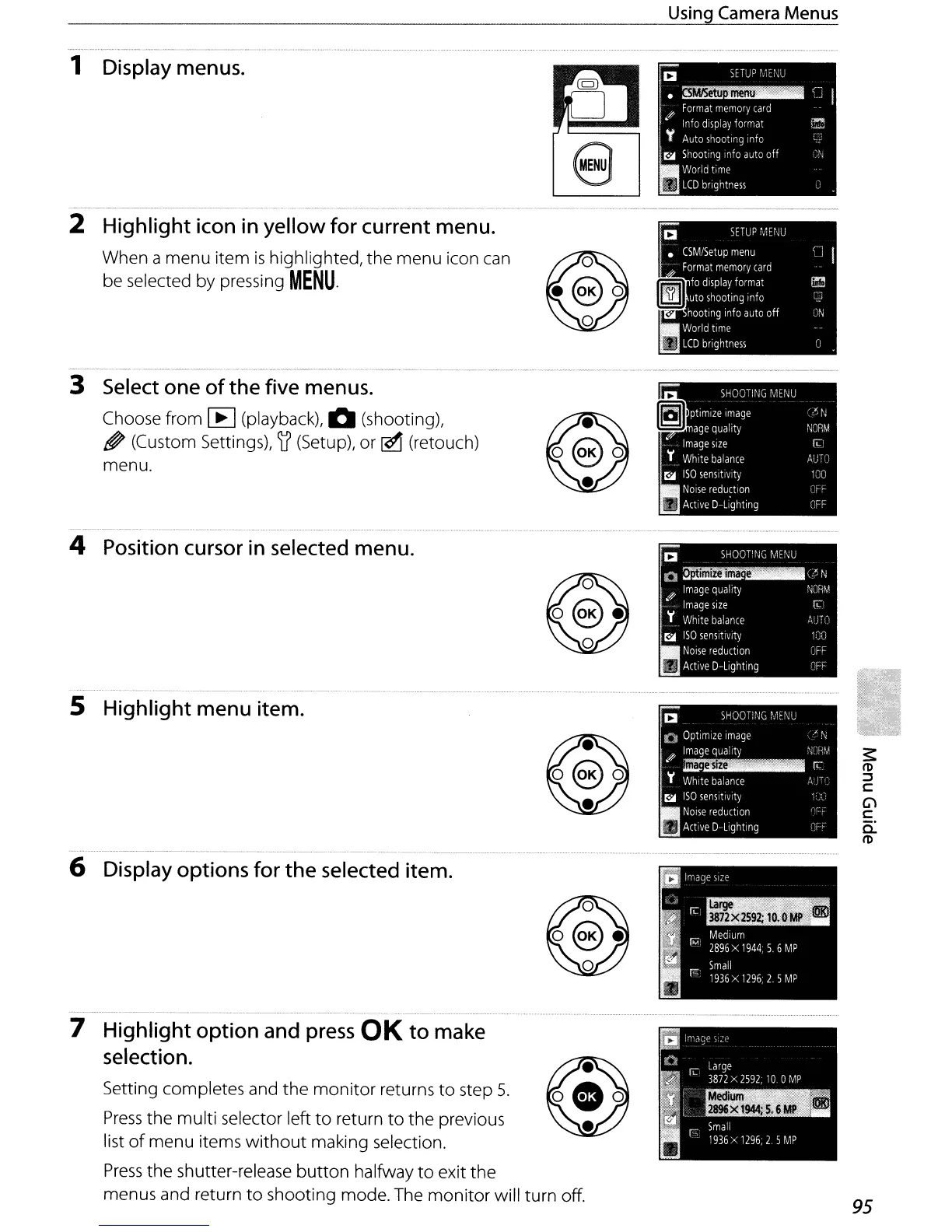
2 Highlight icon
in
yellow for current menu.
When a menu item
is
highlighted, the menu icon can
be selected by pressing
MENU.
95
Setting completes and the
monitor
returns
to
step
5.
Press
the multi selector left
to
return
to
the previous
list
of
menu items
without
making selection.
Press
the shutter-release
button
halfway
to
exit the
menus and return
to
shooting mode. The monitor will turn off.
5 Highlight menu item.
4 Position cursor
in
selected menu.
1 Display menus.
7 Highlight option and
press
OK
to
make
selection.
3 Select one
of
the
five menus.
Choose from [E] (playback), 0 (shooting),
~
(Custom Settings), )f (Setup), or
[£1
(retouch)
menu.
6 Display options for
the
selected item.



 To Next Page