EasyManua.ls Logo

Nikon D60 - Two-Button Reset

Nikon D60
248 pages
Print Icon
To Next Page IconTo Next Page
To Previous Page IconTo Previous Page
Loading...
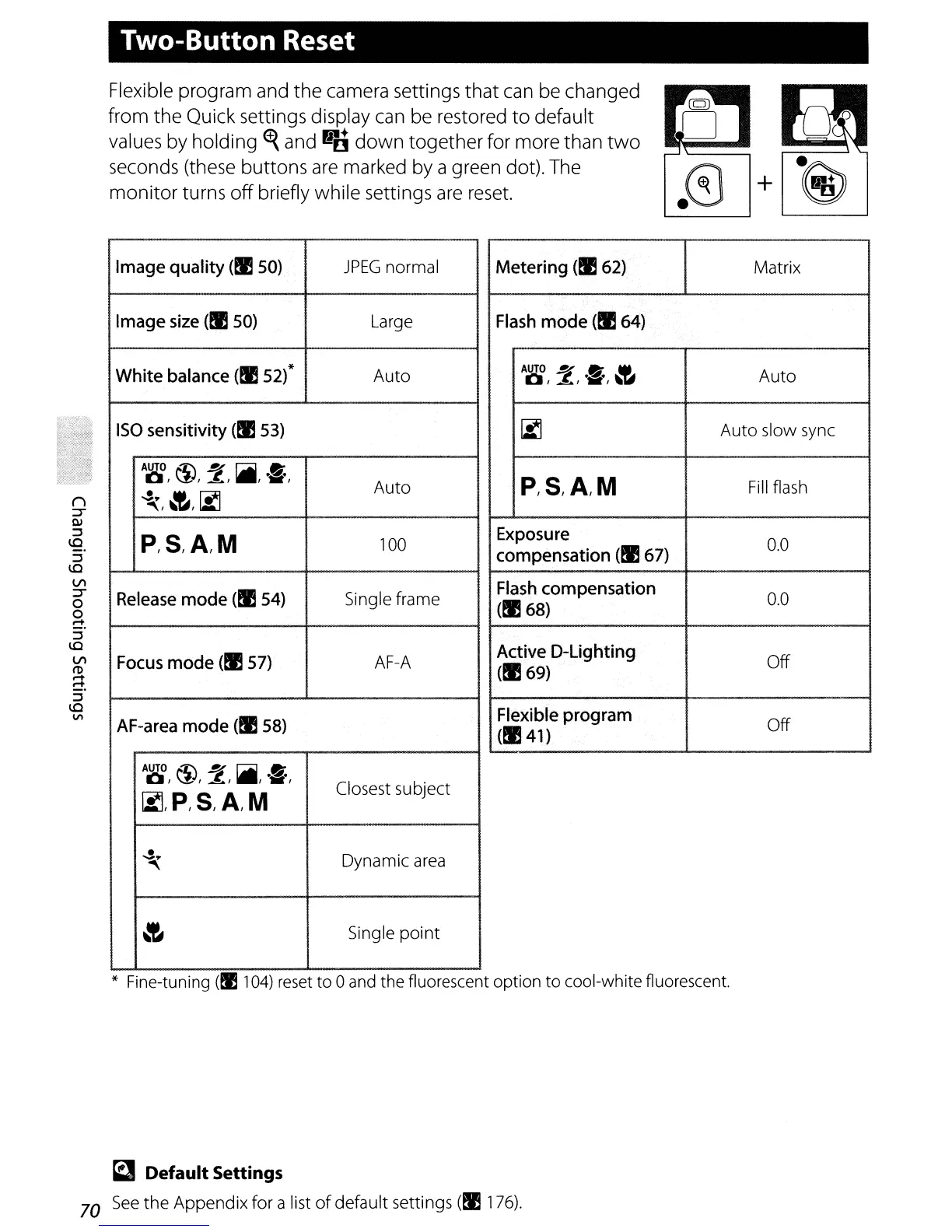
Two-Button Reset
I
Flexible program and
the
camera settings
that
can be changed
from the Quick settings display
can
be restored
to
default
values by holding
~
and
.~
down
together for more than
two
seconds (these buttons
are
marked by a green dot). The
monitor
turns
off
briefly while settings
are
reset.
+@J
Image
quality
(!ISO)
JPEG
normal
Image
size
(I!
50)
Large
White
balance
(I!
52)*
Auto
ISO
sensitivity
(I!
53)
AUTO
t1)
?
!iii
.ft
0,
1.-=.a1
,.,
Auto
..s~
~
~
""
I
'i
I
P,S,A,M
100
Release
mode
(!I 54) Single frame
Focus
mode
(I!
57)
AF-A
AF-area
mode
(!I
58)
AUTO
t1)
?
!iii
.ft
0,
,
~1
I
IiII
Closest subject
~,P,S,A/M
..s
Dynamic
area
~
~
Single point
Metering (!I
62)
Matrix
Flash
mode
(.64)
AUTO?
.ft
~
Auto
0,
~I
iii
I
'i
~
Auto slow
sync
P/S,A/M
Fill
flash
Exposure
0.0
compensation
(I!
67)
Flash
compensation
0.0
(I!
68)
Active
D-Lighting
Off
(.69)
Flexible
program
Off
(.41)
* Fine-tuning
(fll
04)
reset
to 0
and
the fluorescent option to cool-white fluorescent.
~
Default Settings
70
See
the Appendix for a list
of
default settings (!I
176).

Table of Contents

Other manuals for Nikon D60

Related product manuals