Shooting
Options:
The
Shooting
Menu
D Color Temperature
The perceived color
of
a light source varies
with
the viewer and other conditions. Color temperature
is
an
objective measure
of
the color
of
a light source, defined
with
reference
to
the temperature
to
which
an
object
would
have
to
be heated
to
radiate light
in
the same wavelengths. While light
sources
with
a color temperature
in
the
neighborhood
of
5,000- 5,500K appear white, light sources
with
a lower color temperature, such
as
incandescent light bulbs, appear slightly yellow or red. Light
sources
with
a higher color temperature appear tinged
with
blue.
Approximate color temperatures for each
white
balance setting are given
below
(when fine tuned
white
balance setting
is
±O.
Values may differ from color temperatures given by
photo
color meters.
White
balance
Color
temperature
AUTO
Auto
3,500
K~8,OOO
K
•
Incandescent
3,000 K
~1
Sodium-vapor lamps 2,700 K
11\
~2
Warm-white
fl.
3,000 K
11\
~3
White fluorescent 3,700 K
11\
~4
Cool-white fluorescent
4,200 K
11\
~5
Day
white
fluorescent
5,000
K
11\
...
Color
White
balance
temperature
~6
Daylight fluorescent 6,500 K
'"
,\1/,
7
Mercury-vapor lamps 7,200 K
~
,'.',
Direct sunlight
5,200 K
.,~"
~
Flash
5,400 K
...
Cloudy
6,000 K
&~.
Shade 8,000 K
Fine-Tuning White Balance
Unless Preset manual
is
selected, white balance
can
be "fine tuned"
to
compensate for
variations in the color
of
the light source or
to
introduce a deliberate color cast into
an
image.
1 Select a white balance option except Preset
manual.
Select White balance
in
the shooting menu, then
highlight
a
white
balance
option
and
press
the multi
s:
selector right. If Fluorescent
is
selected,
highlight
a
~
lighting type and press the multi selector right.
c:
g'
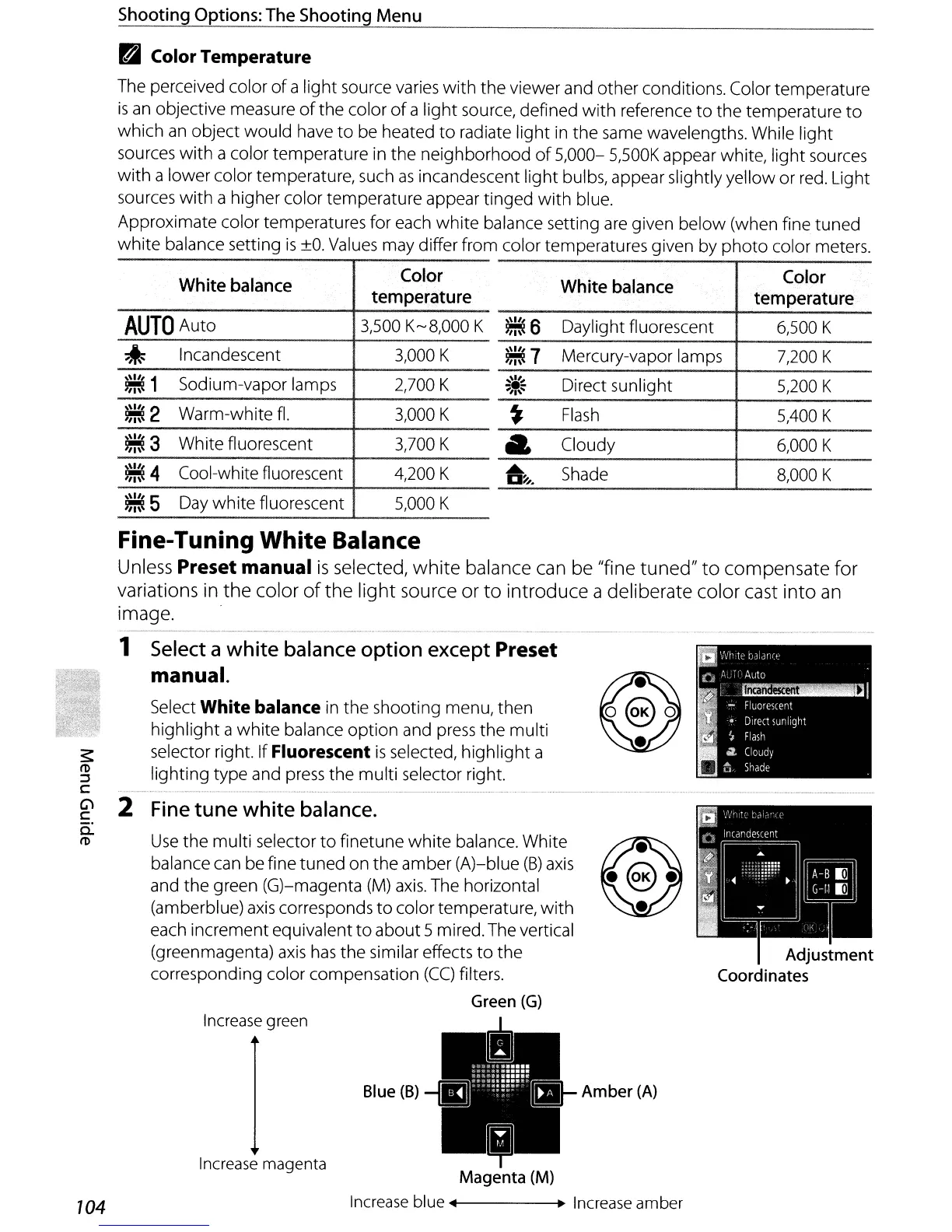
2 Fine tune white balance.
0.:
ro
Use
the
multi selector
to
finetune
white
balance. White
balance can be fine
tuned
on
the
amber (A)-blue
(8)
axis
and the green (G)-magenta
(M)
axis.
The horizontal
(amberblue)
axis
corresponds
to
color temperature,
with
each increment equivalent
to
about 5 mired. The vertical
(greenmagenta)
axis
has
the similar effects
to
the
corresponding color compensation
(CC)
filters.
Green
(G)
Adjustment
Coordinates
Increase green
Blue
(B)
Increase magenta
104
+-------+~
Increase
amber



 To Next Page