752
Optional
Flash
Units
(Speedlights)
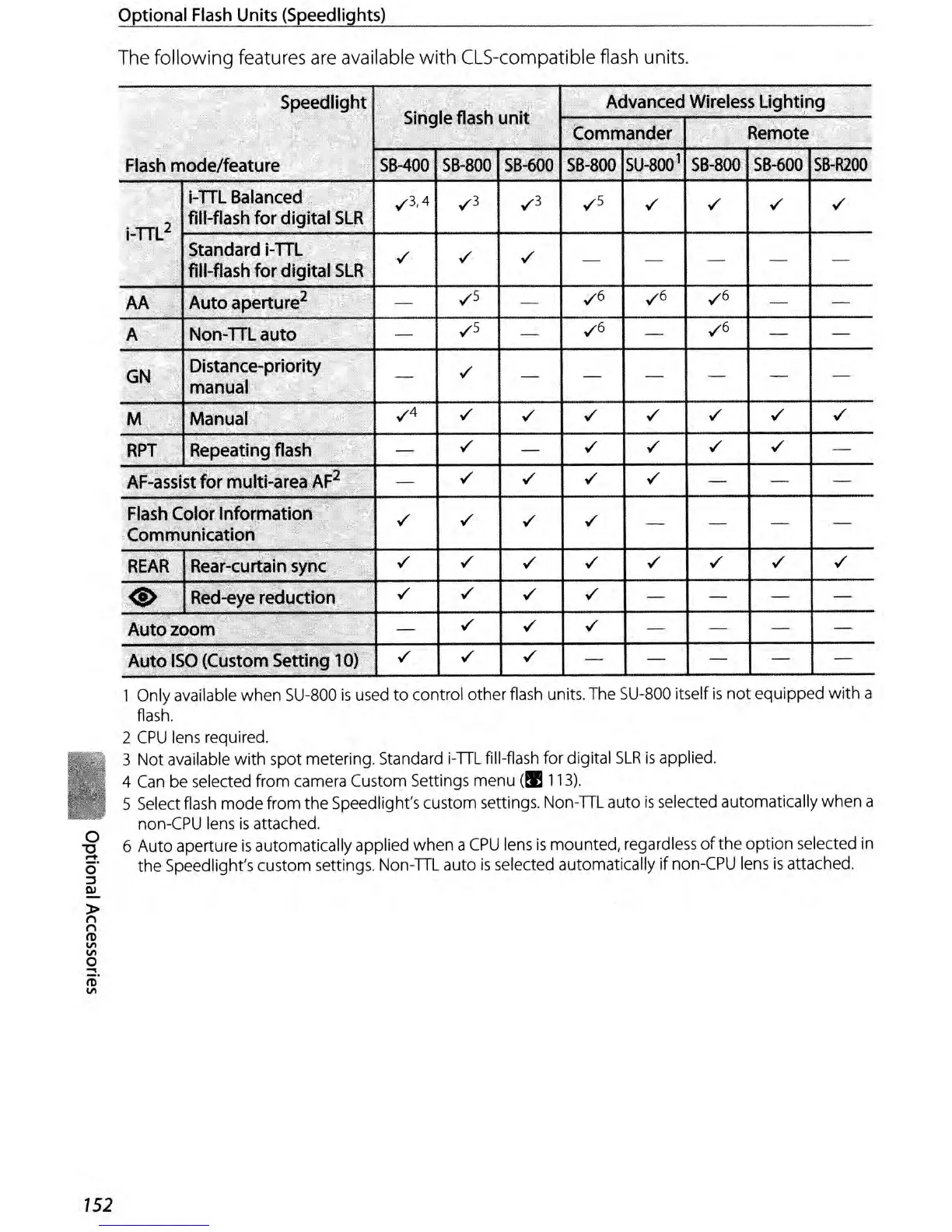
The following features
are
available
with
CLS-compatible flash units.
Speedlight
Single
flash
unit
Advanced
Wireless
Lighting
Commander
Remote
Flash
mode/feature
S8-400
58-800
58-600
58-800
SU-800
1
58-BOO
58-600
SB-R200
i-TIL
Balanced
v"3,4
v"3 v"3 v"s
v" v" v" v"
i-TIL
2
fill-flash
for
digital
SLR
Standard
i-m
v" v" v"
fill-flash
for
digital
SLR
-
- - - -
AA
Auto
aperture
2
-
v"s
-
v"6
v"6 v"6
-
-
A
Non-mauto
-
v"5
-
v"6
-
v"6
-
-
GN
Distance-priority
-
v"
- - - - - -
manual
M
Manual
v"4
v"
v" v" v" v" v" v"
RPT
Repeating
flash
-
v"
-
v" v"
v" v"
-
AF-assist
for
multi-area
AF
2
-
v"
v"
v"
v"
- - -
Flash
Color
Information
v" v"
v" v"
Communication'
~F
- - - -
"
REAR
Rear-eurtain
sync
v" v"
v" v" v"
v" v" v"
<§>
Red-eye
reduction
v" v"
v" v"
- - - -
Auto zoom
-
v"
v"
v"
- - - -
Auto
ISO
(Custom
Setting
10)
v"
v" v"
- - -
-
-
1 Only available
when
SU-800
is
used
to
control
other
flash units. The SU-800 itself
is
not
equipped
with
a
flash.
2
CPU
lens required.
3
Not
available
with
spot metering. Standard i-TIL fill-flash for digital
SLR
is
applied.
4 Can be selected from camera Custom Settings menu
(!I
113).
5 Select flash
mode
from
the
Speedlight's custom settings. Non-TIL auto
is
selected automatically
when
a
non-CPU lens
is
attached.
6
Auto
aperture
is
automatically applied
when
a
CPU
lens
is
mounted,
regardless
of
the
option
selected in
the
Speedlight's custom settings.
Non-TIL
auto
is
selected automatically
if
non-CPU lens
is
attached.



 To Next Page