»
("\
("\
(1)
VI
VI
o
~.
(1)
VI
154
Optional
Flash
Units
(Speedlights)
B Notes on Optional Speedlights
Refer
to
the
documentation
provided
with
Speedlight for details. If
the
Speedlight supports
the
Creative Lighting System, refer
to
the section on CLS-compatible digital
SLR
cameras. The
060
is
not
included in
the
"digital
SLR"
category in
the
S8-80DX, S8-28DX, and S8-50DX manuals.
The shutter will synchronize
with
an
external flash at speeds
of
1/
2
00S
or
slower.
i-TIL flash control can be used at
ISO
sensitivities between 100 and 1600. Higher values may
not
produce
the
desired results at some ranges or apertures. If
the
flash-ready indicator blinks in the
viewfinder for
about
three seconds after a
photograph
is
taken in i-TIL or Non-TIL auto mode,
the
flash
has
fired at full
power
and
the
photograph
may be underexposed.
The S8-400, S8-800, and S8-600 provide red-eye reduction, while
the
S8-800, S8-600, and SU-800
provide AF-assist illumination (the SU-800 does
not
prOVide AF-assist illumination in close-up mode).
Auto
power
zoom
is
available only
with
58-800 and 5B-600 5peedlights.
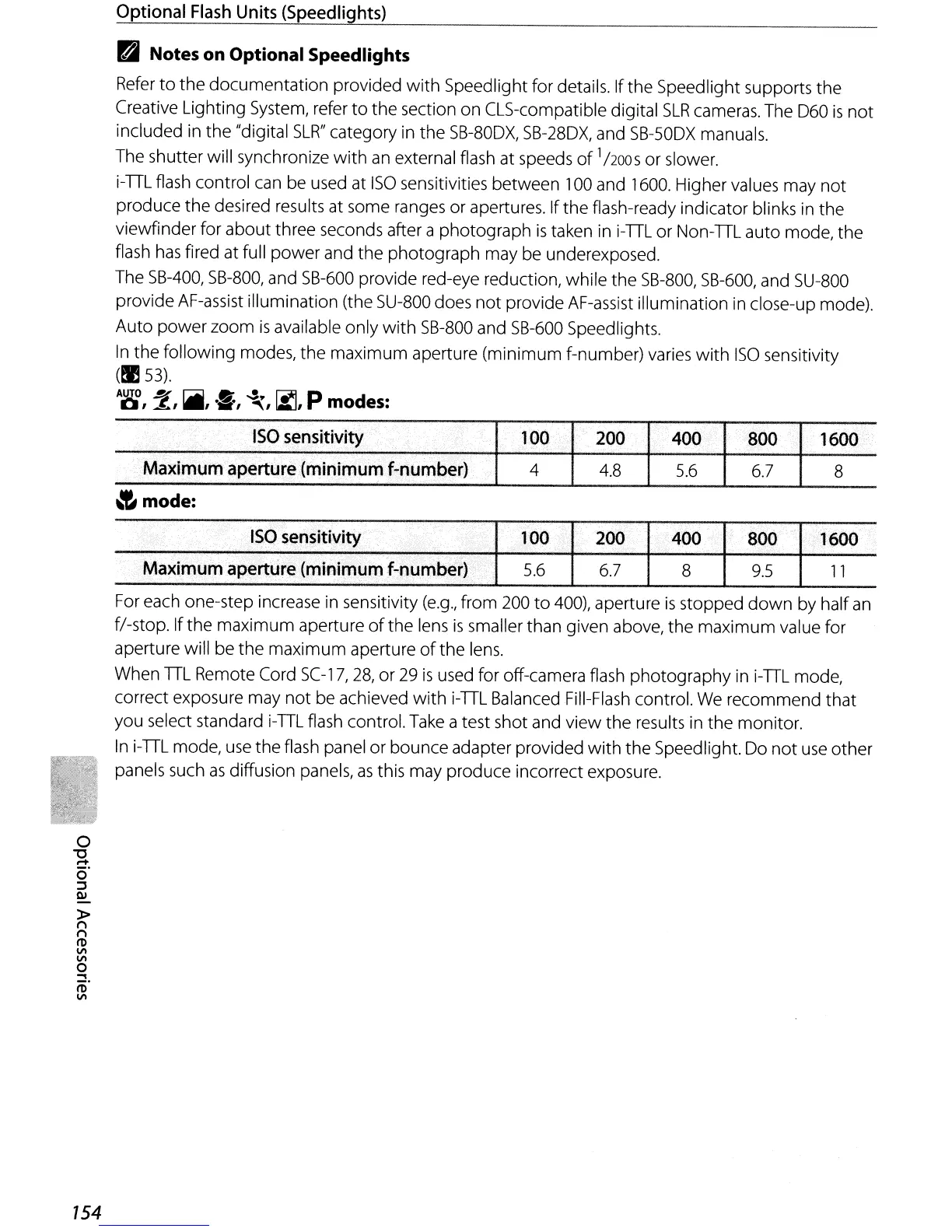
In
the following modes,
the
maximum
aperture
(minimum
f-number) varies
with
150
sensitivity
(t:l53).
AUTO
~
r::;;jjjJ
..
.,,~
~
P d
0,
~,
.,
.•.
, "'\,
IMJ,
mo
es:
'.'
.-
ISO
sensitivity
..
100
200
.;
400
800
1600
..
MaxiJ11um
aperture:(minimum
f-number}
4
4.8
5.6
6.7
8
~
mode:
. c
•.
ISO
se~sitivity
lOO
200 400 800 1
~OO
; .." .
";';;
Maximum
aperture
(minimum
(:I)umber)
5.6
6.7
8
9.5
11
For each one-step increase in sensitivity
(e.g.,
from 200
to
400), aperture
is
stopped
down
by half
an
fI-stop. If
the
maximum aperture
of
the
lens
is
smaller than given above,
the
maximum value for
aperture will be
the
maximum
aperture
of
the
lens.
When
TIL
Remote Cord
SC-17,
28,
or
29
is
used for off-camera flash
photography
in i-TIL mode,
correct exposure may
not
be achieved
with
i-TIL Balanced Fill-Flash control.
We
recommend
that
you select standard i-TIL flash control. Take a test shot and view the results in the monitor.
In
i-TIL mode, use
the
flash panel or bounce adapter provided
with
the 5peedlight. Do
not
use other
panels such
as
diffusion panels,
as
this may produce incorrect exposure.



 To Next Page