EasyManua.ls Logo

Nikon D60 - Page 173

Nikon D60
248 pages
Print Icon
To Next Page IconTo Next Page
To Previous Page IconTo Previous Page
Loading...
Cleaning
at
Startup/Shutdown
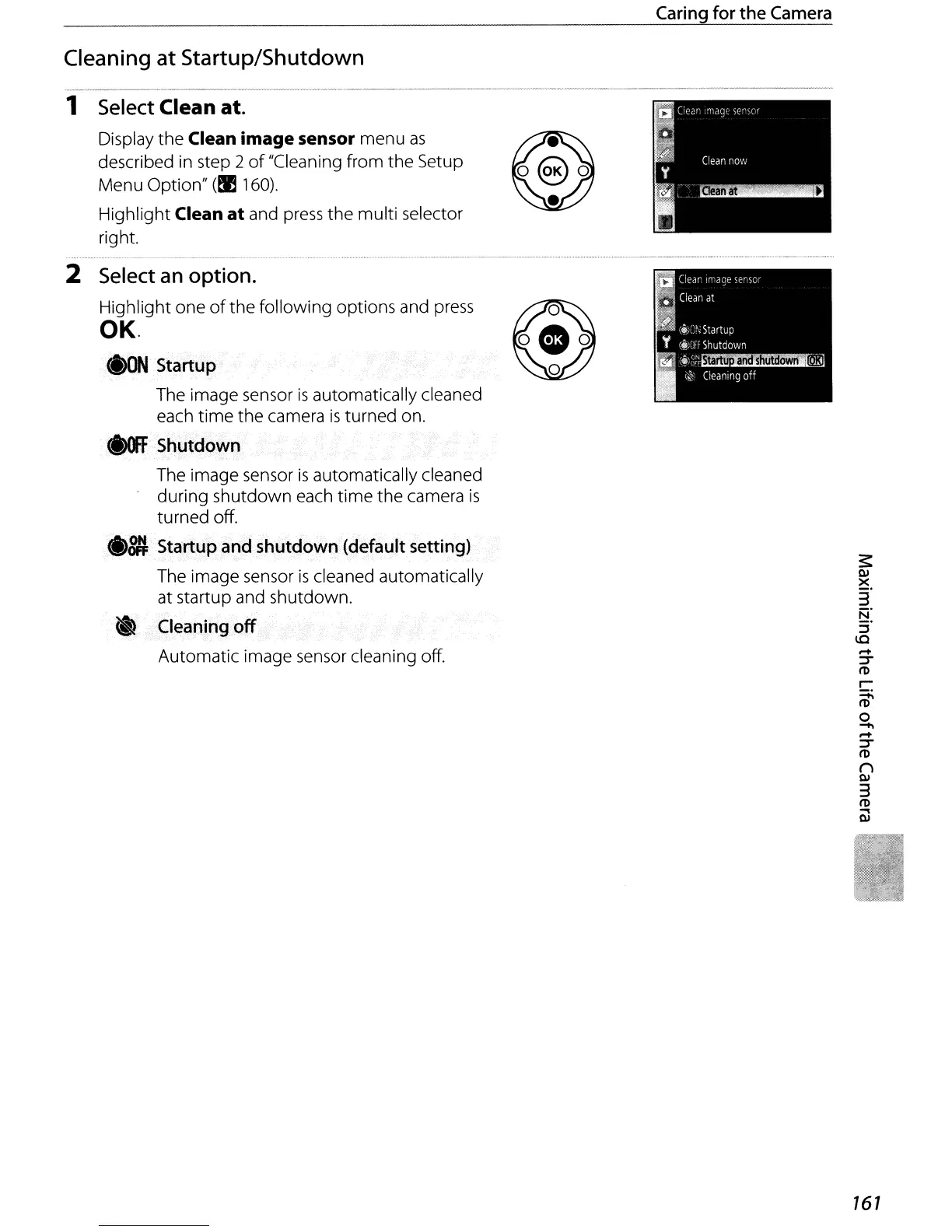
1 Select Clean at.
Display
the
Clean
image
sensor menu
as
described in step 2
of
"Cleaning from
the
Setup
Menu Option"
(~
160).
Highlight Clean
at
and
press
the
multi selector
right.
Caring
for
the
Camera
.................................
..
_ _ _ -
..
_ .
2 Select
an
option.
Highlight one
of
the
following options and press
OK.
<I>ON
Startup
The image sensor
is
automatically cleaned
each
time
the camera
is
turned on.
<i)(fFSti~tQown
The image sensor
is
automatically cleaned
during shutdown each
time
the
camera
is
turned
off
.
••
Startup
and
shutdown (default
setting)
The image sensor
is
cleaned automatically
at startup and shutdown.
.'
Cleaning
off
Automatic image sensor cleaning off.
s:
QJ
~.
3
:;"
I.C
.....
:T
I'D
r
~
o
......
.....
'::f'
I'D
()
QJ
3
I'D
....
QJ
161

Table of Contents

Other manuals for Nikon D60

Related product manuals