Camera
Error
Messages
and
Displays
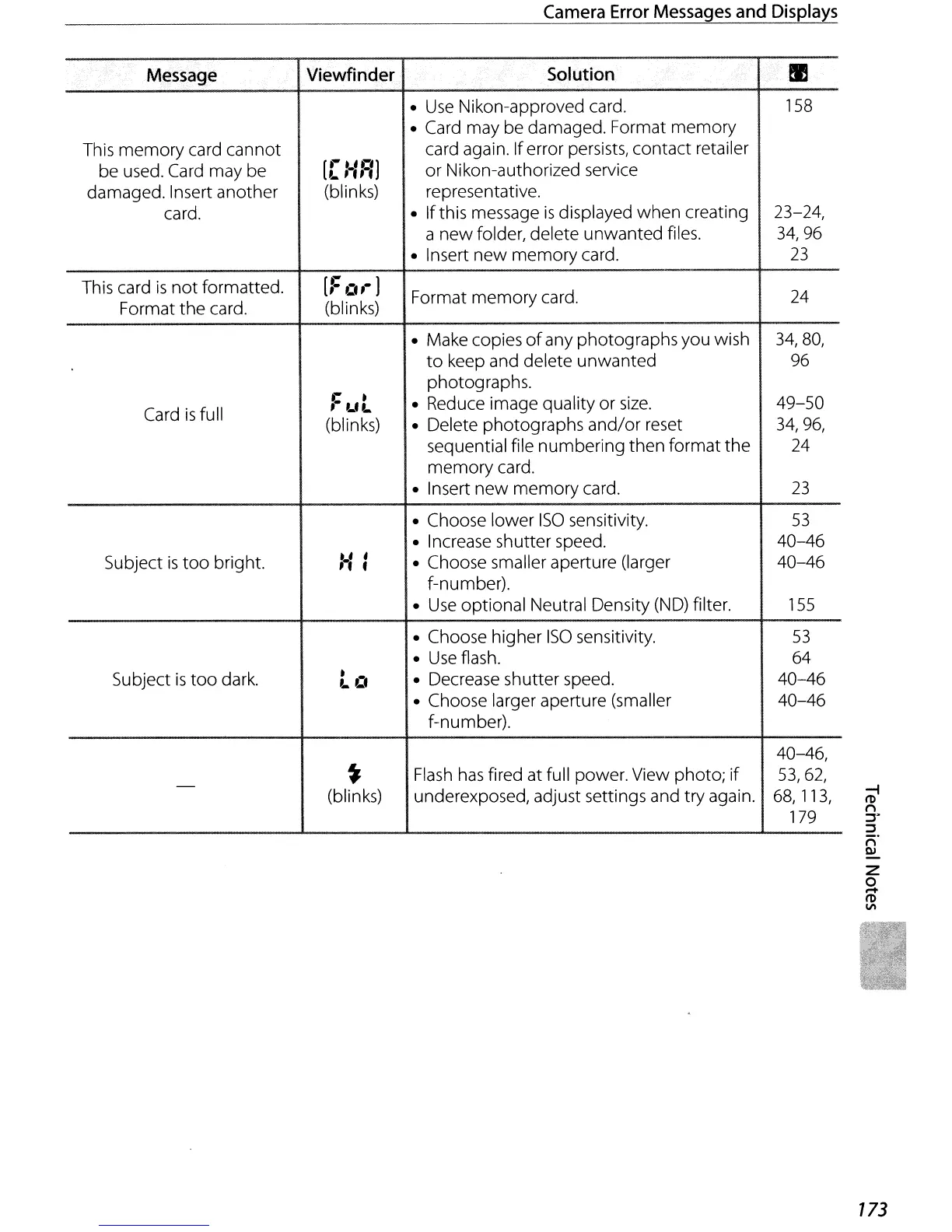
Message
Viewfinder
Solution
...
em
•
Use
Nikon-approved card.
158
• Card may be damaged. Format memory
This memory card cannot
[,.
""')
card again. Iferror persists, contact retailer
be used. Card may be
L
,.".,
or Nikon-authorized service
damaged. Insert another
(blinks) representative.
card.
•
If
this message
is
displayed when creating
23-24,
a
new
folder, delete unwanted files.
34,96
• Insert
new
memory
card.
23
This card
is
not
formatted.
[::
Cu·
)
Format memory card.
24
Format
the
card.
(blinks)
• Make copies
of
any photographs you wish
34,80,
to
keep and delete unwanted
96
photographs.
,.
-
• Reduce image quality or
size.
49-50
Card
is
full
,.
L'L
(blinks)
• Delete photographs
and/or
reset
34,96,
sequential file numbering then format
the
24
memory
card.
• Insert
new
memory
card.
23
• Choose lower
ISO
sensitivity.
53
• Increase shutter speed.
40-46
Subject
is
too
bright.
-.'
,
• Choose smaller aperture (larger 40-46
'"
f-number).
•
Use
optional Neutral Density
(ND)
filter.
155
• Choose higher
ISO
sensitivity.
53
•
Use
flash.
64
Subject
is
too
dark.
- .
• Decrease shutter speed.
40-46
L
Lf
• Choose larger aperture (smaller 40-46
f-number).
40-46,
-
~
Flash
has
fired at
full
power. View photo;
if
53,62,
(blinks)
underexposed, adjust settings and try again.
68,
113,
179
173



 To Next Page