56 Reference: P, S, A, and M Modes / Exposure
Bracketing
Controls used: button + command dials
Bracketing automatically varies selected settings slightly with each shot, “bracketing” the
current value. The setting aff ected is chosen with Custom Setting 13 (Auto BKT set; 90);
Below, it is assumed that AE & fl ash is selected to vary exposure and fl ash level. Other op-
tions can be used to vary exposure or fl ash level separately or to bracket white balance.
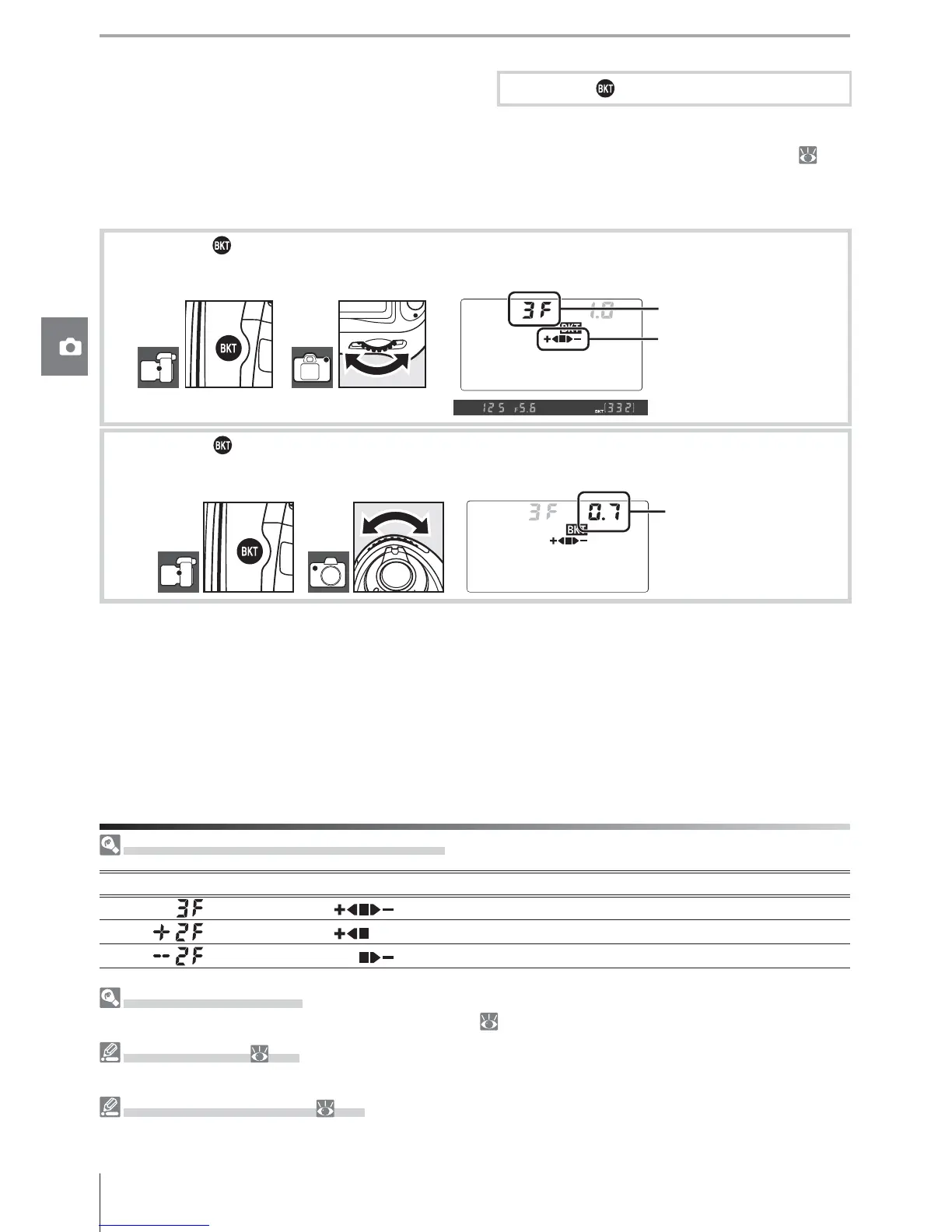
1
Press the button and rotate the main command dial to choose the number of shots
in the bracketing sequence (two or three).
Progress indicator
No. of shots
2
Press the button and rotate the sub-command dial to choose the bracketing incre-
ment from values between 0.3 EV and 2.0 EV.
Bracketing
increment
Understanding the Bracketing Display
Number of shots Progress indicator Description
3 shots: unmodifi ed, negative, positive
2 shots: unmodifi ed, positive
2 shots: unmodifi ed, negative
Bracketing Programs
See the Appendix for a list of bracketing programs ( 140).
10 — EV Step (
89)
Use this option to set the increments for exposure and fl ash bracketing to ½ EV.
14 — Auto BKT Order (
91)
This option can be used to change the bracketing order.



 To Next Page