82 Menu Guide / Shooting Options: The Shooting Menu
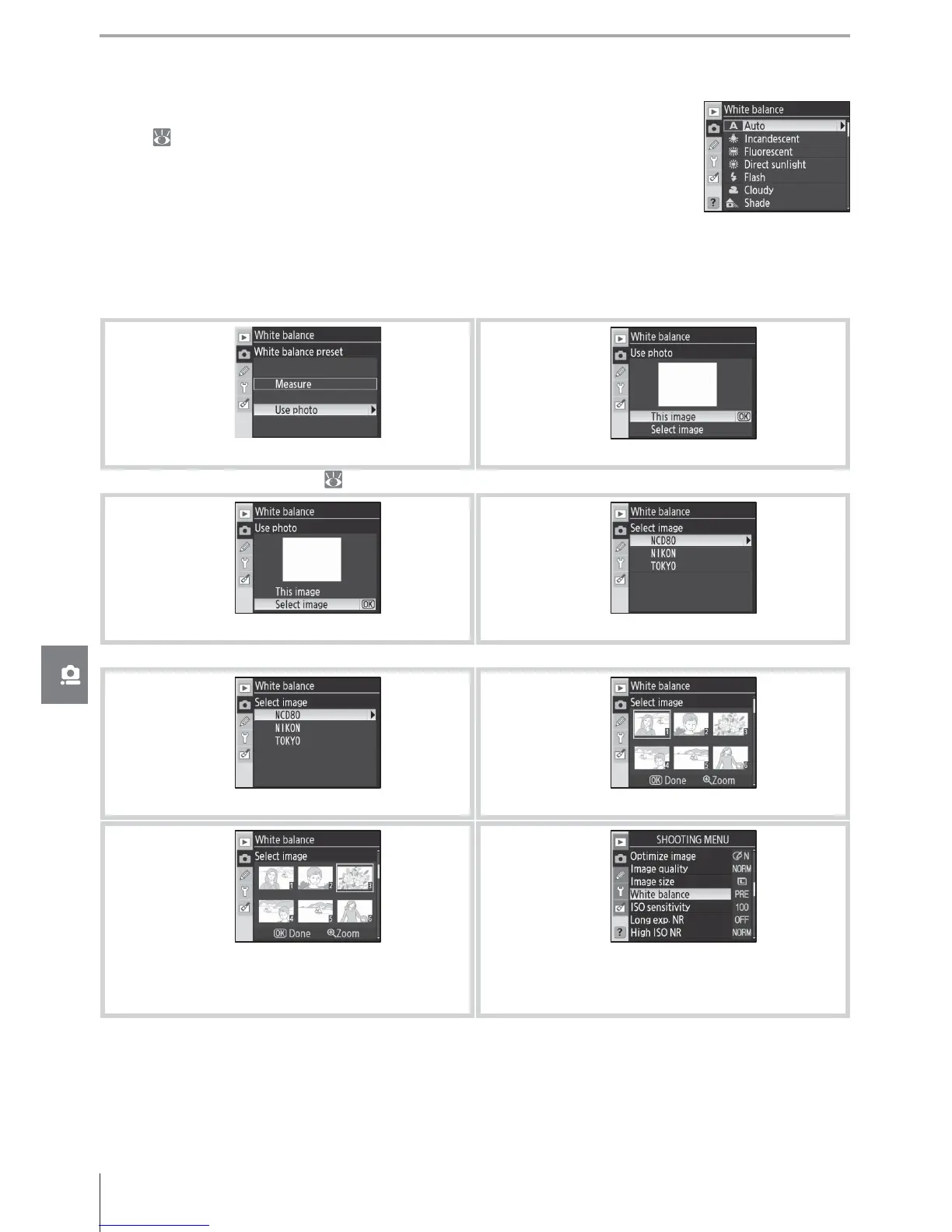
Copying White Balance from a Photograph
A white balance value copied from an existing photograph can be used for preset white
balance. Select White balance > White balance preset in the shooting menu. The menu
shown in Step 1 will be displayed.
1
Highlight Use photo.
*
2
Display current source photo.
* To use last measured value (
60), highlight Measure and press multi selector right.
3
Highlight Select image.
†
4
Display folder list.
† To use the previous source photo, highlight This image and press multi selector right.
5
Highlight folder.
6
Display images in selected folder.
7
Highlight photograph.
‡
8
Set preset white balance to value for high-
lighted photograph and return to shooting
menu.
‡ Images displayed may include those created with other cameras, but only photographs created
with D80 can be used as source for preset white balance.
Note that if a new value is measured for white balance, white balance will be set to the mea-
sured value even if Use photo is currently selected in the preset white balance menu.
White Balance (P, S, A, and M Modes)
Nine options are available for white balance. See “Reference: White Bal-
ance” ( 58).



 To Next Page