140Service Manual – SC401, SCRUBTEC 344 34 - Scrub System, Disc
Maintenance and Adjustments
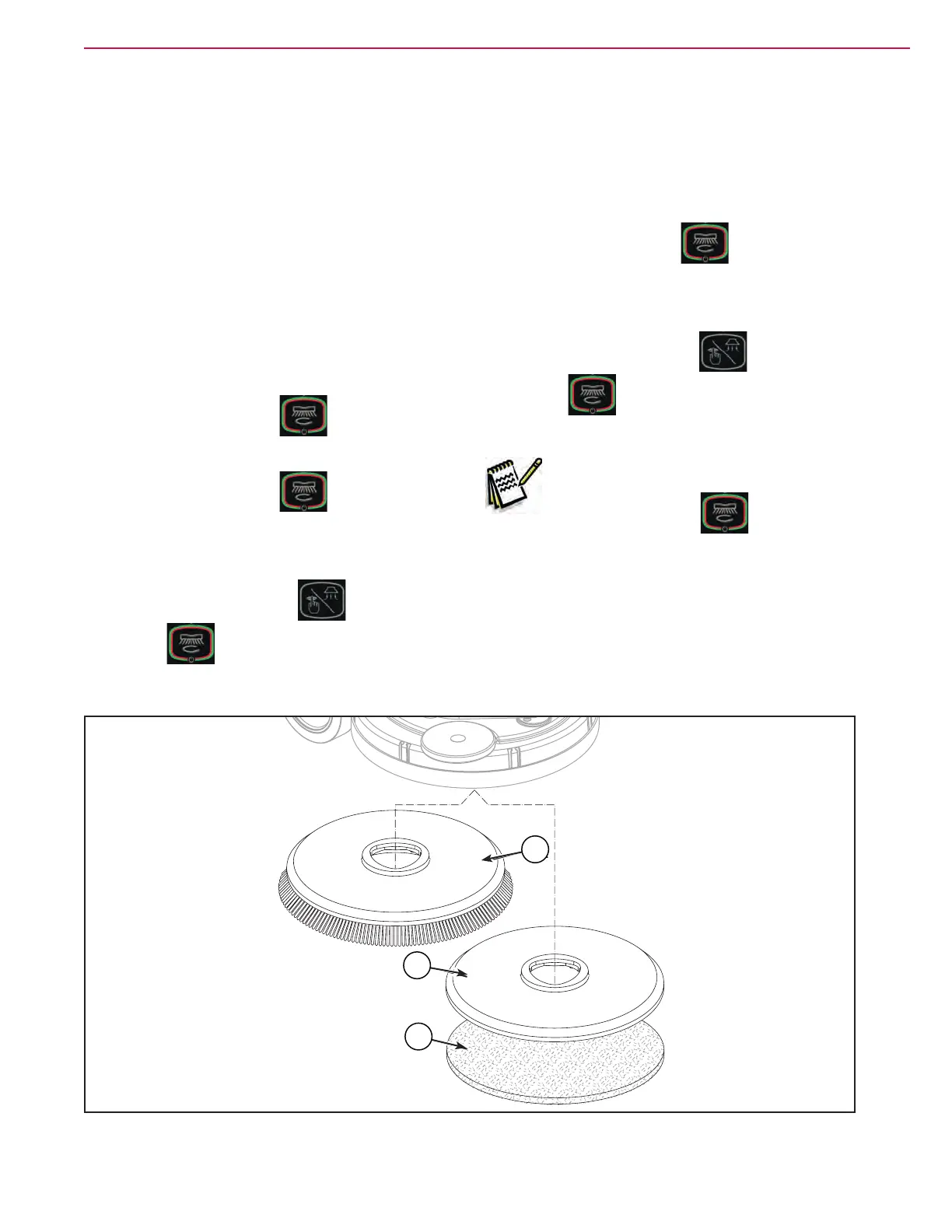
Brush or Pad-Holder
Installation
According to the kind of cleaning to be performed,
the machine can be equipped either with the brush
(A) or the pad-holder (B) with pad (C) together with
the appropriate deck.
1. Place the brush (A) or the pad-holder (B) under
the brush deck.
2. (If equipped) Turn the ignition key to “I”.
3. Press the main button
to start the
machine.
4. Press the main button
(LED on) again.
5. Lower the brush deck by pressing the pedal.
6. To activate the brush engagement function,
press the vacuum button
and the main
button
simultaneously for one second.
Removal
7. Press the main button
(LED off).
8. Lift the brush deck by pressing the pedal.
9. To activate the brush disengagement function,
press the vacuum button
and the main
button
simultaneously for one second,
then wait for the brush to fall on the oor.
Note: When the brush engagement/
disengagement function is activated,
main button
LED ashes.
A
B
C
Figure 4:
C
B
A



 To Next Page
 Loading...