75Service Manual – SC401, SCRUBTEC 344 05 - Control System - Cord
User Interface Controller (EB2) and Operator’s Presence Sensors (S1, S2)
User Interface Controller (EB2)
1. Make sure that the scrubber is disconnected from the power supply.
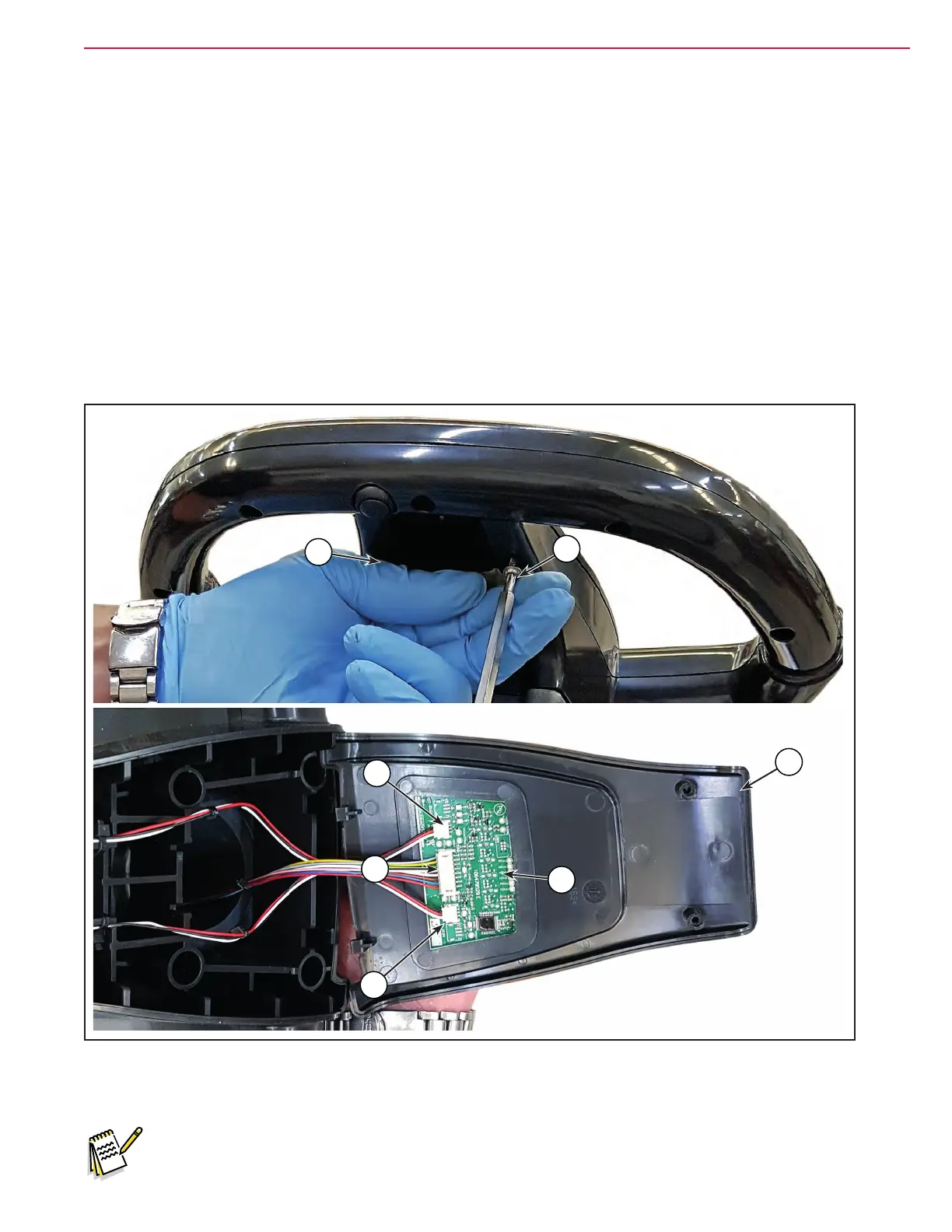
2. Unscrew the 2 screws (A) and open the user interface controller cover (B).
3. Disconnect the following connections:
◦ (C) and (D), left and right Operator’s presence sensors connection.
◦ (E) User interface controller power supply connection (J201).
4. Carefully remove the User interface controller (F) detaching it from the cover (B).
5. Clean the cover area from the glue remained of the User interface controller removed.
Figure 17:
A
A
B
D
F
C
E
6. Assemble the components in the reverse order of disassembly.
Note: The new User interface controller is provided with an self-adhesive seat for assembling.



 To Next Page
 Loading...